
Key concepts
Authentication
Infracost Cloud supports logging in via GitHub, Google, an email/password, or enterprise SSO providers.
- Go to Infracost Cloud to sign up or log in.
- Switch to the desired organization. Every Infracost user has a default organization for personal use. You should create a new organization for your company using the organization dropdown at the top of the page.
- Follow the onboarding steps in the dashboard.
If you signed up using an email/password, you can change your password by logging out and clicking on "Don't remember your password?".
Email addresses are unique in Infracost Cloud. Thus when you log in with GitHub, Google or an email/password, if the email associated with the login is the same as a previous login, you will have to link the accounts together in Infracost, so you can log in using either method.
Organizations
In Infracost Cloud, organizations are used to group repos, policies and other associated settings.
Permissions
From the Org Settings > Members page, you can invite your team members to join your organization. Currently these roles are supported:
-
Org Owner: they have complete control over the organization. We recommend giving the main billing contact the owner role. From the Members page, the owner can transfer this role to another member. Only the owner can delete the organization or change its name or slug.
-
Org Admin: they can do everything except deleting the organization, or changing its name or slug. We recommend giving FinOps/Platform team members the admin role so they can setup integrations for everyone, manage users, custom price books, and configure other Org Settings.
-
Org Editor: they can change everything except Org Settings and data exports. This means they cannot invite members to the organization either. They can view everything except the following Org Settings: API keys, Members, Plan and billing, Custom price books, Integrations. We recommend giving team leads/managers the editor role so they can also add guardrails, policies and reports for their teams if required.
-
Org Viewer: they can view everything except the following Org Settings: API keys, Members, Plan and billing, Custom price books, Integrations. They cannot make any changes apart from their personal user settings such as their password or multi-factor-authentication setup. We recommend giving engineers the viewer role so they can see preexisting issues and fix them.
-
Org API Access: an API-only role intended for engineers who consume Infracost programmatically through the IDE extensions and AI skills. Users in this role cannot sign in to the Infracost Cloud web dashboard, but they can authenticate against the Infracost API so they get the full feature set of the editor plugins and AI tooling.
noteOrg API Access grants the same data permissions as Org Viewer — the only difference is that users in this role cannot sign in to the web dashboard. By design, they can still call the Infracost API and retrieve anything a Viewer would see in the UI. This is not a strict security boundary: it limits incidental exposure by removing the dashboard surface, but it isn't a substitute for proper data isolation.
Repos
Repos, short for code repositories, is where your code lives in GitHub, Azure Repos, GitLab or any other source control system. A repo contains one or more projects. Infracost Cloud lets you track how the costs and policy issues of repos and projects change over time.
Projects
Projects map to repo sub-groups. The majority of Infracost users will have repos that have many projects, these include:
- code paths for mono repos, each path represents a deployment environment such as dev, stage, prod
- workspaces, same idea as above but done using Terraform var files or workspaces
- Terraform or Terragrunt modules, which are components of a repo, e.g. core-api or data-stack
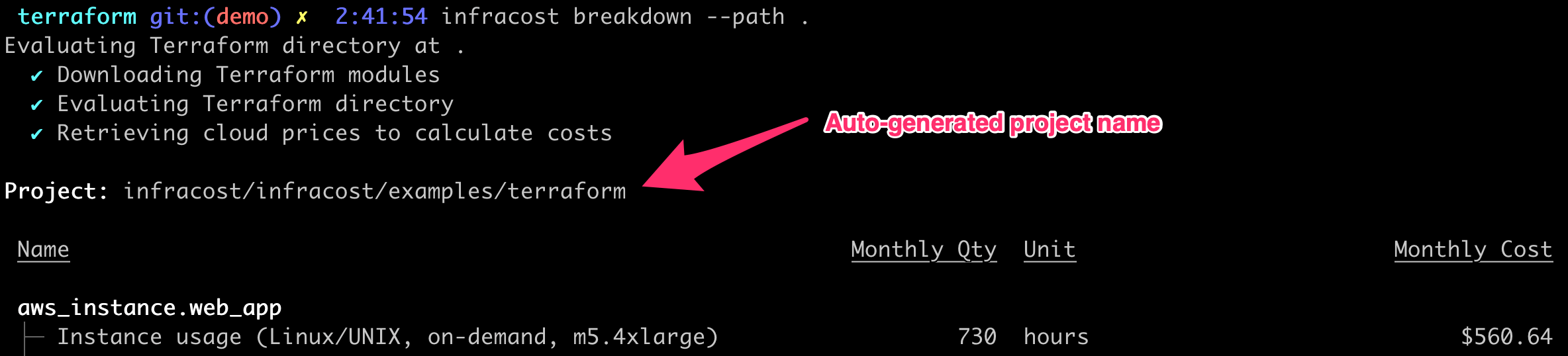
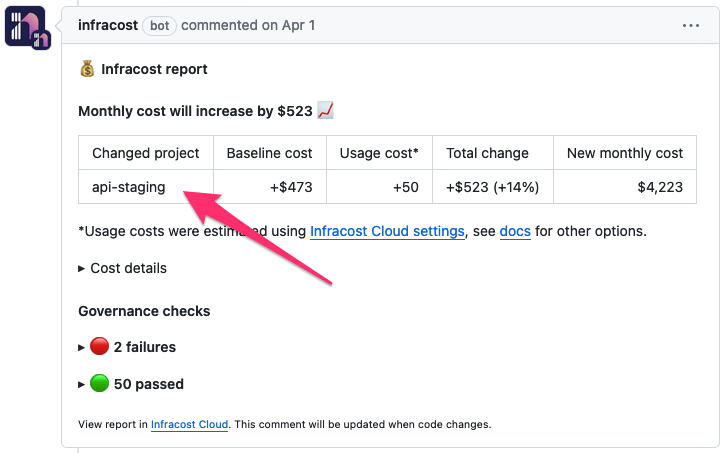
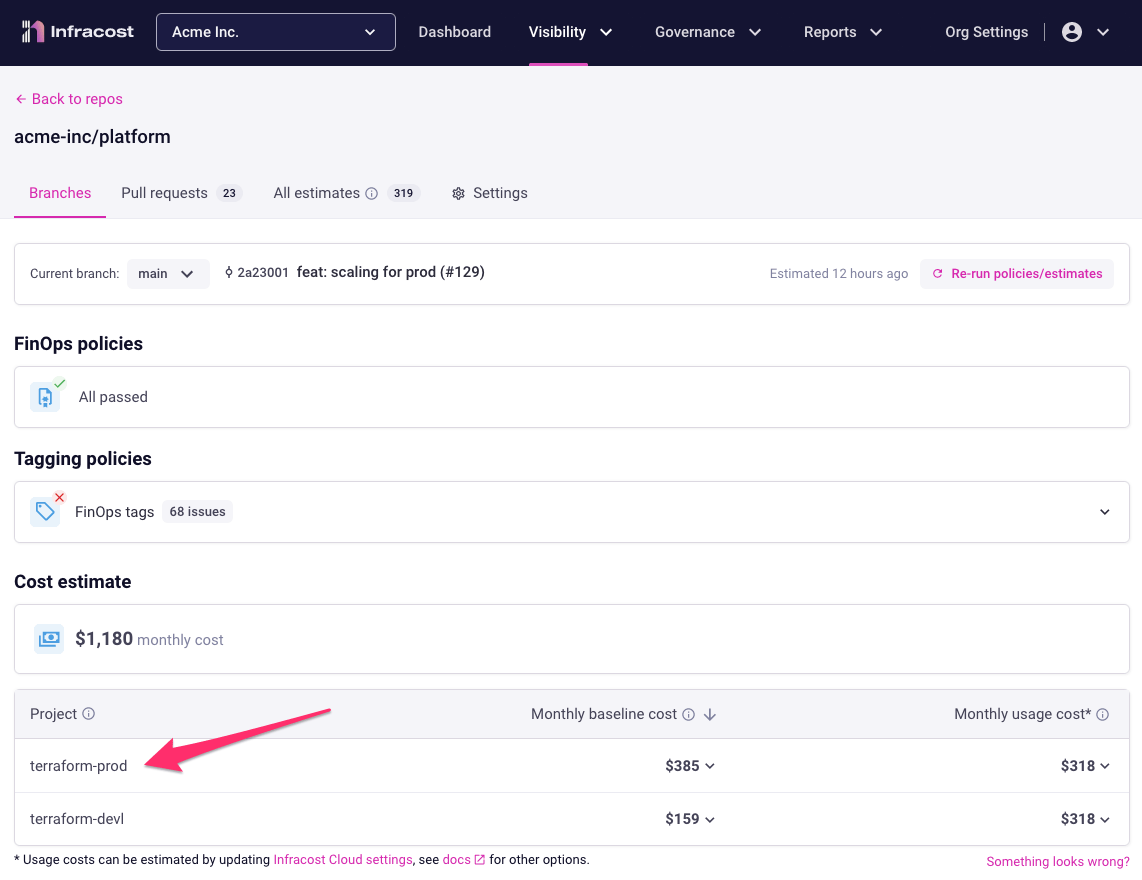
Infracost auto-generates project names based on code paths, workspaces or Terraform/Terragrunt modules. The name appears in the CLI output and pull request comments and Infracost Cloud as shown below. If Infracost cannot detect your projects, or if you would like to customize them, we recommend using a config file.
Module Repos
Terraform modules are reusable components that encapsulate a set of resources and their configuration. They allow you to create logical abstractions on top of resource sets, making your infrastructure code more organized, maintainable, and shareable. Modules can be sourced from various locations including local paths, Git repositories, the Terraform Registry, or other remote sources.
Cost Tracking for Modules
Module Repositories
Cost tracking is not applied to repositories that contain only Terraform module definitions (i.e., repositories without a root configuration or provider definitions). This is because modules by themselves don't represent deployable infrastructure, they are templates that need to be instantiated by a root configuration.
Root Configurations Using Modules
Cost tracking is applied to repositories that use modules in their root configurations. When Infracost analyzes these repositories, it:
- Evaluates the module calls and their input variables
- Calculates costs for all resources defined within the referenced modules
- Provides cost estimates for the complete infrastructure stack, including module-defined resources
This approach ensures that cost estimates are generated where infrastructure is actually deployed, rather than where it's merely defined.
Mixed-Mode Module Repos
Mixed-mode module repos are Terraform repositories that contain both:
- A module definition (reusable components)
- A root configuration with provider definitions
This pattern is particularly useful when you want to:
- Provide working examples or templates for developers
- Demonstrate typical usage patterns of your module
- Offer a ready-to-deploy configuration alongside the reusable module
Cost Tracking for Mixed-Mode Module Repos
For mixed-mode module repos, cost tracking will be applied because the presence of a root configuration with providers makes the repository deployable. This enables several benefits:
- Cost Communication: Share estimated or typical costs when using the module
- Example Validation: Ensure your example configurations are cost-effective
- Template Guidance: Help users understand the financial impact before adopting the module
The cost estimates generated for mixed-mode module repos serve as valuable documentation, helping teams make informed decisions about module adoption and usage patterns.
Best Practices
When creating mixed-mode module repos:
- Separate Concerns: Keep your module definition clean and separate from the example/template configuration
- Realistic Examples: Ensure your root configuration represents realistic usage scenarios
- Variable Defaults: Provide sensible defaults that reflect typical deployments