API
The Infracost Cloud API enables you to programmatically manage tagging policies, guardrails, price books and business properties. This is particularly useful for enterprises that need to sync data from external systems like ServiceNow, Backstage, or internal CMDBs rather than managing everything manually through the dashboard.
What the API enables
Sync tag values from your source of truth
Large enterprises often maintain thousands of application IDs, service names, or cost center codes in systems like ServiceNow. Rather than manually keeping Infracost's tagging policies in sync, you can push valid values via the API on a schedule.
When engineers write infrastructure-as-code, Infracost validates their tag values against your authoritative list, automatically catching typos, incorrect capitalization, and invalid entries before code is merged. No more cleaning up tagging data after the fact.
Manage guardrails programmatically
Create, update, and delete cost guardrails through the API. This is useful for:
- Automating guardrail creation across multiple organizations
- Adjusting thresholds based on external budget data
- Integrating guardrail management into your infrastructure provisioning workflows
Keep business properties in sync
If you maintain organizational hierarchy data in Backstage, ServiceNow, or a CMDB, you can push updates to Infracost automatically. This ensures cost attribution stays current as teams reorganize and ownership changes.
Price Book Management
Create, update and delete custom price books through the API. This is useful to provide custom pricing data when you have committed use discounts and similar with your cloud provider (e.g. AWS Private Pricing).
We currently support custom price book management of AWS and Azure Price Books.
Authentication
API requests require a service account token (your CLI token won't work with the API).
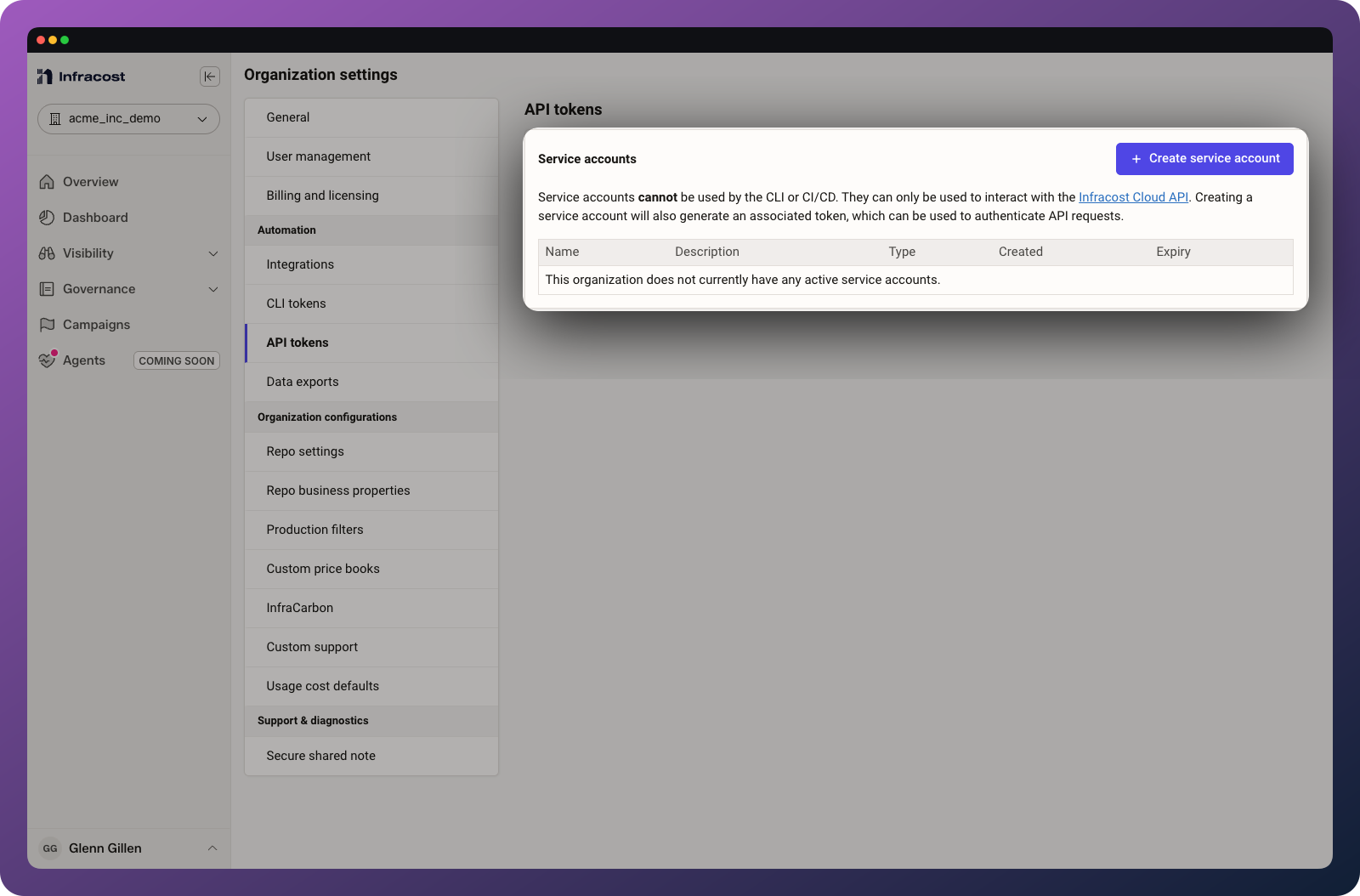
To create one:
- Log in to Infracost Cloud
- Go to Org Settings > API tokens
- Click Create service account
- Copy the generated token
Include the token in your requests:
curl -H "Authorization: Bearer $INFRACOST_API_TOKEN" \
  https://api.infracost.io/v1/orgs/{orgSlug}/...
You'll also need your organization slug, available from Org Settings > General.
API reference
Full API documentation with request/response schemas is available at api.infracost.io/v1/docs.
Tagging policies
Update allowed tag values
The most common API use case is pushing a list of valid tag values from an external system. This validates that engineers use correct values (no typos, proper formatting) when tagging resources.
Example: Validate app_id tags against a list of registered applications from ServiceNow.
Create a JSON file (tags.json):
{
  "data": {
    "attributes": {
      "tags": [
        {
          "key": "app_id",
          "mandatory": true,
          "valueType": "LIST",
          "allowedValues": [
            "app-inventory-prod",
            "app-payments-prod",
            "app-auth-prod",
            "app-analytics-prod"
          ]
        }
      ]
    }
  }
}
Get your policy ID from Governance > Tagging policies > select your policy (the ID is in the URL).
Update the policy:
curl -X PATCH \
  -H "Authorization: Bearer $INFRACOST_API_TOKEN" \
  -H "Content-Type: application/json" \
  --data @tags.json \
  https://api.infracost.io/v1/orgs/{orgSlug}/tagging-policies/{policyId}
💡 Tip: Run this on a schedule (e.g., daily via cron or CI) to keep Infracost in sync with your application registry. Engineers get immediate feedback when they use an unregistered application ID.
Customize the validation message
You can customize the message engineers see when validation fails. Include instructions for how to fix the issue:
{
  "data": {
    "attributes": {
      "tags": [
        {
          "key": "app_id",
          "mandatory": true,
          "valueType": "LIST",
          "allowedValues": ["app-inventory-prod", "app-payments-prod"],
          "message": "The application ID isn't registered. Please ensure your application is listed at https://services.acme-inc.com/register before using it in infrastructure code."
        }
      ]
    }
  }
}
Guardrails
Create a guardrail
Create a JSON file (guardrail.json):
{
  "data": {
    "type": "guardrails",
    "attributes": {
      "name": "Production Cost Limit",
      "scope": "PULL_REQUEST",
      "increaseThreshold": 500,
      "message": "This PR increases monthly costs by more than $500. Please get approval from your team lead before merging.",
      "prComment": true,
      "blockPr": false,
      "filters": {
        "repos": {
          "include": ["production-infra", "platform-services"],
          "exclude": []
        }
      }
    }
  }
}
Create the guardrail:
curl -X POST \
  -H "Authorization: Bearer $INFRACOST_API_TOKEN" \
  -H "Content-Type: application/json" \
  --data @guardrail.json \
  https://api.infracost.io/v1/orgs/{orgSlug}/guardrails
Guardrail operations
| Operation | Method | Endpoint |
|---|---|---|
| List all guardrails | GET | /v1/orgs/{orgSlug}/guardrails |
| Get a guardrail | GET | /v1/orgs/{orgSlug}/guardrails/{id} |
| Create a guardrail | POST | /v1/orgs/{orgSlug}/guardrails |
| Update a guardrail | PATCH | /v1/orgs/{orgSlug}/guardrails/{id} |
| Delete a guardrail | DELETE | /v1/orgs/{orgSlug}/guardrails/{id} |
Guardrail attributes
| Attribute | Type | Description |
|---|---|---|
name | string | Display name for the guardrail |
scope | string | PULL_REQUEST (evaluate per PR) or PROJECT (evaluate per project) |
increaseThreshold | number | Trigger when cost increase exceeds this amount |
increasePercentageThreshold | number | Trigger when cost increase exceeds this percentage |
totalThreshold | number | Trigger when total cost exceeds this budget |
message | string | Custom message shown when guardrail triggers |
prComment | boolean | Show guardrail info in PR comments |
blockPr | boolean | Block PR from merging when triggered |
webhookUrl | string | URL to receive webhook notifications |
filters.repos.include | array | Only apply to these repositories |
filters.repos.exclude | array | Exclude these repositories |
Business properties
Update business properties CSV
Push your organizational hierarchy data to Infracost. This is useful for syncing from Backstage, ServiceNow, or other systems that maintain team ownership data.
Create a CSV file (business_properties.csv):
service_id,team,division,cost_center,slack_channel
auth-service,identity,platform,CC-1001,#identity-team
payment-api,payments,product,CC-1002,#payments-eng
inventory-svc,logistics,product,CC-1002,#logistics
Upload the CSV:
curl -X POST \
  -H "Authorization: Bearer $INFRACOST_API_TOKEN" \
  -H "Content-Type: text/csv" \
  --data-binary @business_properties.csv \
  https://api.infracost.io/v1/orgs/{orgSlug}/custom-properties
⚠️ Warning: You must use --data-binary with curl. Using --data or -d strips newlines from the CSV, resulting in no data being uploaded.
💡 Tip: Schedule this to run daily. Business properties don't typically change frequently, so daily syncs keep data current without excessive API calls.
Price Books
Price Books are an enterprise feature, meaning that a price book is owned by an enterprise, not an organization. However, organizations then use ingested price books.
As such, the API Token used for the requests needs to be by a user or service account with orgAdmin permissions of the primary org of an enterprise.
Lifecycle overview
A custom price book moves through five states from creation to active use:
- Create the price book record (one POST per price book).
- Upload one or more CSV files. Each file is a two-step exchange: ask the API for a presigned S3 URL, then
PUTthe CSV bytes directly to S3. - Trigger ingestion once all files are uploaded.
- Poll the price book until its
statusisSUCCESS(orFAILED). - Activate the price book on an organization so its costs use your custom prices.
Step 1: Create a price book
POST /v1/enterprises/{enterpriseId}/price-books
Creates an empty price book record. The response includes the id you'll use in every subsequent step. The new price book starts in WAITING_FOR_UPLOAD.
curl -X POST \
    'https://api.infracost.io/v1/enterprises/{enterpriseId}/price-books' \
    -H "Authorization: Bearer $INFRACOST_API_TOKEN" \
    -H 'Content-Type: application/json' \
    -d '{"provider": "AZURE"}' # or AWS.
{
  "data": {
    "id": "4687fa2f-076d-487f-ba47-7c35b4530e6b",
    "enterpriseId": "61a1ad7c-c20a-4f17-8e01-51da84033fc7",
    "createdAt": "2026-02-06T11:42:20.692Z",
    "updatedAt": "2026-02-06T11:42:20.692Z",
    "provider": "AZURE",
    "status": "WAITING_FOR_UPLOAD",
    "statusMessage": "",
    "sourceFiles": []
  }
}
Step 2: Upload price book files
Uploading is a two-call exchange per file: the API issues a presigned S3 URL, and you upload the CSV directly to S3. Repeat for every file you need to attach to this price book before moving on to ingestion.
⚠️ Note: A price book can have at most 5 files. If your pricing data is split across more files, concatenate them into 5 or fewer CSVs before uploading.
Request a presigned upload URL
POST /v1/enterprises/{enterpriseId}/price-books/{priceBookId}/files
curl -X POST \
    "https://api.infracost.io/v1/enterprises/{enterpriseId}/price-books/{priceBookId}/files" \
    -H "Authorization: Bearer $INFRACOST_API_TOKEN"
{
  "data": {
    "file": {
      "id": "d3528900-4e6a-4e8e-8b1c-82bc8f111d1f",
      "createdAt": "2026-02-06T11:44:59.923Z",
      "updatedAt": "2026-02-06T11:44:59.923Z",
      "enterpriseId": "61a1ad7c-c20a-4f17-8e01-51da84033fc7",
      "priceBookId": "4687fa2f-076d-487f-ba47-7c35b4530e6b"
    },
    "preSignedUrl": "https://infracost-prod-price-books.s3.us-east-2.amazonaws.com/{enterpriseId}/{priceBookId}/{fileId}.csv?..."
  }
}
Upload the CSV to S3
PUT {preSignedUrl} — sent directly to S3, not the Infracost API.
curl -X PUT \
    'https://infracost-prod-price-books.s3.us-east-2.amazonaws.com/{enterpriseId}/{priceBookId}/{fileId}.csv?...' \
    -H 'Content-Type: text/csv' \
    --data-binary '@<path to your priceBookFile>'
If you have multiple files (e.g. one per region or per account), repeat both sub-steps above for each file before triggering ingestion.
Supported file formats
- Azure: please follow this guide
to export your pricing data and get your price book files. This should give
you CSV files with the following columns:
EnrollmentNumberMeterIdMeterNameMeterTypeMeterCategoryMeterSubCategoryServiceFamilyProductSkuIDProductIDMeterRegionUnitOfMeasurePartNumberEffectiveStartDateEffectiveEndDateUnitPriceBasePriceMarketPriceCurrencyCodeIncludedQuantityOfferIdTermPriceType
- AWS: This option is designed for cases when you want to use blended prices, see this docs section.
productcodeinstancetypedatabaseengineoperatingsystemdeploymentoptionlicensemodelhourlycostvcpumemoryregiondatabaseeditiondescription
Step 3: Trigger ingestion
POST /v1/enterprises/{enterpriseId}/price-books/{priceBookId}/ingest
Once all files are uploaded, kick off ingestion. The price book transitions to PROCESSING.
curl -X POST \
    'https://api.infracost.io/v1/enterprises/{enterpriseId}/price-books/{priceBookId}/ingest' \
    -H "Authorization: Bearer $INFRACOST_API_TOKEN"
{
  "data": {
    "id": "4687fa2f-076d-487f-ba47-7c35b4530e6b",
    "enterpriseId": "61a1ad7c-c20a-4f17-8e01-51da84033fc7",
    "createdAt": "2026-02-06T11:42:20.692Z",
    "updatedAt": "2026-02-06T13:15:35.804Z",
    "provider": "AZURE",
    "status": "PROCESSING",
    "statusMessage": "",
    "sourceFiles": [
      {
        "id": "d3528900-4e6a-4e8e-8b1c-82bc8f111d1f",
        "createdAt": "2026-02-06T11:44:59.923Z",
        "updatedAt": "2026-02-06T11:44:59.923Z",
        "enterpriseId": "61a1ad7c-c20a-4f17-8e01-51da84033fc7",
        "priceBookId": "4687fa2f-076d-487f-ba47-7c35b4530e6b"
      }
    ]
  }
}
Step 4: Check ingestion status
GET /v1/enterprises/{enterpriseId}/price-books/{priceBookId}
Poll this endpoint until status is SUCCESS (ready to activate) or FAILED (see statusMessage for the reason). While ingestion is in flight, status is PROCESSING.
curl -X GET \
    'https://api.infracost.io/v1/enterprises/{enterpriseId}/price-books/{priceBookId}' \
    -H "Authorization: Bearer $INFRACOST_API_TOKEN"
Step 5: Activate on an organization
PATCH /v1/organizations/{organizationId}
Setting customPriceBookId on an organization tells Infracost to evaluate that org's costs against your custom prices. Only price books in SUCCESS can be activated.
curl -X PATCH \
  "https://api.infracost.io/v1/organizations/{organizationId}" \
  -H "Authorization: Bearer $INFRACOST_API_TOKEN" \
  -H "Content-Type: application/json" \
  --data '{"customPriceBookId": "{priceBookId}"}'
{
  "data": {
    "id": "04b2632b-a0f1-4140-b5fe-a09074727336",
    "name": "...",
    "slug": "...",
    "customPriceBookId": "4687fa2f-076d-487f-ba47-7c35b4530e6b",
    "createdAt": "2026-02-08T12:33:12.173Z",
    "updatedAt": "2026-02-09T10:35:50.124Z"
  }
}
List price books
GET /v1/enterprises/{enterpriseId}/price-books
Returns every price book belonging to the enterprise, regardless of status.
curl -X GET \
    'https://api.infracost.io/v1/enterprises/{enterpriseId}/price-books' \
    -H "Authorization: Bearer $INFRACOST_API_TOKEN"
Delete a price book
DELETE /v1/enterprises/{enterpriseId}/price-books/{priceBookId}
Removes the price book and its uploaded files. If the price book is currently activated on any organization, switch that organization to another active price book first by PATCHing it with the new customPriceBookId (see Step 5: Activate on an organization).
curl -X DELETE \
    'https://api.infracost.io/v1/enterprises/{enterpriseId}/price-books/{priceBookId}' \
    -H "Authorization: Bearer $INFRACOST_API_TOKEN"
Rate limits
The API is rate-limited to ensure fair usage. If you receive a 429 Too Many Requests response, wait before retrying. For bulk operations, we recommend:
- Batching updates rather than making individual calls per item
- Running syncs during off-peak hours
- Using exponential backoff for retries
Troubleshooting
If you run into any issues, please join our community Slack channel, we'll help you very quickly 😄
401 Unauthorized
Common causes: Invalid or expired token, using a CLI token instead of a service account token.
Solution: Create a new service account token from Org Settings > API tokens. Verify you're using the service account token, not your personal CLI token.
404 Not Found
Common causes: Incorrect organization slug or resource ID, or the resource doesn't exist.
Solution: Verify your org slug in Org Settings > General. For policy/guardrail IDs, copy the ID from the URL when viewing the resource in the dashboard.
400 Bad Request
Common causes: Malformed JSON, missing required fields, or invalid field values.
Solution: Validate your JSON syntax. Check the API docs for required fields and valid values.
CSV upload shows no data
Common causes: Using --data instead of --data-binary with curl, which strips newlines.
Solution: Always use --data-binary when uploading CSV files:
curl --data-binary @file.csv ...  # Correct
curl --data @file.csv ...         # Wrong - strips newlines