Budgets
Budgets let FinOps practitioners define cloud cost budgets scoped to infrastructure tags, and surface budget consumption directly inside pull requests. Engineers see the full picture: actual spend accumulated so far in the budget period, combined with the projected cost impact of their changes, without leaving their existing workflow.
Stop chasing overruns — catch them in the PR
Until now, budget overruns were discovered after the fact: in quarterly reviews, finance meetings, or when a bill arrived unexpectedly high. Infracost Budgets shift that accountability left, surfacing it at the moment infrastructure decisions are made.
When a pull request touches infrastructure carrying a relevant budget tag, the engineer sees:
- Actual spend accumulated so far in the current budget period
- The projected cost impact of their changes
- Remaining budget headroom
Budget status is surfaced in the pull request for visibility. Engineers can see the impact of their changes and act on that context before merging. FinOps teams configure which budgets are visible on pull requests and get a centralized view of how all budgets are progressing.
Prerequisites
- An AWS Integration configured for your management account (required to pull actual spend data via AWS Cost Explorer)
- Cost aggregation tags configured in Organization Settings under the Cloud costs tab (these define the tag keys Infracost recognizes for budget scoping)
- Existing tag policies in Infracost covering the tags you want to use to scope budgets. The more consistently your infrastructure is tagged, the more accurate budget scoping will be.
📌 Tip: Use the Infracost AI Agent Skill in your code assistant to reach 100% tagging compliance on your cost allocation tags faster.
Create a budget
Budgets are scoped to an infrastructure tag key-value pair (e.g. team=payments). Once enabled on pull requests, any PR that modifies infrastructure carrying that tag will automatically display the budget status.
Steps to create a budget
- Go to Infracost Cloud and navigate to Governance -> Budgets.
- Select Create budget.
- Set the tag key and tag value to scope the budget (e.g.
team/payments). - Set the budget period (monthly or quarterly) and budget limit.
- Optionally, add a custom message to display in the PR comment when this budget is exceeded.
- Under Pull request visibility, choose whether to surface this budget on relevant pull requests.
- Save the budget.
📌 The "Pull request visibility" toggle gives FinOps teams control over which budgets are visible to engineers and when. You can configure a budget without surfacing it until you're ready.
What engineers see
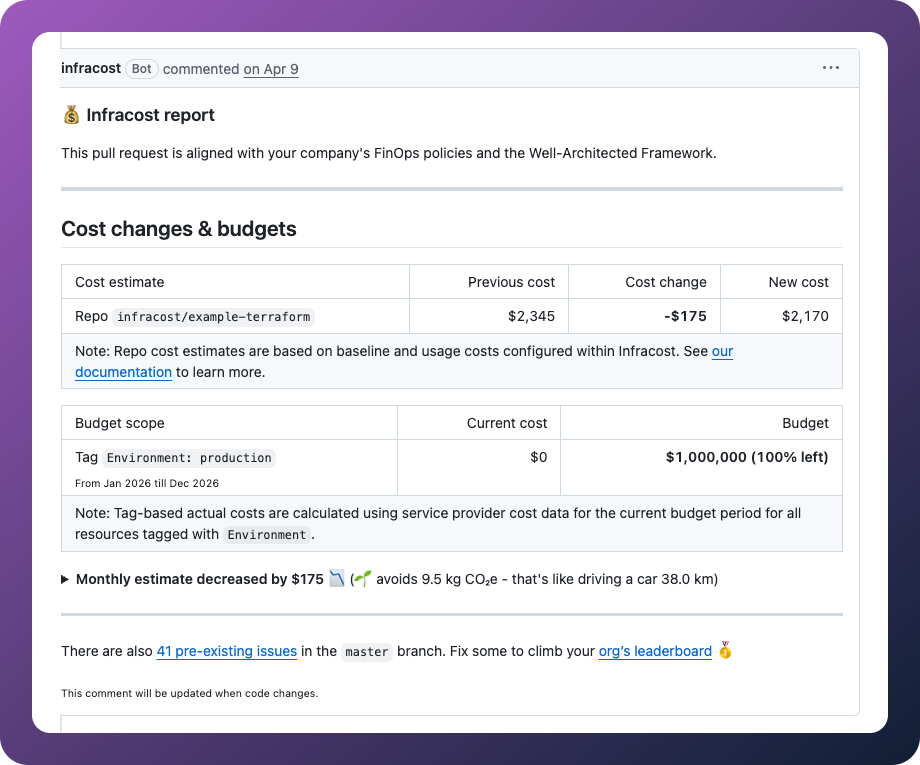
When an engineer opens a pull request that modifies infrastructure with a matching tag, Infracost adds a Cost changes & budgets section to the pull request comment automatically. No additional steps are required from the engineer.
The budget table shows each in-scope budget by tag, with two columns:
- Current cost: the actual accumulated spend for resources carrying that tag in the current budget period
- Budget: the configured budget limit, with a status indicator showing whether the budget is within limit or overrun
If the new cost would exceed the budget when the change is merged, the PR comment displays a budget overrun warning and any custom message configured for that budget.
Manage budgets
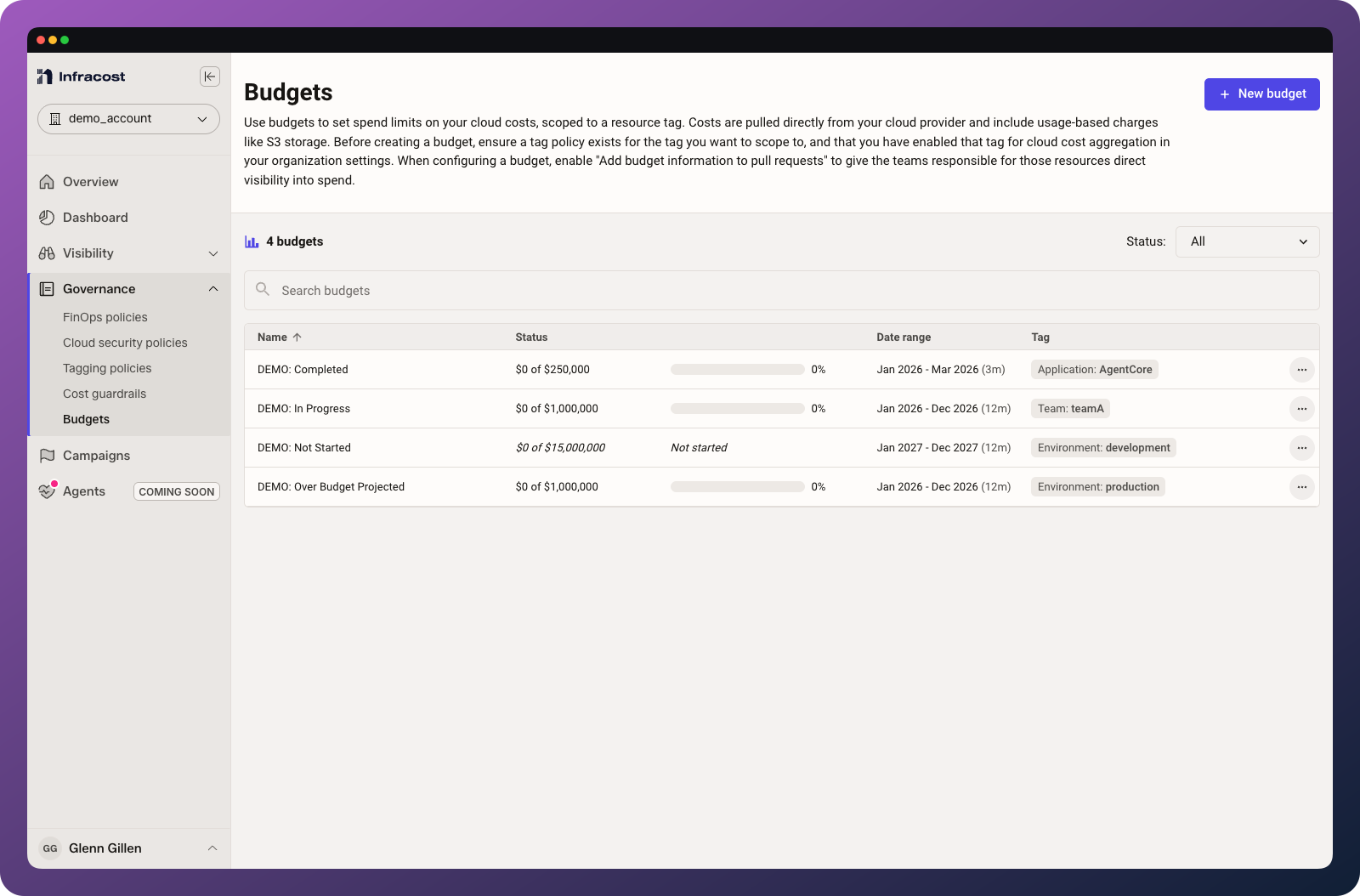
The Budgets page in Infracost Cloud gives you a summary of all configured budgets, showing each budget's name, tag scope, date range, and current status. The status column displays spend to date against the budget limit with a progress indicator, and flags any budgets that are over budget or trending over.
From this page you can:
- Edit a budget to update the limit, period, or tag scope
- Toggle pull request visibility on or off without deleting the budget
- Delete a budget to stop tracking and remove it from pull requests
Supported clouds
Budgets currently support AWS only. Actual spend data is pulled from AWS Cost Explorer via the AWS Integration. If you'd like to see support for other cloud providers, send your request to support@infracost.io.
FAQ
What tags should I use?
Use whatever tag dimensions your finance team already uses to report budget consumption, such as team, service, application, or business-unit. The tag you scope the budget to must be present on your infrastructure resources for spend to be attributed correctly.
How is budget consumption calculated?
It combines two things: actual spend accumulated against that tag scope so far in the current budget period (from AWS Cost Explorer), plus the projected cost change introduced by the pull request. This gives a realistic view of where the budget stands if the change is merged.
What happens if a pull request would exceed the budget?
The budget status is surfaced in the pull request comment. The goal is visibility and informed decision-making, giving engineers the context to decide how to proceed before merging.
Do I need to re-tag all my infrastructure?
No. The feature works with your existing tagging conventions. The more consistently your infrastructure is tagged, the more accurate the budget scoping will be. If you need to improve tag coverage, see Tagging policies.
Does this require engineers to change their workflow?
No. Budget information appears directly in the pull request comment, in the workflow engineers already use. There is no separate dashboard to check.