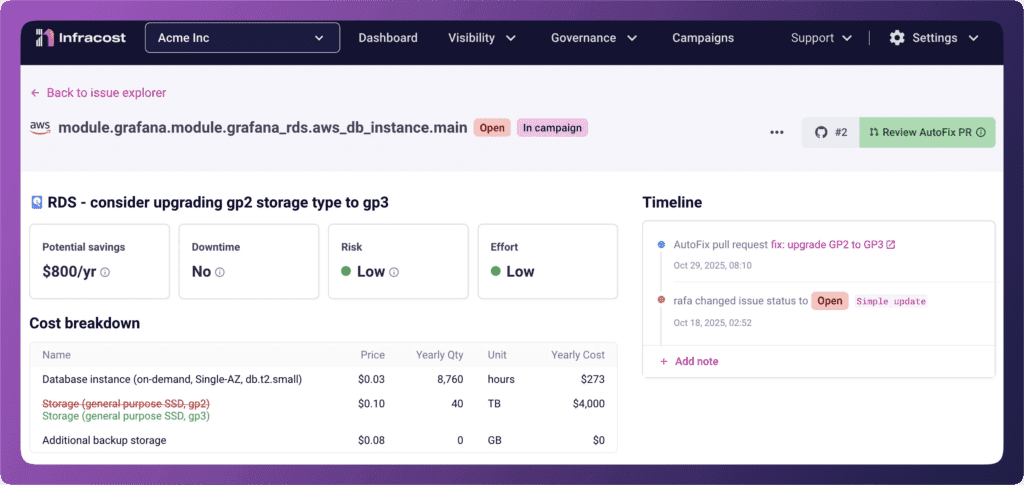
Here’s something we keep seeing: an engineer grabs Terraform code from their last project, makes a few tweaks, and ships. The code works. The infrastructure deploys. Everyone moves on.
Six months later, finance asks why the cloud bill spiked.
The culprit? That “working” code used a database version that’s now in extended support. Or storage volumes that default to an older, more expensive type. Or production-grade configurations in a dev environment that no one will ever load test.
Engineers aren’t being careless. They’re optimizing for what they’re measured on: shipping quickly and reliably. They don’t check whether a Postgres version will trigger AWS extended support fees, or whether aws_instance still defaults to gp2 volumes instead of gp3. Why would they? These details are buried in pricing pages most people have never read.
Today, we’re releasing a set of new FinOps policies that catch these issues before they reach production, plus new metadata that helps teams prioritize which issues to fix first.

Extended support: the fee most engineers have never heard of
When open source projects stop maintaining older versions, cloud providers don’t force you to upgrade. Instead, they keep the old versions running and charge you for the privilege. AWS calls this “extended support” and the fees can be substantial.
The challenge is timing. Your engineer writes code using a database version that’s perfectly fine today. But versions age, and what was current two years ago might be approaching the extended support deadline now.
Infracost now covers all AWS services that charge extended support fees:
ElastiCache: Warns when Redis versions are approaching extended support deadlines
OpenSearch: Flags versions that will incur additional charges
EC2 and RDS: Already covered in our existing policy set
We flag these issues six months before extended support charges begin, giving teams time to plan upgrades rather than scramble when the fees appear on the bill.
The gp2 problem: when defaults work against you
Here’s a detail that surprises people: Terraform’s aws_instance resource still defaults to gp2 volumes. AWS released gp3 in December 2020 — better performance, 20% lower cost — but the Terraform default never changed.
This means every engineer who copies working EC2 code is unknowingly choosing the older, more expensive option. The code works. The infrastructure deploys. The savings opportunity disappears into the noise.
We’ve added gp2-to-gp3 policies for services where we still see significant usage of the older volume type:
EMR: Flag gp2 storage that could be upgraded to gp3
RDS: Identify database volumes still using gp2
These aren’t theoretical savings. gp3 volumes cost 20% less per GB with equivalent or better performance. For organizations running hundreds of instances, the numbers add up quickly.
Non-production environments: when prod configs leak everywhere
Enterprise customers keep telling us the same story: developers copy production configurations into non-production environments because it’s faster than figuring out what’s actually needed for dev and test workloads.
The result? Staging environments running with production-grade capacity. Dev databases with enterprise backup retention. Test instances sized for traffic they’ll never see.
We’ve added policies for services where we commonly see this pattern:
Azure SQL
Consider limiting vCores and capacity in non-production projects
Consider using serverless with auto-pause for intermittent workloads
Azure PostgreSQL
Consider adjusting backup retention for non-production projects
Consider enabling autogrow to avoid over-provisioning
DynamoDB
Consider on-demand tables rather than provisioned capacity for non-production workloads
These policies only flag issues in repositories or environments we’ve detected as non-production so they won’t create noise for your actual production infrastructure.
Preferred configurations: when your negotiated discounts go unused
Large enterprises (organizations spending $100M or more annually on cloud) don’t pay list prices. They negotiate custom rates for specific storage tiers, replication types, and service configurations.
The problem? Those hard-won discounts only save money if engineers actually use the discounted options. And unless someone tells them which configurations have preferential pricing, they’ll just pick whatever the documentation suggests.
We’ve added policies that let you define your organization’s preferred configurations:
Azure Storage Accounts
Nudge engineers toward your preferred access tier
Recommend your negotiated replication type
You configure these policies with your organization’s specific preferences, and Infracost flags resources that could use the options you’ve already paid to optimize.
Risk, effort, and deployment context: making ROI visible
Not all savings are created equal.
A $1,000/month saving that requires no downtime and thirty minutes of engineering time is a completely different ROI than a $1,000/month saving that requires a weekend migration, extensive testing, and potential service disruption.
We’ve added three new metadata fields to every FinOps policy issue:
Risk: What’s the likelihood this change causes problems?
Effort: How much engineering time does this typically require?
Deployment: What’s involved in rolling this out? (No downtime? Maintenance window? Blue-green deployment?)
These assessments are based on the cloud providers documentation and direct feedback from customers. But we also know that “typical” doesn’t always match your context. A change that’s low-risk for most organizations might be high-risk in your specific environment.
That’s why you can customize these values. If your organization has learned that a particular type of change requires extra caution, you can adjust the defaults to reflect that. The metadata then flows through to your engineers in pull request comments and Autofix suggestions, helping them make informed decisions about which issues to prioritize.
See it in action with Autofix
These new policies work with Autofix, which generates pull requests to fix issues automatically. When an engineer sees an Autofix suggestion, they now also see the risk, effort, and deployment context so they can decide whether to apply the fix immediately or schedule it for a maintenance window.
Get started
All of these policies are available now in Infracost Cloud.
Already using Infracost Cloud?
Navigate to your organization’s policy settings to enable the new policies. For the Azure Storage preferred configuration policies, you’ll need to specify which tiers and replication types your organization prefers. The risk, effort, and deployment metadata appears automatically on all policy issues. Customize the defaults if your organization’s context differs from the standard assessments.
New to Infracost?
Sign up for Infracost Cloud. It’s free to get started. Connect your repositories, enable FinOps policies, and start catching cost issues before they reach production.
What’s next
We’re continuing to expand our policy coverage based on what we hear from customers. If there’s a cost pattern you keep seeing in your infrastructure — a default that works against you, a configuration that leaks between environments, a fee that catches teams by surprise — we want to know about it.
Join our community Slack and tell us what you’re seeing.
Infracost ROI Report
Learn how the ROI of shifting FinOps left is measured