Categories

Infracost Now Tracks 10 Million Cloud Service SKUs So You Don’t Have To
Over the years, cloud pricing has grown to be very complicated. AWS alone publishes pricing across hundreds of services, each with dozens of instance types, storage tiers, data transfer rates, licensing models, and regional variations. Azure and Google Cloud aren't far behind. If you subscribe to their notifications, you’ll likely get dozens of emails about changes each year.
Infracost keeps up with the complexity so you can focus on shipping. Our service now tracks more than 10 million cloud service SKUs across AWS, Azure, and GCP. Everything continuously as providers add, change, and deprecate pricing.
We get it -- that number sounds ridiculous. The math is pretty straightforward though. For example, a single EC2 instance type like m6i.xlarge isn't one SKU. It's dozens—one for each region, one for on-demand vs. reserved vs. spot, one for Linux vs. Windows, and so on. Multiply that across hundreds of instance families, then add hundreds of services across three cloud providers, and the complexity adds up.
With 10 million SKUs in our pricing database, Infracost can show engineers the cost of any infrastructure changes before code ever ships to production -- no spreadsheets, no manual lookups, no surprises at month-end.
So where are the big gotchas among these 10 million?
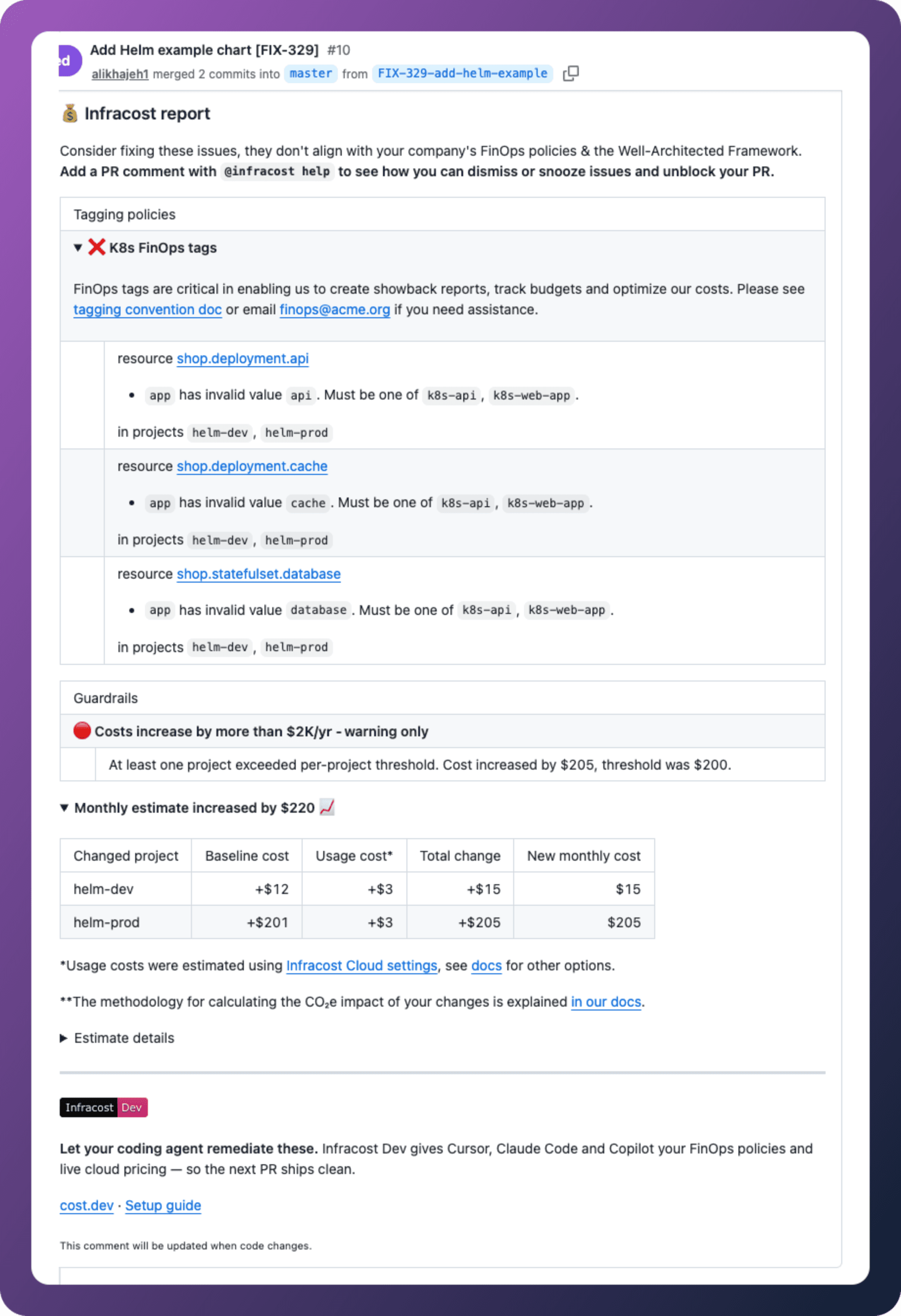
We'd be shocked to see any company using even half of the services available on AWS, Azure, or GCP. After all, there are hundreds. So in the spirit of making FinOps actionable, we've identified the cloud cost ptifalls we see most often — and why they're so hard to catch without shifting FinOps left in your CI/CD pipeline.
1. Running Previous-Generation EC2 Instance Families
AWS regularly releases newer instance generations that are faster and cheaper than their predecessors. An m4.large costs more and performs worse than an m6i.large. But if no one flags it, engineers keep provisioning what they know. They’ll copy and past a code block that worked before, not realizing that there are better alternatives. Infracost surfaces instance generation warnings directly in pull requests, where the fix is easy.
2. Multi-AZ SQL in Dev Environments
Multi-AZ replication makes sense in production. In a dev or staging environment where an outage means a brief inconvenience rather than a customer incident, it's just a cost multiplier. We see this constantly—configurations copy-pasted from prod templates, with nobody noticing the redundancy setting that doesn't belong in a dev namespace. Oops.
3. Monitor Log Groups Retaining Logs Indefinitely
Logs are useful. Logs from three years ago that nobody queries are just expensive. It's common to see a monitoring tool with default retention settings are often left untouched, accumulating data that adds to your bill every month. Setting a sensible retention policy is a one-line change. It rarely happens without a nudge.
4. Container Image Registries That Keep Everything Forever
Every image push stays in the registry. Every version. Every failed build. ECR, ACR, and GCR all charge for storage, and container registries have a way of quietly accumulating gigabytes—sometimes terabytes—of images that no running container has referenced in months. Lifecycle policies fix this, but they have to be created deliberately.
5. gp2 EBS Volumes (and Why gp3 Matters)
AWS introduced gp3 EBS volumes in 2020, offering better baseline performance at a lower price than gp2. Yet gp2 remains the default in many Terraform modules, AMIs, and runbooks. This affects not just standalone EBS volumes but RDS storage and EMR clusters as well. A simple volume type change can cut storage costs by 20% or more with no other changes.
6. S3 Multi-Part Upload Debris
When a large file upload fails mid-transfer, the uploaded parts don't disappear—they sit in S3, incomplete, accruing storage charges. For buckets used for large file uploads, this debris can accumulate into meaningful costs over time. An S3 lifecycle rule to abort incomplete multi-part uploads after a defined number of days eliminates this entirely.
7. Default RDS Instance Sizing
When an engineer creates an RDS instance and doesn't change the default instance type—often db.m5.large—they're frequently over-provisioning for what they actually need. Development databases, internal tools, and low-traffic applications don't need the same instance class as production workloads, but defaults don't know that. Without infrastructure cost visibility in the development workflow, over-sized databases go unnoticed.
8. The Test Environment That Was Never Torn Down
An engineer spins up a test environment, gets pulled into something urgent, and never shuts it down. Infracost surfaces the monthly cost estimate in the PR, and tagging policies can require an owner and environment tag before the code even merges — making every test environment attributable and auditable from day one.
9. Data Transfer Costs
Engineers think about compute. They think about storage. They rarely think about egress. But data transfer costs cut across almost every AWS, Azure, and GCP service—and they're notoriously hard to estimate in advance. Traffic between availability zones, cross-region replication, CDN egress, API Gateway responses—each carries its own per-GB pricing that only becomes visible after the bill arrives.
NAT gateways and VPC endpoints just compound the problem. They're cheap to copy-paste into a Terraform module, which means they proliferate. Hundreds of them, sometimes thousands, each quietly accruing hourly charges whether they're handling meaningful traffic or not. No single one breaks the budget. All of them together do.
10. New Services With No Cost Mental Model
AWS releases new services faster than most teams can track. Something like AWS Verified Access or AWS Clean Rooms may look like a straightforward feature addition—until the bill arrives and reveals a pricing model that nobody had mapped out. Engineers adopt new managed services without a clear sense of what they cost at scale. Without cost guardrails, it’s hard to catch these mistakes until it’s too late.
The Common Thread
These aren't the result of careless engineers. They're the result of engineers making reasonable decisions without cost context at the moment those decisions are made. The billing console is a lagging indicator. By the time the surprise shows up, the infrastructure has been running for weeks.
The fix isn't better finance reviews after the fact. It's giving engineers:
1.) real cost information earlier in the workflow—in the pull request, before the merge, when changing a volume type or disabling a flag is a two-minute edit instead of a production change requiring a maintenance window, and
2.) the appropriate tagging guidelines and cost guardrails so they don’t have to worry about getting in trouble.
See What Infracost Catches in Your Infrastructure
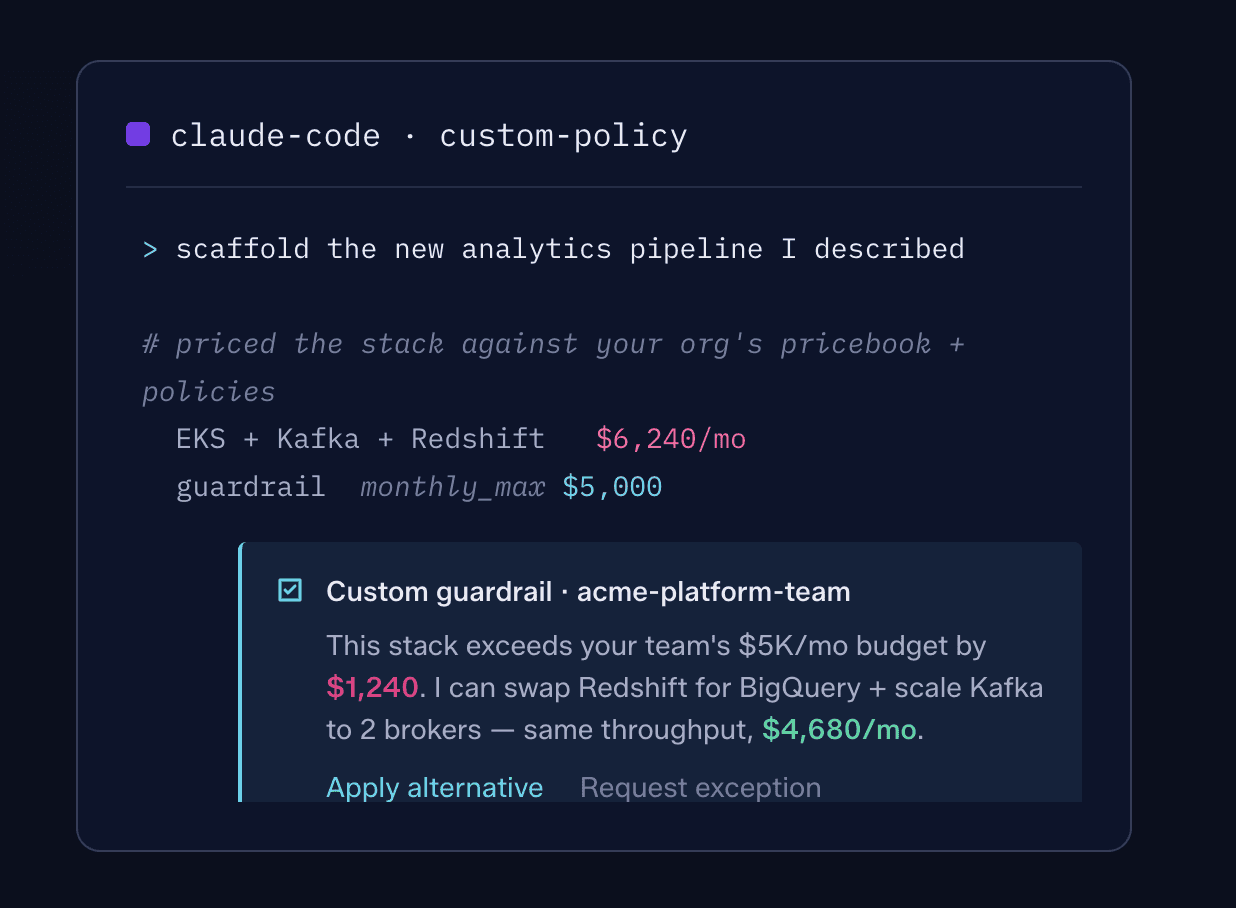
Infracost integrates with your existing CI/CD pipeline and surfaces cost estimates—and cost regressions—directly in pull requests. Infracost Cloud enables your team to set up cost guardrails and FinOps policies, so teams can think about shipping instead of worrying about cloud costs after the fact.
Ready to see the cloud waste hiding in your Terraform, CloudFormation, or CDK configs?
Sign up for Infracost or schedule a demo →

Issue Explorer: Find Your Highest-ROI Cost Savings
On December 2nd 2025, AWS announced that RDS for SQL Server now supports M7i and R7i instances with up to 55% lower prices than previous generation equivalents. If you provisioned an RDS SQL Server database last month, you made a reasonable decision with the information available. Today, that same decision might be costing you 55% more than it needs to.
This is the reality of cloud infrastructure: prices change constantly. New instance families launch. Storage tiers get cheaper. Resources you provisioned years ago quietly slip into "extended support" and start accruing additional charges you never anticipated. Nobody can be expected to track every pricing change across every resource type in every region. But that's exactly what Infracost does. We track every price change and every new resource type launched by the cloud providers. Infracost automatically scans all your existing infrastructure to identify optimization opportunities — resources that could be upgraded, rightsized, or modernized. When we find one, that's an "issue" to be investigated. And now Issue Explorer makes it easier than ever to find and act on the savings that matter most.
What's new?
Projected annual savings on every issue
Issue Explorer now displays the estimated annual cost savings for each issue we detect (we even take into consideration your negotiated discounts and custom prices). This isn't just about catching expensive mistakes in pull requests (though we do that too). It's about surfacing optimization opportunities in infrastructure that's already running. Opportunities that exist not because someone made a bad decision, but because the economics changed after deployment.
Filter by savings threshold
For a mid-tier enterprise spending $10M/year on cloud, a $10K/year saving is worth pursuing. For a large enterprise spending $100M/year, that threshold might be significantly higher. You can now filter issues by potential savings to focus on what actually moves the needle for your organization. Combined with our recently released risk, downtime, and effort categorization, you can prioritize the issues that deliver the highest ROI for the time invested.
Group by tags
Tags are foundational to well-governed infrastructure. They're how organizations track ownership, allocate costs, and enforce accountability. Issue Explorer now lets you group issues by any tag, making it easy to see which teams, applications, or business units have the most optimization potential.
When you don’t use Tagging policies, you end-up with this, which is from a customer. 4 different ways of defining business unit, Infracost tells devs exactly which one to use as soon as they send a pull request in GitHub so you avoid this mess.
Export everything
We've learned that putting FinOps issues directly in the path of engineers in Git dramatically increases action rates. The same is true for executives and managers—meet them where they work, and they act on what they see. All of this data—savings estimates, risk levels, effort ratings, tags—is now available in data exports, so you can bring it to the relevant people in the tools they already use. Whether you aggregate in Excel, feed it into a BI tool, or integrate with another system for deeper analysis, the data is yours.
Turning insights into action
Finding savings opportunities is only half the challenge. If you haven't been shifting left and preventing issues so far, you might have thousands of issues across hundreds of engineers. Acting on them at scale is where most organizations get stuck.
Infracost Cloud includes Campaigns to help you coordinate modernization efforts across your entire organization — assigning issues to the right teams, tracking progress, and ensuring nothing falls through the cracks. And for many common optimizations, AutoFix can generate the required code changes automatically, so your engineers just need to review and deploy.
Get started
Issue Explorer improvements are available now live for all customers. Log in to your Infracost Cloud dashboard and you'll see projected savings on every issue, new filtering options, and tag grouping ready to use.
Not using Infracost Cloud yet? Sign up free and connect your repositories to start surfacing cost optimization opportunities across your infrastructure.
We want your feedback
What savings thresholds matter for your organization? What other groupings would help you prioritize? Join our community Slack and let us know — your input shapes what we build next!

The Code That Works Might Be Costing You Thousands
Here's something we keep seeing: an engineer grabs Terraform code from their last project, makes a few tweaks, and ships. The code works. The infrastructure deploys. Everyone moves on.
Six months later, finance asks why the cloud bill spiked.
The culprit? That "working" code used a database version that's now in extended support. Or storage volumes that default to an older, more expensive type. Or production-grade configurations in a dev environment that no one will ever load test.
Engineers aren't being careless. They're optimizing for what they're measured on: shipping quickly and reliably. They don't check whether a Postgres version will trigger AWS extended support fees, or whether aws_instance still defaults to gp2 volumes instead of gp3. Why would they? These details are buried in pricing pages most people have never read.
Today, we're releasing a set of new FinOps policies that catch these issues before they reach production, plus new metadata that helps teams prioritize which issues to fix first.
Extended support: the fee most engineers have never heard of
When open source projects stop maintaining older versions, cloud providers don't force you to upgrade. Instead, they keep the old versions running and charge you for the privilege. AWS calls this "extended support" and the fees can be substantial.
The challenge is timing. Your engineer writes code using a database version that's perfectly fine today. But versions age, and what was current two years ago might be approaching the extended support deadline now.
Infracost now covers all AWS services that charge extended support fees:
ElastiCache: Warns when Redis versions are approaching extended support deadlines
OpenSearch: Flags versions that will incur additional charges
EC2 and RDS: Already covered in our existing policy set
We flag these issues six months before extended support charges begin, giving teams time to plan upgrades rather than scramble when the fees appear on the bill.
The gp2 problem: when defaults work against you
Here's a detail that surprises people: Terraform's aws_instance resource still defaults to gp2 volumes. AWS released gp3 in December 2020 — better performance, 20% lower cost — but the Terraform default never changed.
This means every engineer who copies working EC2 code is unknowingly choosing the older, more expensive option. The code works. The infrastructure deploys. The savings opportunity disappears into the noise.
We've added gp2-to-gp3 policies for services where we still see significant usage of the older volume type:
EMR: Flag gp2 storage that could be upgraded to gp3
RDS: Identify database volumes still using gp2
These aren't theoretical savings. gp3 volumes cost 20% less per GB with equivalent or better performance. For organizations running hundreds of instances, the numbers add up quickly.
Non-production environments: when prod configs leak everywhere
Enterprise customers keep telling us the same story: developers copy production configurations into non-production environments because it's faster than figuring out what's actually needed for dev and test workloads.
The result? Staging environments running with production-grade capacity. Dev databases with enterprise backup retention. Test instances sized for traffic they'll never see.
We've added policies for services where we commonly see this pattern:
Azure SQL
Consider limiting vCores and capacity in non-production projects
Consider using serverless with auto-pause for intermittent workloads
Azure PostgreSQL
Consider adjusting backup retention for non-production projects
Consider enabling autogrow to avoid over-provisioning
DynamoDB
Consider on-demand tables rather than provisioned capacity for non-production workloads
These policies only flag issues in repositories or environments we’ve detected as non-production so they won't create noise for your actual production infrastructure.
Preferred configurations: when your negotiated discounts go unused
Large enterprises (organizations spending $100M or more annually on cloud) don't pay list prices. They negotiate custom rates for specific storage tiers, replication types, and service configurations.
The problem? Those hard-won discounts only save money if engineers actually use the discounted options. And unless someone tells them which configurations have preferential pricing, they'll just pick whatever the documentation suggests.
We've added policies that let you define your organization's preferred configurations:
Azure Storage Accounts
Nudge engineers toward your preferred access tier
Recommend your negotiated replication type
You configure these policies with your organization's specific preferences, and Infracost flags resources that could use the options you've already paid to optimize.
Risk, effort, and deployment context: making ROI visible
Not all savings are created equal.
A $1,000/month saving that requires no downtime and thirty minutes of engineering time is a completely different ROI than a $1,000/month saving that requires a weekend migration, extensive testing, and potential service disruption.
We've added three new metadata fields to every FinOps policy issue:
Risk: What's the likelihood this change causes problems?
Effort: How much engineering time does this typically require?
Deployment: What's involved in rolling this out? (No downtime? Maintenance window? Blue-green deployment?)
These assessments are based on the cloud providers documentation and direct feedback from customers. But we also know that "typical" doesn't always match your context. A change that's low-risk for most organizations might be high-risk in your specific environment.
That's why you can customize these values. If your organization has learned that a particular type of change requires extra caution, you can adjust the defaults to reflect that. The metadata then flows through to your engineers in pull request comments and Autofix suggestions, helping them make informed decisions about which issues to prioritize.
See it in action with Autofix
These new policies work with Autofix, which generates pull requests to fix issues automatically. When an engineer sees an Autofix suggestion, they now also see the risk, effort, and deployment context so they can decide whether to apply the fix immediately or schedule it for a maintenance window.
Get started
All of these policies are available now in Infracost Cloud.
Already using Infracost Cloud?
Navigate to your organization's policy settings to enable the new policies. For the Azure Storage preferred configuration policies, you'll need to specify which tiers and replication types your organization prefers. The risk, effort, and deployment metadata appears automatically on all policy issues. Customize the defaults if your organization's context differs from the standard assessments.
New to Infracost?
Sign up for Infracost Cloud. It's free to get started. Connect your repositories, enable FinOps policies, and start catching cost issues before they reach production.
What's next
We're continuing to expand our policy coverage based on what we hear from customers. If there's a cost pattern you keep seeing in your infrastructure — a default that works against you, a configuration that leaks between environments, a fee that catches teams by surprise — we want to know about it.
Join our community Slack and tell us what you're seeing.

CloudFormation Support is Here: Shift-Left Cost Visibility for AWS-Native Teams
AWS Cloud Spend and AWS Budgets allow AWS users to monitor cloud spend after it’s already been deployed. This presents issues for engineering teams that are steeped in AWS CloudFormation — do they optimize after deployment and slow engineering teams down, or simply accept cloud waste?
Now, organizations that rely on CloudFormation can proactively reduce cloud costs before each deployment. Today, we’re announcing support for CloudFormation in Infracost Cloud. That's been true for our Terraform users, and now it's true for CloudFormation teams too.
Meeting teams where they are
Enterprise infrastructure is rarely uniform. Teams inherit CloudFormation stacks. Organizations standardize on AWS-native tooling. Platform teams support multiple IaC frameworks across different business units. A single company might run Terraform in one division and CloudFormation in another.
CloudFormation has been one of our most-requested capabilities with over 185 engineers voicing their support on our GitHub repo. We heard them. But we made a deliberate choice to go deep before going wide.
Cost estimation is deceptively complex. Usage-based pricing, regional variations, spot pricing, tiered discounts — getting these right matters. Getting them wrong erodes trust. So we focused on making our Terraform support rock-solid first: accurate estimates, reliable workflows, a great developer UX (including the ability to dismiss and snooze issues from within a PR), policies that actually catch issues, and so much more. Today, thousands of engineering teams use Infracost daily in their Terraform workflows.
That foundation is what makes CloudFormation support possible, having full parity with our Terraform integration from day one.
CloudFormation, meet Infracost Cloud
Starting today, Infracost Cloud analyzes CloudFormation templates directly. No deployed stacks required. No change sets. Just point us at your template repos, and we'll show you what they'll cost.
We've built full parity with our Terraform support. The same resource coverage, the same policies, the same pull request experience. If you're already using Infracost with Terraform, you know exactly what to expect.
Here's what this means for your team:
Cost estimates in every pull request. When an engineer modifies a CloudFormation template, they see the cost impact before the code is merged. No surprises. No finger-pointing when bills arrive.
FinOps and Tagging policies that actually get enforced. Your carefully crafted tagging standards? Your instance type guidelines? They now apply to CloudFormation just like they do to Terraform. Policies are checked in the engineering workflow, before anything reaches production.
One dashboard for all your infrastructure. Whether you're running Terraform in one team and CloudFormation in another, Infracost Cloud gives you unified visibility. Same policies. Same campaigns. Same reporting.
Built with our community
One of our core values is U stomer, we see ourselves and our users as one. The CloudFormation request on GitHub wasn't just popular; it was rich with context. Engineers shared their specific use cases, their team structures, their challenges. That input shaped how we approached this… not just whether to build it, but how.
To everyone who contributed to that conversation: this one's for you.
Get started
Already using Infracost Cloud?
CloudFormation support is available now in early access. Connect your repositories containing CloudFormation templates, and email hello@infracost.io to request early access.
New to Infracost?
Sign up for Infracost Cloud. It's free to get started. Connect your preferred version control provider (GitHub, GitLab, or Azure Repos), add your CloudFormation repositories, and email hello@infracost.io to request early access and experience shift-left cost visibility for the first time.
What's next
This launch is Infracost Cloud-first. CLI and IDE support for CloudFormation are on the roadmap for 2026 and we'll share more as those pieces come together.
In the meantime, we want to hear from you. What's working? What's missing? What would make this even more useful for your team?
Join our community Slack and let us know. The best features start as conversations.

AI for FinOps: Fix Cloud Cost Issues 10x Faster
A key question at this year’s FinOpsX conference was: what does “AI for FinOps” really mean? Today, we’re answering that with the general availability of AutoFix pull requests for GitHub.
Infracost doesn’t just prevent new cost issues anymore, it now opens AI-powered pull requests to fix existing ones. Engineers can remediate issues 10x faster and at scale, with validated code fixes that avoid the risks of LLM hallucinations.
For enterprises, this means cost optimization finally scales: engineers take action without extra meetings or manual coordination, and FinOps leaders can track progress quarter over quarter. AutoFix turns AI for FinOps from a buzzword into practical, developer-first solutions already used at Fortune 100 enterprises.
Skip Jira tickets and meetings with AutoFix pull requests
Cloud cost issues pile up quickly in large enterprises; tens of thousands of issues across thousands of code repos. FinOps teams try to surface them in Jira tickets or planning meetings, but those get delayed or deprioritized. Meanwhile, developers rarely go looking for cost issues buried in AWS or Azure consoles or spreadsheets. The result: problems sit unresolved for many quarters, if they get fixed at all.
AI sounded like the answer, but we quickly discovered the limits. LLMs don’t understand an organization’s priorities, and they hallucinate. Bad or irrelevant code fixes waste engineers’ time and destroy trust. The right fix might involve updating a module or adjusting variables, and engineers reviewing the pull request need context on deployment details (e.g., does the VM require a reboot when changing the volume type?) and the risks of the change (e.g., applying a storage lifecycle policy deletes old data). What’s needed is action at scale on the highest-priority campaigns, with context so engineers are fully informed to review and approve each change.
Infracost AutoFix opens pull requests to help engineers fix existing issues quickly
That’s what AutoFix delivers. Infracost now goes beyond detecting new cost issues when engineers are making changes; it proactively opens pull requests to fix existing issues across your codebase. Engineers review and merge, just like they do with security fixes. The results speak for themselves: one customer fixed 300 issues in just 2 weeks — 10x faster than before!
Infracost customer fixing issues 10x faster with AutoFix
Why this matters
Actionable fixes at scale: Cloud infrastructure is decentralized, so fixing cost issues is a distributed problem. FinOps initiatives—like adopting Graviton—require engineers across many repos to take action to realize savings. Developers don’t chase Jira tickets or sit in monthly FinOps meetings. AutoFix surfaces actionable opportunities directly in GitHub as new pull requests, putting the data where engineers already work and making distributed action simple and scalable.
Speed without bottlenecks : Get more savings applied faster because AutoFix eliminates the back-and-forth of two engineers coordinating. Normally, one engineer has to open a PR and another has to review it; multiplying the effort and slowing everything down. With AutoFix, the Infracost bot opens the PRs so engineers can simply review and merge; no bottlenecks, no delays. This is the same model security teams rely on to drive adoption: by lowering the effort required, you get dramatically more action.
How it works
FinOps teams create a campaign to highlight which policies matter most this quarter; whether that’s adopting Graviton, or tightening log retention. Infracost then automatically opens PRs with actionable code fixes, intelligently paced so engineers aren’t overwhelmed, while tracking progress across repos. And if you’re using the standard GitHub
CODEOWNERSfile, AutoFix PRs are automatically assigned to the right engineers or teams so they’re notified immediately and can take action without extra coordination.AutoFix combines context from our static analysis engine (the Infracost CLI), and customer-specific policies and price books to generate actionable code fixes, using AI to power the code generation. You can also customize the prompt passed to the LLM for each policy. For example, you can instruct it to set log retention to 30 days when opening pull requests to fix AWS CloudWatch issues.
Our static analysis engine validates each fix, ensuring it resolves the issue without introducing new costs or breaking changes. This reliability is essential for enterprise AI adoption. Enterprises don’t just want LLMs that may hallucinate; they need confidence that solutions are safe, predictable, and won’t waste engineering time.
Conclusion
AI for FinOps isn’t about flashy buzzwords; it’s about making action possible at scale. With AutoFix, engineers finally get validated, AI-powered pull requests that make fixing issues 10x faster and easier, directly in their workflow.
👉Log in to Infracost Cloud and start a free 2-week trial to test AutoFix pull requests! If you prefer a live demo, book one here.

Shifting Carbon Impact Left: Introducing InfraCarbon
Here is a number that surprises people: the ICT sector, which includes data centers, networks, and devices, produces roughly 1.5 to 4 percent of worldwide greenhouse gas emissions. That puts it in the same range as the aviation industry. 😱
Engineers are in a unique position to collectively decarbonize millions of tonnes of Co2 from behind their laptops. They make infrastructure decisions every day, but the impact of those choices is rarely visible. Cost savings in particular can feel distant. When someone switches from a c5.24xlarge to a more efficient c8g.24xlarge, they do not see the two thousand dollars saved each year. That win ends up in a finance spreadsheet and feels abstract.
What we learned early on is that many engineers care just as much about environmental impact as they do about cost. That came into focus when one of our early access users reviewed a pull request suggesting a newer instance type. It saved money, but this one infrastructure tweak would also prevent more carbon emissions over the next year than their entire team would generate flying to their upcoming offsite in Spain.
Suddenly, it was not about the company’s cloud bill. It was personal.
Why visibility changes behavior
Every deploy pulls energy from a grid, powers cooling systems, and contributes to a footprint that engineers never see. Data center energy usage continues to grow faster than global electricity consumption, which makes this hidden impact even more important to understand.
The issue has never been a lack of interest. Engineers care. They have simply never had this information at the moment decisions are being made.
Until now.
Introducing InfraCarbon
Starting today, Infracost Cloud shows the carbon impact of your infrastructure changes directly in your pull requests — right next to the cost information you already rely on.
🌱 avoid 450kg CO₂e — about the same as three flights between London and Paris
We translate technical carbon numbers into real-world equivalents because “450kg of CO₂e” doesn’t mean much. But “three flights avoided” does. It’s simple. It’s relatable. And for many engineers, it’s a more motivating signal than “$2,203 saved.”
Powered by real carbon data
We partnered with the team at Greenpixie to bring this to life. They specialize in understanding the environmental impact of cloud infrastructure and account for factors like grid emissions, hardware characteristics, and regional differences.
Their emissions intelligence now powers InfraCarbon across AWS, Azure, and Google Cloud, giving engineers a practical way to factor sustainability into their day-to-day work.
As part of the partnership, engineers who want to go deeper can access Greenpixie’s Cloud Sustainability Fundamentals program through the GreenOps Academy. More than 1,500 students have already completed the course, and InfraCarbon users are welcome to enroll for free if they want a stronger grounding in how cloud emissions are calculated and what drives them.
This creates a simple win for teams. The choices that reduce emissions often reduce costs at the same time. Even if someone is not motivated by climate impact, the fact that developers care about this and act on it also helps the business save money.
This partnership is also a first step toward building a broader ecosystem around FinOps and sustainability. Greenpixie brings credibility in the climate space; Infracost brings distribution and engineering workflow visibility. Together, we can reach developers who care about more than costs.
Why this matters more than ever
Many companies are being asked to report on their cloud-related emissions, and cloud is becoming a larger part of sustainability reports. The challenge is that these numbers usually show up months after the decisions that created them.
By then, it’s too late to fix anything.
InfraCarbon shifts that visibility left — to the moment when engineers are deciding which instance type, region, or architecture makes sense. No new dashboard. No new platform to check. The context simply appears in the PR comment where the decision is already being made.
Two wins, one change
The nice thing is that cost-efficient and carbon-efficient decisions often overlap.
Newer instance generations tend to get more performance per watt. Rightsizing eliminates waste in both dimensions. Picking a region with a cleaner energy mix can reduce emissions and improve latency.
InfraCarbon is not about forcing engineers to choose sustainability over cost. In most cases, the better choice does both.
And when someone makes that change, it’s not because finance asked them to. It’s because they can see that this one adjustment offsets a personal flight — and that feels meaningful.
Get started
Already using Infracost Cloud?
Head to your organization settings and turn on InfraCarbon. You’ll start seeing carbon insights in your PR comments right away.
New to Infracost?
Sign up at infracost.io and integrate with GitHub, GitLab, or Azure repos. Open a pull request with a change to your infrastructure and you’ll automatically see both cost visibility and the carbon impact of your changes.
What we’re learning
We built InfraCarbon because we believe visibility changes behavior. We’ve seen it with costs; the moment you show engineers the price impact of their code, decisions shift. We expect the same with carbon.
But we are learning alongside you. What equivalents resonate? How do different teams use this information? What context should we add next?
If you want to share your thoughts or help shape where this goes, join our community Slack. We’d love to hear how your team is using InfraCarbon.

Cloud Security Policies: Shift-Left Security for Your Infrastructure Code
Most security scanners treat infrastructure-as-code like any other codebase: pattern matching, regex rules, surface-level checks. But infrastructure code isn't like application code. Variables reference other variables. Modules pull in external dependencies. A single Terraform code block might expand into dozens of cloud resources, after evaluation, across different environments.
We've spent years building deep parsing for Terraform, CloudFormation, and AWS CDK. We evaluate variables, load external modules, and understand what your infrastructure will actually become… not just what the text looks like. That foundation now powers a new category of governance: Cloud Security Policies.
Why security in Infracost?
The path here was customer-driven. We started with FinOps policies to catch cost issues before deployment. Then enterprise customers asked us to check tagging because FinOps teams rely heavily on consistent tags for cost allocation. Then came the recurring question: " Can you also scan for security issues?"
Specifically, customers wanted cloud security posture management (CSPM) checks, for example AWS Security Hub standards and Azure best practices, but applied at the infrastructure-as-code layer, before misconfigured resources ever reach production.
So we built it.
The right people, the right info, the right time, the right place
Enterprise customers love the developer experience Infracost provides. Connect your GitHub, GitLab, or Azure Repos organization and we automatically detect every infrastructure-as-code repository. No manual configuration per repo. No yaml files to maintain. Your developers get superpowers within the source control systems they already use.
That last part matters. Developers never leave their workflow. They don't log into another dashboard, learn another tool, or check a separate system. Security issues appear directly in pull requests. Exactly where the engineer who can fix them is already working.
This is what shift-left actually looks like: the right information reaching the right people at the right time, in the right place.
Prevention, remediation, and everything in between
Pull request comments focus on prevention. When a CloudFront distribution is missing WAF protection or an RDS instance lacks encryption at rest, the developer sees the issue before merge. Not in a security report weeks later.
AutoFix pull requests tackle existing issues. Rather than creating tickets that sit in a backlog, Infracost generates ready-to-merge fixes that engineers can review and apply.
Bot commands keep developers in flow. Dismiss or snooze issues directly from pull request comments using @infracostcommands. Security and platform teams maintain oversight while developers retain agency.
Campaigns: direct efforts, track progress
All of this is powered by Campaigns.
For cloud security practitioners and engineering leadership, Campaigns provide the control plane for governance across the enterprise. Create a campaign, assign the policies that matter, target the repositories that need attention, and track progress with the metrics that matter:
% of new issues prevented : How effectively are you stopping problems before they reach production?
% of existing issues fixed : How quickly is your backlog shrinking?
Campaigns transform security governance from "we have policies" to "we're measurably improving." Leadership gets visibility into remediation velocity. Platform teams can direct engineering efforts strategically. And developers get clear, actionable guidance rather than overwhelming backlogs.
Launch policies
We're launching with 22 policies covering critical security configurations across AWS and Azure:
Cloud | Service | Policies |
|---|---|---|
AWS | SQS | consider making queues encrypted at rest |
AWS | CloudFront | consider setting a default root object on distributions |
AWS | DMS | consider making replication instances not publicly accessible |
AWS | ECS | consider avoiding secrets in container environment variables |
AWS | ECS | prevent services from being publicly accessible |
AWS | Kinesis | consider making streams encrypted at rest |
AWS | Kinesis Data Firehouse | consider making delivery streams encrypted at rest |
AWS | DMS | endpoints should use SSL |
AWS | EC2 | Amazon EC2 and launch templates should not associate a public IPv4 address |
AWS | RDS | DB instances should have encryption at-rest enabled |
AWS | CloudFront | distributions should have WAF enabled |
AWS | EC2 | consider disabling associate public IP address in launch templatesActive policy |
AWS | EC2 | require Instance Metadata Service Version 2 (IMDSv2) |
AWS | KMS | consider enabling automatic key rotation |
AWS | RDS | consider enabling CloudWatch log exports |
AWS | RDS | should copy tags to snapshots |
AWS | S3 | consider blocking public access for the S3 access points |
AWS | EC2 | VPC default security groups should not allow inbound or outbound traffic |
AWS | ELB | Application Load Balancer should be configured to redirect all HTTP requests to HTTPS |
Azure | App Service | consider enabling HTTPS-only mode |
Azure | App Service | consider using latest TLS version |
Azure | Storage Account | consider disabling public network access |
Each policy can be customized with Risk, Effort, and Deployment metadata, the same framework our enterprise customers use for FinOps policies to help teams prioritize remediation based on organizational context.
What makes this different
Generic security scanners don't understand infrastructure as code the way Infracost does. They see text; we see infrastructure.
Other tools require manual repo configuration, separate dashboards, and context-switching that breaks developer flow. Infracost meets developers where they are: in their pull requests, in their existing workflow, with automatic detection across every IaC repository in their organization.
Get started
Already using Infracost Cloud?
Cloud security policies are available now. Navigate to Governance → Cloud security policies to enable the policies relevant to your organization. Policies will begin evaluating on your next pull request.
New to Infracost?
Sign up for Infracost Cloud—it's free to get started. Connect your version control provider, and you'll have cost visibility, FinOps policies, and cloud security policies working across your infrastructure repositories in minutes.
What's next
This launch covers AWS and Azure services aligned with security hub standards and cloud best practices. We're expanding coverage based on customer feedback and if there's a security control you need, let us know.
Join our community Slack and tell us what you'd like to see next.

Same Language, Same Visibility: AWS CDK Support is Here
When engineers choose AWS CDK, they're making a bet on unification. One language for their application code and their infrastructure. TypeScript all the way down, or Python from Lambda to load balancer. It's an elegant proposition.
But until now, that choice came with a trade-off: the cost visibility that Terraform teams take for granted simply wasn't available.
As of today, Infracost Cloud now supports AWS CDK natively (TypeScript, JavaScript, and Python).
Why CDK, and why now
The infrastructure-as-code landscape continues to fragment. Some teams standardize on Terraform. Others inherit CloudFormation stacks. And increasingly, we're seeing a third pattern: engineering organizations choosing CDK as their strategic default for all new applications.
The logic is straightforward: when your backend runs TypeScript and your infrastructure is TypeScript, you eliminate an entire category of context-switching. Your developers can contribute to infrastructure without learning HCL. Your type system catches errors before deployment. Your constructs become shareable libraries with the same package management you already use.
AWS continues to invest heavily in CDK. Large enterprises tell us they're standardizing on it precisely because it lets their teams stay in their native programming language. We're hearing this especially from organizations that believe in self-service and want their application developers contributing to infrastructure without requiring them to learn a new language to do it.
How it works
When you connect a CDK repository to Infracost Cloud, we analyze your code directly. No pipeline changes required. No cdk synth output to manage. You just need to connect us to your repo.
We've built native parsing for TypeScript, JavaScript, and Python initially because they are the languages that make up the overwhelming majority of CDK usage. Under the hood, we're running cdk synth: resolving your stacks, following your construct references, fetching the packages you depend on from npm, GitHub Packages, Artifactory or wherever they live.
The result is that Infracost can show you cost estimates for your main branch, and for every pull request, just like we do for Terraform and CloudFormation.
But we go further than cost estimates.
Policies that point to the problem
One of the most powerful capabilities in Infracost Cloud is policy enforcement — checking that infrastructure changes meet your organization's FinOps and tagging standards before they're merged.
With CDK support, these policies don't just tell you that something is wrong. They show you exactly where to fix it!
When a tagging policy fails, we pinpoint the exact lines in your TypeScript or Python code that need to change. If your production environment tag says "Prod" when it should say "Production," the PR comment links directly to the relevant lines in your source file.
This is shift-left in the truest sense: catching issues where engineers are already working, with enough context to fix them immediately.
Beyond costs: catching problems early
Because we run cdk synth, we can identify more than just infrastructure costs. If your code has issues that would cause synthesis to fail (for example duplicate construct names, invalid configurations, missing context values) we surface them in the PR before you discover them during deployment.
It's faster feedback. Engineers see the problem while they're still in the code review context, not after they've context-switched to deployment and have to trace back to figure out what went wrong.
The engineers who asked for this
We’ve again developed this in partnership with the engineers in our community and our Ustomers, working closely with them as they shared their use cases, requirements, and workflow contexts.
What we learned from those conversations shaped how we built this. The engineers using CDK aren't looking for a separate tool or a new workflow. They want cost visibility that fits naturally into how they already work — in their IDE, in their pull requests, in the language they chose specifically to avoid tool sprawl.
That feedback, combined with what we learned building CloudFormation support, brought us here.
Get started
Already using Infracost Cloud?
CDK support is available now in early access. Connect your repositories containing CDK applications, and email hello@infracost.io to request early access.
New to Infracost?
Sign up for Infracost Cloud. It's free to get started. Connect your preferred version control provider (GitHub, GitLab, or Azure Repos), add your CDK repositories, and email hello@infracost.io to request early access and experience shift-left cost visibility for the first time.
What's next
This launch is Infracost Cloud-first. CLI and IDE support for CDK are on the roadmap for 2026 and we'll share more as those pieces come together.
In the meantime, we want to hear from you. What's working? What's missing? What would make this even more useful for your team?
Join our community Slack and let us know. The best features start as conversations.

Enterprise Reporting: Track FinOps Governance Across Your Organization
Large enterprises struggle to scale FinOps governance. With tens of thousands of applications spread across business units, product families, and thousands of engineers, cost issues are scattered across code repos; making it nearly impossible to see the full picture.
Today we’re introducing Issue Explorer - enterprise reporting that gives FinOps and business leaders clear visibility into where issues sit in the organization, who owns them, and which initiatives are driving results. Fortune 100 enterprises are already using it to uncover the biggest opportunities and drive large-scale FinOps campaigns with AutoFix pull requests.
Why visibility and accountability matter
Cloud infrastructure is self-service, owned across many teams, and not controlled by any single group; so cost issues surface across countless code repositories. Strategic initiatives—like migrating to Graviton or storage lifecycle policies—only succeed if hundreds or thousands of engineers update their repositories.
The challenge for leadership is visibility. Issues can exist at any level of the enterprise hierarchy: from Business Units, through Product Families, and Products, all the way to Business Applications and Components. Without reporting that maps issues to your organization structure, it’s nearly impossible to see where progress is happening, where teams need more support, or how initiatives are impacting the business.
The result is that spend continues unchecked, initiatives lose momentum, and leadership lacks the evidence to show results or guide teams effectively.
Enable progress and measurable results
Issue Explorer gives FinOps teams and business leadership the visibility they need to guide distributed efforts, highlight where momentum is building, and support teams that need help. By surfacing progress clearly and tying it to organizational goals, leaders can create alignment and accelerate results across the enterprise.
With Issue Explorer, you can:
Align cost control with org structure: Group and filter issues by any custom property such as business unit, product, product family or application.
Track progress at scale: See which teams are acting, which campaigns are advancing, and where help is needed. For example, in the following screenshot it’s clear that the E-Commerce and Supply Chain business units are fixing significantly more issues, so you can learn from their process, and promote those best practices across the enterprise.
Use any data source: application registries, ServiceNow CMDB, and cloud resource tags are all supported. Support for GitHub custom properties is coming soon.
By connecting cloud cost issues to your organizational hierarchy, Issue Explorer turns complexity into clarity, enabling leaders to run consistent, measurable FinOps campaigns and foster a culture of accountability. Every code repository now surfaces which business unit, product family, or application it belongs to, so FinOps teams and engineering leadership can see real progress using the same metadata your organization already trusts.
How it works
Upload a CSV export from your application registry or ServiceNow CMDB. This can be tested directly in the Infracost Cloud UI quickly, and automated to happen daily via the Infracost API.
Edit custom property names and choose which should appear as filters in Issue Explorer.
Our Customer Success team will write a lightweight mapping script that maps your code repositories to your organizational hierarchy. Infracost supports repo names, files (e.g.
assets.yml), or any custom logic to map repos to your registry properties.Infracost automatically updates Issue Explorer whenever your CSV data changes, or whenever a repository is added or changed.
Conclusion
Issue Explorer gives you the tools to turn complex, distributed cloud environments into actionable insights. By mapping cost issues to your organizational hierarchy, you can track initiative progress, and ensure every part of the enterprise contributes to cost optimization. This isn’t just visibility; it’s a way to drive measurable results, scale FinOps governance, and embed a culture of accountability across your organization.
👉 See it in action:Book a live demo to discover how Issue Explorer can help your enterprise pinpoint cost issues, track progress, and run consistent, high-impact savings campaigns.

Infracost Now Tracks 10 Million Cloud Service SKUs So You Don’t Have To
Over the years, cloud pricing has grown to be very complicated. AWS alone publishes pricing across hundreds of services, each with dozens of instance types, storage tiers, data transfer rates, licensing models, and regional variations. Azure and Google Cloud aren't far behind. If you subscribe to their notifications, you’ll likely get dozens of emails about changes each year.
Infracost keeps up with the complexity so you can focus on shipping. Our service now tracks more than 10 million cloud service SKUs across AWS, Azure, and GCP. Everything continuously as providers add, change, and deprecate pricing.
We get it -- that number sounds ridiculous. The math is pretty straightforward though. For example, a single EC2 instance type like m6i.xlarge isn't one SKU. It's dozens—one for each region, one for on-demand vs. reserved vs. spot, one for Linux vs. Windows, and so on. Multiply that across hundreds of instance families, then add hundreds of services across three cloud providers, and the complexity adds up.
With 10 million SKUs in our pricing database, Infracost can show engineers the cost of any infrastructure changes before code ever ships to production -- no spreadsheets, no manual lookups, no surprises at month-end.
So where are the big gotchas among these 10 million?
We'd be shocked to see any company using even half of the services available on AWS, Azure, or GCP. After all, there are hundreds. So in the spirit of making FinOps actionable, we've identified the cloud cost ptifalls we see most often — and why they're so hard to catch without shifting FinOps left in your CI/CD pipeline.
1. Running Previous-Generation EC2 Instance Families
AWS regularly releases newer instance generations that are faster and cheaper than their predecessors. An m4.large costs more and performs worse than an m6i.large. But if no one flags it, engineers keep provisioning what they know. They’ll copy and past a code block that worked before, not realizing that there are better alternatives. Infracost surfaces instance generation warnings directly in pull requests, where the fix is easy.
2. Multi-AZ SQL in Dev Environments
Multi-AZ replication makes sense in production. In a dev or staging environment where an outage means a brief inconvenience rather than a customer incident, it's just a cost multiplier. We see this constantly—configurations copy-pasted from prod templates, with nobody noticing the redundancy setting that doesn't belong in a dev namespace. Oops.
3. Monitor Log Groups Retaining Logs Indefinitely
Logs are useful. Logs from three years ago that nobody queries are just expensive. It's common to see a monitoring tool with default retention settings are often left untouched, accumulating data that adds to your bill every month. Setting a sensible retention policy is a one-line change. It rarely happens without a nudge.
4. Container Image Registries That Keep Everything Forever
Every image push stays in the registry. Every version. Every failed build. ECR, ACR, and GCR all charge for storage, and container registries have a way of quietly accumulating gigabytes—sometimes terabytes—of images that no running container has referenced in months. Lifecycle policies fix this, but they have to be created deliberately.
5. gp2 EBS Volumes (and Why gp3 Matters)
AWS introduced gp3 EBS volumes in 2020, offering better baseline performance at a lower price than gp2. Yet gp2 remains the default in many Terraform modules, AMIs, and runbooks. This affects not just standalone EBS volumes but RDS storage and EMR clusters as well. A simple volume type change can cut storage costs by 20% or more with no other changes.
6. S3 Multi-Part Upload Debris
When a large file upload fails mid-transfer, the uploaded parts don't disappear—they sit in S3, incomplete, accruing storage charges. For buckets used for large file uploads, this debris can accumulate into meaningful costs over time. An S3 lifecycle rule to abort incomplete multi-part uploads after a defined number of days eliminates this entirely.
7. Default RDS Instance Sizing
When an engineer creates an RDS instance and doesn't change the default instance type—often db.m5.large—they're frequently over-provisioning for what they actually need. Development databases, internal tools, and low-traffic applications don't need the same instance class as production workloads, but defaults don't know that. Without infrastructure cost visibility in the development workflow, over-sized databases go unnoticed.
8. The Test Environment That Was Never Torn Down
An engineer spins up a test environment, gets pulled into something urgent, and never shuts it down. Infracost surfaces the monthly cost estimate in the PR, and tagging policies can require an owner and environment tag before the code even merges — making every test environment attributable and auditable from day one.
9. Data Transfer Costs
Engineers think about compute. They think about storage. They rarely think about egress. But data transfer costs cut across almost every AWS, Azure, and GCP service—and they're notoriously hard to estimate in advance. Traffic between availability zones, cross-region replication, CDN egress, API Gateway responses—each carries its own per-GB pricing that only becomes visible after the bill arrives.
NAT gateways and VPC endpoints just compound the problem. They're cheap to copy-paste into a Terraform module, which means they proliferate. Hundreds of them, sometimes thousands, each quietly accruing hourly charges whether they're handling meaningful traffic or not. No single one breaks the budget. All of them together do.
10. New Services With No Cost Mental Model
AWS releases new services faster than most teams can track. Something like AWS Verified Access or AWS Clean Rooms may look like a straightforward feature addition—until the bill arrives and reveals a pricing model that nobody had mapped out. Engineers adopt new managed services without a clear sense of what they cost at scale. Without cost guardrails, it’s hard to catch these mistakes until it’s too late.
The Common Thread
These aren't the result of careless engineers. They're the result of engineers making reasonable decisions without cost context at the moment those decisions are made. The billing console is a lagging indicator. By the time the surprise shows up, the infrastructure has been running for weeks.
The fix isn't better finance reviews after the fact. It's giving engineers:
1.) real cost information earlier in the workflow—in the pull request, before the merge, when changing a volume type or disabling a flag is a two-minute edit instead of a production change requiring a maintenance window, and
2.) the appropriate tagging guidelines and cost guardrails so they don’t have to worry about getting in trouble.
See What Infracost Catches in Your Infrastructure
Infracost integrates with your existing CI/CD pipeline and surfaces cost estimates—and cost regressions—directly in pull requests. Infracost Cloud enables your team to set up cost guardrails and FinOps policies, so teams can think about shipping instead of worrying about cloud costs after the fact.
Ready to see the cloud waste hiding in your Terraform, CloudFormation, or CDK configs?
Sign up for Infracost or schedule a demo →

Shifting Carbon Impact Left: Introducing InfraCarbon
Here is a number that surprises people: the ICT sector, which includes data centers, networks, and devices, produces roughly 1.5 to 4 percent of worldwide greenhouse gas emissions. That puts it in the same range as the aviation industry. 😱
Engineers are in a unique position to collectively decarbonize millions of tonnes of Co2 from behind their laptops. They make infrastructure decisions every day, but the impact of those choices is rarely visible. Cost savings in particular can feel distant. When someone switches from a c5.24xlarge to a more efficient c8g.24xlarge, they do not see the two thousand dollars saved each year. That win ends up in a finance spreadsheet and feels abstract.
What we learned early on is that many engineers care just as much about environmental impact as they do about cost. That came into focus when one of our early access users reviewed a pull request suggesting a newer instance type. It saved money, but this one infrastructure tweak would also prevent more carbon emissions over the next year than their entire team would generate flying to their upcoming offsite in Spain.
Suddenly, it was not about the company’s cloud bill. It was personal.
Why visibility changes behavior
Every deploy pulls energy from a grid, powers cooling systems, and contributes to a footprint that engineers never see. Data center energy usage continues to grow faster than global electricity consumption, which makes this hidden impact even more important to understand.
The issue has never been a lack of interest. Engineers care. They have simply never had this information at the moment decisions are being made.
Until now.
Introducing InfraCarbon
Starting today, Infracost Cloud shows the carbon impact of your infrastructure changes directly in your pull requests — right next to the cost information you already rely on.
🌱 avoid 450kg CO₂e — about the same as three flights between London and Paris
We translate technical carbon numbers into real-world equivalents because “450kg of CO₂e” doesn’t mean much. But “three flights avoided” does. It’s simple. It’s relatable. And for many engineers, it’s a more motivating signal than “$2,203 saved.”
Powered by real carbon data
We partnered with the team at Greenpixie to bring this to life. They specialize in understanding the environmental impact of cloud infrastructure and account for factors like grid emissions, hardware characteristics, and regional differences.
Their emissions intelligence now powers InfraCarbon across AWS, Azure, and Google Cloud, giving engineers a practical way to factor sustainability into their day-to-day work.
As part of the partnership, engineers who want to go deeper can access Greenpixie’s Cloud Sustainability Fundamentals program through the GreenOps Academy. More than 1,500 students have already completed the course, and InfraCarbon users are welcome to enroll for free if they want a stronger grounding in how cloud emissions are calculated and what drives them.
This creates a simple win for teams. The choices that reduce emissions often reduce costs at the same time. Even if someone is not motivated by climate impact, the fact that developers care about this and act on it also helps the business save money.
This partnership is also a first step toward building a broader ecosystem around FinOps and sustainability. Greenpixie brings credibility in the climate space; Infracost brings distribution and engineering workflow visibility. Together, we can reach developers who care about more than costs.
Why this matters more than ever
Many companies are being asked to report on their cloud-related emissions, and cloud is becoming a larger part of sustainability reports. The challenge is that these numbers usually show up months after the decisions that created them.
By then, it’s too late to fix anything.
InfraCarbon shifts that visibility left — to the moment when engineers are deciding which instance type, region, or architecture makes sense. No new dashboard. No new platform to check. The context simply appears in the PR comment where the decision is already being made.
Two wins, one change
The nice thing is that cost-efficient and carbon-efficient decisions often overlap.
Newer instance generations tend to get more performance per watt. Rightsizing eliminates waste in both dimensions. Picking a region with a cleaner energy mix can reduce emissions and improve latency.
InfraCarbon is not about forcing engineers to choose sustainability over cost. In most cases, the better choice does both.
And when someone makes that change, it’s not because finance asked them to. It’s because they can see that this one adjustment offsets a personal flight — and that feels meaningful.
Get started
Already using Infracost Cloud?
Head to your organization settings and turn on InfraCarbon. You’ll start seeing carbon insights in your PR comments right away.
New to Infracost?
Sign up at infracost.io and integrate with GitHub, GitLab, or Azure repos. Open a pull request with a change to your infrastructure and you’ll automatically see both cost visibility and the carbon impact of your changes.
What we’re learning
We built InfraCarbon because we believe visibility changes behavior. We’ve seen it with costs; the moment you show engineers the price impact of their code, decisions shift. We expect the same with carbon.
But we are learning alongside you. What equivalents resonate? How do different teams use this information? What context should we add next?
If you want to share your thoughts or help shape where this goes, join our community Slack. We’d love to hear how your team is using InfraCarbon.

Issue Explorer: Find Your Highest-ROI Cost Savings
On December 2nd 2025, AWS announced that RDS for SQL Server now supports M7i and R7i instances with up to 55% lower prices than previous generation equivalents. If you provisioned an RDS SQL Server database last month, you made a reasonable decision with the information available. Today, that same decision might be costing you 55% more than it needs to.
This is the reality of cloud infrastructure: prices change constantly. New instance families launch. Storage tiers get cheaper. Resources you provisioned years ago quietly slip into "extended support" and start accruing additional charges you never anticipated. Nobody can be expected to track every pricing change across every resource type in every region. But that's exactly what Infracost does. We track every price change and every new resource type launched by the cloud providers. Infracost automatically scans all your existing infrastructure to identify optimization opportunities — resources that could be upgraded, rightsized, or modernized. When we find one, that's an "issue" to be investigated. And now Issue Explorer makes it easier than ever to find and act on the savings that matter most.
What's new?
Projected annual savings on every issue
Issue Explorer now displays the estimated annual cost savings for each issue we detect (we even take into consideration your negotiated discounts and custom prices). This isn't just about catching expensive mistakes in pull requests (though we do that too). It's about surfacing optimization opportunities in infrastructure that's already running. Opportunities that exist not because someone made a bad decision, but because the economics changed after deployment.
Filter by savings threshold
For a mid-tier enterprise spending $10M/year on cloud, a $10K/year saving is worth pursuing. For a large enterprise spending $100M/year, that threshold might be significantly higher. You can now filter issues by potential savings to focus on what actually moves the needle for your organization. Combined with our recently released risk, downtime, and effort categorization, you can prioritize the issues that deliver the highest ROI for the time invested.
Group by tags
Tags are foundational to well-governed infrastructure. They're how organizations track ownership, allocate costs, and enforce accountability. Issue Explorer now lets you group issues by any tag, making it easy to see which teams, applications, or business units have the most optimization potential.
When you don’t use Tagging policies, you end-up with this, which is from a customer. 4 different ways of defining business unit, Infracost tells devs exactly which one to use as soon as they send a pull request in GitHub so you avoid this mess.
Export everything
We've learned that putting FinOps issues directly in the path of engineers in Git dramatically increases action rates. The same is true for executives and managers—meet them where they work, and they act on what they see. All of this data—savings estimates, risk levels, effort ratings, tags—is now available in data exports, so you can bring it to the relevant people in the tools they already use. Whether you aggregate in Excel, feed it into a BI tool, or integrate with another system for deeper analysis, the data is yours.
Turning insights into action
Finding savings opportunities is only half the challenge. If you haven't been shifting left and preventing issues so far, you might have thousands of issues across hundreds of engineers. Acting on them at scale is where most organizations get stuck.
Infracost Cloud includes Campaigns to help you coordinate modernization efforts across your entire organization — assigning issues to the right teams, tracking progress, and ensuring nothing falls through the cracks. And for many common optimizations, AutoFix can generate the required code changes automatically, so your engineers just need to review and deploy.
Get started
Issue Explorer improvements are available now live for all customers. Log in to your Infracost Cloud dashboard and you'll see projected savings on every issue, new filtering options, and tag grouping ready to use.
Not using Infracost Cloud yet? Sign up free and connect your repositories to start surfacing cost optimization opportunities across your infrastructure.
We want your feedback
What savings thresholds matter for your organization? What other groupings would help you prioritize? Join our community Slack and let us know — your input shapes what we build next!

Cloud Security Policies: Shift-Left Security for Your Infrastructure Code
Most security scanners treat infrastructure-as-code like any other codebase: pattern matching, regex rules, surface-level checks. But infrastructure code isn't like application code. Variables reference other variables. Modules pull in external dependencies. A single Terraform code block might expand into dozens of cloud resources, after evaluation, across different environments.
We've spent years building deep parsing for Terraform, CloudFormation, and AWS CDK. We evaluate variables, load external modules, and understand what your infrastructure will actually become… not just what the text looks like. That foundation now powers a new category of governance: Cloud Security Policies.
Why security in Infracost?
The path here was customer-driven. We started with FinOps policies to catch cost issues before deployment. Then enterprise customers asked us to check tagging because FinOps teams rely heavily on consistent tags for cost allocation. Then came the recurring question: " Can you also scan for security issues?"
Specifically, customers wanted cloud security posture management (CSPM) checks, for example AWS Security Hub standards and Azure best practices, but applied at the infrastructure-as-code layer, before misconfigured resources ever reach production.
So we built it.
The right people, the right info, the right time, the right place
Enterprise customers love the developer experience Infracost provides. Connect your GitHub, GitLab, or Azure Repos organization and we automatically detect every infrastructure-as-code repository. No manual configuration per repo. No yaml files to maintain. Your developers get superpowers within the source control systems they already use.
That last part matters. Developers never leave their workflow. They don't log into another dashboard, learn another tool, or check a separate system. Security issues appear directly in pull requests. Exactly where the engineer who can fix them is already working.
This is what shift-left actually looks like: the right information reaching the right people at the right time, in the right place.
Prevention, remediation, and everything in between
Pull request comments focus on prevention. When a CloudFront distribution is missing WAF protection or an RDS instance lacks encryption at rest, the developer sees the issue before merge. Not in a security report weeks later.
AutoFix pull requests tackle existing issues. Rather than creating tickets that sit in a backlog, Infracost generates ready-to-merge fixes that engineers can review and apply.
Bot commands keep developers in flow. Dismiss or snooze issues directly from pull request comments using @infracostcommands. Security and platform teams maintain oversight while developers retain agency.
Campaigns: direct efforts, track progress
All of this is powered by Campaigns.
For cloud security practitioners and engineering leadership, Campaigns provide the control plane for governance across the enterprise. Create a campaign, assign the policies that matter, target the repositories that need attention, and track progress with the metrics that matter:
% of new issues prevented : How effectively are you stopping problems before they reach production?
% of existing issues fixed : How quickly is your backlog shrinking?
Campaigns transform security governance from "we have policies" to "we're measurably improving." Leadership gets visibility into remediation velocity. Platform teams can direct engineering efforts strategically. And developers get clear, actionable guidance rather than overwhelming backlogs.
Launch policies
We're launching with 22 policies covering critical security configurations across AWS and Azure:
Cloud | Service | Policies |
|---|---|---|
AWS | SQS | consider making queues encrypted at rest |
AWS | CloudFront | consider setting a default root object on distributions |
AWS | DMS | consider making replication instances not publicly accessible |
AWS | ECS | consider avoiding secrets in container environment variables |
AWS | ECS | prevent services from being publicly accessible |
AWS | Kinesis | consider making streams encrypted at rest |
AWS | Kinesis Data Firehouse | consider making delivery streams encrypted at rest |
AWS | DMS | endpoints should use SSL |
AWS | EC2 | Amazon EC2 and launch templates should not associate a public IPv4 address |
AWS | RDS | DB instances should have encryption at-rest enabled |
AWS | CloudFront | distributions should have WAF enabled |
AWS | EC2 | consider disabling associate public IP address in launch templatesActive policy |
AWS | EC2 | require Instance Metadata Service Version 2 (IMDSv2) |
AWS | KMS | consider enabling automatic key rotation |
AWS | RDS | consider enabling CloudWatch log exports |
AWS | RDS | should copy tags to snapshots |
AWS | S3 | consider blocking public access for the S3 access points |
AWS | EC2 | VPC default security groups should not allow inbound or outbound traffic |
AWS | ELB | Application Load Balancer should be configured to redirect all HTTP requests to HTTPS |
Azure | App Service | consider enabling HTTPS-only mode |
Azure | App Service | consider using latest TLS version |
Azure | Storage Account | consider disabling public network access |
Each policy can be customized with Risk, Effort, and Deployment metadata, the same framework our enterprise customers use for FinOps policies to help teams prioritize remediation based on organizational context.
What makes this different
Generic security scanners don't understand infrastructure as code the way Infracost does. They see text; we see infrastructure.
Other tools require manual repo configuration, separate dashboards, and context-switching that breaks developer flow. Infracost meets developers where they are: in their pull requests, in their existing workflow, with automatic detection across every IaC repository in their organization.
Get started
Already using Infracost Cloud?
Cloud security policies are available now. Navigate to Governance → Cloud security policies to enable the policies relevant to your organization. Policies will begin evaluating on your next pull request.
New to Infracost?
Sign up for Infracost Cloud—it's free to get started. Connect your version control provider, and you'll have cost visibility, FinOps policies, and cloud security policies working across your infrastructure repositories in minutes.
What's next
This launch covers AWS and Azure services aligned with security hub standards and cloud best practices. We're expanding coverage based on customer feedback and if there's a security control you need, let us know.
Join our community Slack and tell us what you'd like to see next.

The Code That Works Might Be Costing You Thousands
Here's something we keep seeing: an engineer grabs Terraform code from their last project, makes a few tweaks, and ships. The code works. The infrastructure deploys. Everyone moves on.
Six months later, finance asks why the cloud bill spiked.
The culprit? That "working" code used a database version that's now in extended support. Or storage volumes that default to an older, more expensive type. Or production-grade configurations in a dev environment that no one will ever load test.
Engineers aren't being careless. They're optimizing for what they're measured on: shipping quickly and reliably. They don't check whether a Postgres version will trigger AWS extended support fees, or whether aws_instance still defaults to gp2 volumes instead of gp3. Why would they? These details are buried in pricing pages most people have never read.
Today, we're releasing a set of new FinOps policies that catch these issues before they reach production, plus new metadata that helps teams prioritize which issues to fix first.
Extended support: the fee most engineers have never heard of
When open source projects stop maintaining older versions, cloud providers don't force you to upgrade. Instead, they keep the old versions running and charge you for the privilege. AWS calls this "extended support" and the fees can be substantial.
The challenge is timing. Your engineer writes code using a database version that's perfectly fine today. But versions age, and what was current two years ago might be approaching the extended support deadline now.
Infracost now covers all AWS services that charge extended support fees:
ElastiCache: Warns when Redis versions are approaching extended support deadlines
OpenSearch: Flags versions that will incur additional charges
EC2 and RDS: Already covered in our existing policy set
We flag these issues six months before extended support charges begin, giving teams time to plan upgrades rather than scramble when the fees appear on the bill.
The gp2 problem: when defaults work against you
Here's a detail that surprises people: Terraform's aws_instance resource still defaults to gp2 volumes. AWS released gp3 in December 2020 — better performance, 20% lower cost — but the Terraform default never changed.
This means every engineer who copies working EC2 code is unknowingly choosing the older, more expensive option. The code works. The infrastructure deploys. The savings opportunity disappears into the noise.
We've added gp2-to-gp3 policies for services where we still see significant usage of the older volume type:
EMR: Flag gp2 storage that could be upgraded to gp3
RDS: Identify database volumes still using gp2
These aren't theoretical savings. gp3 volumes cost 20% less per GB with equivalent or better performance. For organizations running hundreds of instances, the numbers add up quickly.
Non-production environments: when prod configs leak everywhere
Enterprise customers keep telling us the same story: developers copy production configurations into non-production environments because it's faster than figuring out what's actually needed for dev and test workloads.
The result? Staging environments running with production-grade capacity. Dev databases with enterprise backup retention. Test instances sized for traffic they'll never see.
We've added policies for services where we commonly see this pattern:
Azure SQL
Consider limiting vCores and capacity in non-production projects
Consider using serverless with auto-pause for intermittent workloads
Azure PostgreSQL
Consider adjusting backup retention for non-production projects
Consider enabling autogrow to avoid over-provisioning
DynamoDB
Consider on-demand tables rather than provisioned capacity for non-production workloads
These policies only flag issues in repositories or environments we’ve detected as non-production so they won't create noise for your actual production infrastructure.
Preferred configurations: when your negotiated discounts go unused
Large enterprises (organizations spending $100M or more annually on cloud) don't pay list prices. They negotiate custom rates for specific storage tiers, replication types, and service configurations.
The problem? Those hard-won discounts only save money if engineers actually use the discounted options. And unless someone tells them which configurations have preferential pricing, they'll just pick whatever the documentation suggests.
We've added policies that let you define your organization's preferred configurations:
Azure Storage Accounts
Nudge engineers toward your preferred access tier
Recommend your negotiated replication type
You configure these policies with your organization's specific preferences, and Infracost flags resources that could use the options you've already paid to optimize.
Risk, effort, and deployment context: making ROI visible
Not all savings are created equal.
A $1,000/month saving that requires no downtime and thirty minutes of engineering time is a completely different ROI than a $1,000/month saving that requires a weekend migration, extensive testing, and potential service disruption.
We've added three new metadata fields to every FinOps policy issue:
Risk: What's the likelihood this change causes problems?
Effort: How much engineering time does this typically require?
Deployment: What's involved in rolling this out? (No downtime? Maintenance window? Blue-green deployment?)
These assessments are based on the cloud providers documentation and direct feedback from customers. But we also know that "typical" doesn't always match your context. A change that's low-risk for most organizations might be high-risk in your specific environment.
That's why you can customize these values. If your organization has learned that a particular type of change requires extra caution, you can adjust the defaults to reflect that. The metadata then flows through to your engineers in pull request comments and Autofix suggestions, helping them make informed decisions about which issues to prioritize.
See it in action with Autofix
These new policies work with Autofix, which generates pull requests to fix issues automatically. When an engineer sees an Autofix suggestion, they now also see the risk, effort, and deployment context so they can decide whether to apply the fix immediately or schedule it for a maintenance window.
Get started
All of these policies are available now in Infracost Cloud.
Already using Infracost Cloud?
Navigate to your organization's policy settings to enable the new policies. For the Azure Storage preferred configuration policies, you'll need to specify which tiers and replication types your organization prefers. The risk, effort, and deployment metadata appears automatically on all policy issues. Customize the defaults if your organization's context differs from the standard assessments.
New to Infracost?
Sign up for Infracost Cloud. It's free to get started. Connect your repositories, enable FinOps policies, and start catching cost issues before they reach production.
What's next
We're continuing to expand our policy coverage based on what we hear from customers. If there's a cost pattern you keep seeing in your infrastructure — a default that works against you, a configuration that leaks between environments, a fee that catches teams by surprise — we want to know about it.
Join our community Slack and tell us what you're seeing.

Same Language, Same Visibility: AWS CDK Support is Here
When engineers choose AWS CDK, they're making a bet on unification. One language for their application code and their infrastructure. TypeScript all the way down, or Python from Lambda to load balancer. It's an elegant proposition.
But until now, that choice came with a trade-off: the cost visibility that Terraform teams take for granted simply wasn't available.
As of today, Infracost Cloud now supports AWS CDK natively (TypeScript, JavaScript, and Python).
Why CDK, and why now
The infrastructure-as-code landscape continues to fragment. Some teams standardize on Terraform. Others inherit CloudFormation stacks. And increasingly, we're seeing a third pattern: engineering organizations choosing CDK as their strategic default for all new applications.
The logic is straightforward: when your backend runs TypeScript and your infrastructure is TypeScript, you eliminate an entire category of context-switching. Your developers can contribute to infrastructure without learning HCL. Your type system catches errors before deployment. Your constructs become shareable libraries with the same package management you already use.
AWS continues to invest heavily in CDK. Large enterprises tell us they're standardizing on it precisely because it lets their teams stay in their native programming language. We're hearing this especially from organizations that believe in self-service and want their application developers contributing to infrastructure without requiring them to learn a new language to do it.
How it works
When you connect a CDK repository to Infracost Cloud, we analyze your code directly. No pipeline changes required. No cdk synth output to manage. You just need to connect us to your repo.
We've built native parsing for TypeScript, JavaScript, and Python initially because they are the languages that make up the overwhelming majority of CDK usage. Under the hood, we're running cdk synth: resolving your stacks, following your construct references, fetching the packages you depend on from npm, GitHub Packages, Artifactory or wherever they live.
The result is that Infracost can show you cost estimates for your main branch, and for every pull request, just like we do for Terraform and CloudFormation.
But we go further than cost estimates.
Policies that point to the problem
One of the most powerful capabilities in Infracost Cloud is policy enforcement — checking that infrastructure changes meet your organization's FinOps and tagging standards before they're merged.
With CDK support, these policies don't just tell you that something is wrong. They show you exactly where to fix it!
When a tagging policy fails, we pinpoint the exact lines in your TypeScript or Python code that need to change. If your production environment tag says "Prod" when it should say "Production," the PR comment links directly to the relevant lines in your source file.
This is shift-left in the truest sense: catching issues where engineers are already working, with enough context to fix them immediately.
Beyond costs: catching problems early
Because we run cdk synth, we can identify more than just infrastructure costs. If your code has issues that would cause synthesis to fail (for example duplicate construct names, invalid configurations, missing context values) we surface them in the PR before you discover them during deployment.
It's faster feedback. Engineers see the problem while they're still in the code review context, not after they've context-switched to deployment and have to trace back to figure out what went wrong.
The engineers who asked for this
We’ve again developed this in partnership with the engineers in our community and our Ustomers, working closely with them as they shared their use cases, requirements, and workflow contexts.
What we learned from those conversations shaped how we built this. The engineers using CDK aren't looking for a separate tool or a new workflow. They want cost visibility that fits naturally into how they already work — in their IDE, in their pull requests, in the language they chose specifically to avoid tool sprawl.
That feedback, combined with what we learned building CloudFormation support, brought us here.
Get started
Already using Infracost Cloud?
CDK support is available now in early access. Connect your repositories containing CDK applications, and email hello@infracost.io to request early access.
New to Infracost?
Sign up for Infracost Cloud. It's free to get started. Connect your preferred version control provider (GitHub, GitLab, or Azure Repos), add your CDK repositories, and email hello@infracost.io to request early access and experience shift-left cost visibility for the first time.
What's next
This launch is Infracost Cloud-first. CLI and IDE support for CDK are on the roadmap for 2026 and we'll share more as those pieces come together.
In the meantime, we want to hear from you. What's working? What's missing? What would make this even more useful for your team?
Join our community Slack and let us know. The best features start as conversations.

CloudFormation Support is Here: Shift-Left Cost Visibility for AWS-Native Teams
AWS Cloud Spend and AWS Budgets allow AWS users to monitor cloud spend after it’s already been deployed. This presents issues for engineering teams that are steeped in AWS CloudFormation — do they optimize after deployment and slow engineering teams down, or simply accept cloud waste?
Now, organizations that rely on CloudFormation can proactively reduce cloud costs before each deployment. Today, we’re announcing support for CloudFormation in Infracost Cloud. That's been true for our Terraform users, and now it's true for CloudFormation teams too.
Meeting teams where they are
Enterprise infrastructure is rarely uniform. Teams inherit CloudFormation stacks. Organizations standardize on AWS-native tooling. Platform teams support multiple IaC frameworks across different business units. A single company might run Terraform in one division and CloudFormation in another.
CloudFormation has been one of our most-requested capabilities with over 185 engineers voicing their support on our GitHub repo. We heard them. But we made a deliberate choice to go deep before going wide.
Cost estimation is deceptively complex. Usage-based pricing, regional variations, spot pricing, tiered discounts — getting these right matters. Getting them wrong erodes trust. So we focused on making our Terraform support rock-solid first: accurate estimates, reliable workflows, a great developer UX (including the ability to dismiss and snooze issues from within a PR), policies that actually catch issues, and so much more. Today, thousands of engineering teams use Infracost daily in their Terraform workflows.
That foundation is what makes CloudFormation support possible, having full parity with our Terraform integration from day one.
CloudFormation, meet Infracost Cloud
Starting today, Infracost Cloud analyzes CloudFormation templates directly. No deployed stacks required. No change sets. Just point us at your template repos, and we'll show you what they'll cost.
We've built full parity with our Terraform support. The same resource coverage, the same policies, the same pull request experience. If you're already using Infracost with Terraform, you know exactly what to expect.
Here's what this means for your team:
Cost estimates in every pull request. When an engineer modifies a CloudFormation template, they see the cost impact before the code is merged. No surprises. No finger-pointing when bills arrive.
FinOps and Tagging policies that actually get enforced. Your carefully crafted tagging standards? Your instance type guidelines? They now apply to CloudFormation just like they do to Terraform. Policies are checked in the engineering workflow, before anything reaches production.
One dashboard for all your infrastructure. Whether you're running Terraform in one team and CloudFormation in another, Infracost Cloud gives you unified visibility. Same policies. Same campaigns. Same reporting.
Built with our community
One of our core values is U stomer, we see ourselves and our users as one. The CloudFormation request on GitHub wasn't just popular; it was rich with context. Engineers shared their specific use cases, their team structures, their challenges. That input shaped how we approached this… not just whether to build it, but how.
To everyone who contributed to that conversation: this one's for you.
Get started
Already using Infracost Cloud?
CloudFormation support is available now in early access. Connect your repositories containing CloudFormation templates, and email hello@infracost.io to request early access.
New to Infracost?
Sign up for Infracost Cloud. It's free to get started. Connect your preferred version control provider (GitHub, GitLab, or Azure Repos), add your CloudFormation repositories, and email hello@infracost.io to request early access and experience shift-left cost visibility for the first time.
What's next
This launch is Infracost Cloud-first. CLI and IDE support for CloudFormation are on the roadmap for 2026 and we'll share more as those pieces come together.
In the meantime, we want to hear from you. What's working? What's missing? What would make this even more useful for your team?
Join our community Slack and let us know. The best features start as conversations.

Enterprise Reporting: Track FinOps Governance Across Your Organization
Large enterprises struggle to scale FinOps governance. With tens of thousands of applications spread across business units, product families, and thousands of engineers, cost issues are scattered across code repos; making it nearly impossible to see the full picture.
Today we’re introducing Issue Explorer - enterprise reporting that gives FinOps and business leaders clear visibility into where issues sit in the organization, who owns them, and which initiatives are driving results. Fortune 100 enterprises are already using it to uncover the biggest opportunities and drive large-scale FinOps campaigns with AutoFix pull requests.
Why visibility and accountability matter
Cloud infrastructure is self-service, owned across many teams, and not controlled by any single group; so cost issues surface across countless code repositories. Strategic initiatives—like migrating to Graviton or storage lifecycle policies—only succeed if hundreds or thousands of engineers update their repositories.
The challenge for leadership is visibility. Issues can exist at any level of the enterprise hierarchy: from Business Units, through Product Families, and Products, all the way to Business Applications and Components. Without reporting that maps issues to your organization structure, it’s nearly impossible to see where progress is happening, where teams need more support, or how initiatives are impacting the business.
The result is that spend continues unchecked, initiatives lose momentum, and leadership lacks the evidence to show results or guide teams effectively.
Enable progress and measurable results
Issue Explorer gives FinOps teams and business leadership the visibility they need to guide distributed efforts, highlight where momentum is building, and support teams that need help. By surfacing progress clearly and tying it to organizational goals, leaders can create alignment and accelerate results across the enterprise.
With Issue Explorer, you can:
Align cost control with org structure: Group and filter issues by any custom property such as business unit, product, product family or application.
Track progress at scale: See which teams are acting, which campaigns are advancing, and where help is needed. For example, in the following screenshot it’s clear that the E-Commerce and Supply Chain business units are fixing significantly more issues, so you can learn from their process, and promote those best practices across the enterprise.
Use any data source: application registries, ServiceNow CMDB, and cloud resource tags are all supported. Support for GitHub custom properties is coming soon.
By connecting cloud cost issues to your organizational hierarchy, Issue Explorer turns complexity into clarity, enabling leaders to run consistent, measurable FinOps campaigns and foster a culture of accountability. Every code repository now surfaces which business unit, product family, or application it belongs to, so FinOps teams and engineering leadership can see real progress using the same metadata your organization already trusts.
How it works
Upload a CSV export from your application registry or ServiceNow CMDB. This can be tested directly in the Infracost Cloud UI quickly, and automated to happen daily via the Infracost API.
Edit custom property names and choose which should appear as filters in Issue Explorer.
Our Customer Success team will write a lightweight mapping script that maps your code repositories to your organizational hierarchy. Infracost supports repo names, files (e.g.
assets.yml), or any custom logic to map repos to your registry properties.Infracost automatically updates Issue Explorer whenever your CSV data changes, or whenever a repository is added or changed.
Conclusion
Issue Explorer gives you the tools to turn complex, distributed cloud environments into actionable insights. By mapping cost issues to your organizational hierarchy, you can track initiative progress, and ensure every part of the enterprise contributes to cost optimization. This isn’t just visibility; it’s a way to drive measurable results, scale FinOps governance, and embed a culture of accountability across your organization.
👉 See it in action:Book a live demo to discover how Issue Explorer can help your enterprise pinpoint cost issues, track progress, and run consistent, high-impact savings campaigns.

AI for FinOps: Fix Cloud Cost Issues 10x Faster
A key question at this year’s FinOpsX conference was: what does “AI for FinOps” really mean? Today, we’re answering that with the general availability of AutoFix pull requests for GitHub.
Infracost doesn’t just prevent new cost issues anymore, it now opens AI-powered pull requests to fix existing ones. Engineers can remediate issues 10x faster and at scale, with validated code fixes that avoid the risks of LLM hallucinations.
For enterprises, this means cost optimization finally scales: engineers take action without extra meetings or manual coordination, and FinOps leaders can track progress quarter over quarter. AutoFix turns AI for FinOps from a buzzword into practical, developer-first solutions already used at Fortune 100 enterprises.
Skip Jira tickets and meetings with AutoFix pull requests
Cloud cost issues pile up quickly in large enterprises; tens of thousands of issues across thousands of code repos. FinOps teams try to surface them in Jira tickets or planning meetings, but those get delayed or deprioritized. Meanwhile, developers rarely go looking for cost issues buried in AWS or Azure consoles or spreadsheets. The result: problems sit unresolved for many quarters, if they get fixed at all.
AI sounded like the answer, but we quickly discovered the limits. LLMs don’t understand an organization’s priorities, and they hallucinate. Bad or irrelevant code fixes waste engineers’ time and destroy trust. The right fix might involve updating a module or adjusting variables, and engineers reviewing the pull request need context on deployment details (e.g., does the VM require a reboot when changing the volume type?) and the risks of the change (e.g., applying a storage lifecycle policy deletes old data). What’s needed is action at scale on the highest-priority campaigns, with context so engineers are fully informed to review and approve each change.
Infracost AutoFix opens pull requests to help engineers fix existing issues quickly
That’s what AutoFix delivers. Infracost now goes beyond detecting new cost issues when engineers are making changes; it proactively opens pull requests to fix existing issues across your codebase. Engineers review and merge, just like they do with security fixes. The results speak for themselves: one customer fixed 300 issues in just 2 weeks — 10x faster than before!
Infracost customer fixing issues 10x faster with AutoFix
Why this matters
Actionable fixes at scale: Cloud infrastructure is decentralized, so fixing cost issues is a distributed problem. FinOps initiatives—like adopting Graviton—require engineers across many repos to take action to realize savings. Developers don’t chase Jira tickets or sit in monthly FinOps meetings. AutoFix surfaces actionable opportunities directly in GitHub as new pull requests, putting the data where engineers already work and making distributed action simple and scalable.
Speed without bottlenecks : Get more savings applied faster because AutoFix eliminates the back-and-forth of two engineers coordinating. Normally, one engineer has to open a PR and another has to review it; multiplying the effort and slowing everything down. With AutoFix, the Infracost bot opens the PRs so engineers can simply review and merge; no bottlenecks, no delays. This is the same model security teams rely on to drive adoption: by lowering the effort required, you get dramatically more action.
How it works
FinOps teams create a campaign to highlight which policies matter most this quarter; whether that’s adopting Graviton, or tightening log retention. Infracost then automatically opens PRs with actionable code fixes, intelligently paced so engineers aren’t overwhelmed, while tracking progress across repos. And if you’re using the standard GitHub
CODEOWNERSfile, AutoFix PRs are automatically assigned to the right engineers or teams so they’re notified immediately and can take action without extra coordination.AutoFix combines context from our static analysis engine (the Infracost CLI), and customer-specific policies and price books to generate actionable code fixes, using AI to power the code generation. You can also customize the prompt passed to the LLM for each policy. For example, you can instruct it to set log retention to 30 days when opening pull requests to fix AWS CloudWatch issues.
Our static analysis engine validates each fix, ensuring it resolves the issue without introducing new costs or breaking changes. This reliability is essential for enterprise AI adoption. Enterprises don’t just want LLMs that may hallucinate; they need confidence that solutions are safe, predictable, and won’t waste engineering time.
Conclusion
AI for FinOps isn’t about flashy buzzwords; it’s about making action possible at scale. With AutoFix, engineers finally get validated, AI-powered pull requests that make fixing issues 10x faster and easier, directly in their workflow.
👉Log in to Infracost Cloud and start a free 2-week trial to test AutoFix pull requests! If you prefer a live demo, book one here.

5 New Features To Proactively Find & Fix Cloud Cost Issues
Since launching Infracost in 2021, we’ve been pulled by engineers who all want to Shift FinOps Left. Today, we're taking a major leap forward. We're announcing five powerful new features designed to help engineers proactively find and fix cloud cost issues, including bringing rightsizing recommendations into the workflow. These features lay the foundation for a new FinOps engineering workflow—one where FinOps teams set priorities and engineers take action. From campaign-driven priorities to automatic pull requests with fixes, this is how FinOps becomes a daily habit across your org.
1. Drive Results with Campaigns
FinOps is everyone 's job. Infrastructure-as-code and self-service provisioning have decentralized cloud ownership—giving engineers autonomy, but also making it harder for FinOps teams to drive action at scale.
FinOps initiatives like tagging or adopting Graviton require coordination across many teams and code repos. The challenge? Communicating what matters, and when, without adding noise to engineers’ workflows (engineers hate noise).
If I tell an engineer to fix 20 things, they’ll say “Non, merci”! But if I say here are the 3 most important things you should fix, we get more action. Once those are done, I then pick the next 3 most important things. So engineers are always working on the most important things.
— Head of Cloud Engineering at an Enterprise Customer
Today, we’re excited to launch Campaigns , a new way to focus engineering efforts on the FinOps policies that matter most to your business. Campaigns follow the S.M.A.R.T. framework, helping you set S pecific, M easurable, A chievable, R elevant, and T ime-bound goals.
This ensures your FinOps initiatives are clear, focused, and trackable. Here’s how it works:
Start with data: Infracost shows you which policies are failing the most across your code repos.
Prioritize with context: FinOps and engineering leaders choose the most relevant policies to focus on. For example, a Graviton campaign starting with just Lambda and ECS is high-impact and easier to implement.
Set a clear goal: Define what success looks like, e.g., “Fix 80% of selected issues within 60 days.” Some issues cannot be fixed, for example, an app not compatible with Graviton, so Campaigns encourage you to choose achievable goals.
As shown in the following screenshot, once a campaign starts, Infracost tracks two key metrics:
Percentage of issues fixed: see how close you reach your campaign goal.
Percentage of new issues prevented: measure how well engineers follow the policy going forward.
Campaigns empower teams to focus, act, and make measurable progress—without adding process overhead.
2. AutoFix: Generate Pull Requests to Fix Issues
FinOps teams find Jira tickets and planning meetings slow and frustrating—they often get deprioritized and delayed. Security teams learned this lesson years ago: if you want engineers to take action, lower the effort by making fixes part of the developer workflow—through pull requests.
When we share recommendations with end users, 99% of the time, we’re asked why we can’t automate the remediation PR generation. The challenge is linking resources to Infra-as-Code files in the GitHub repo.
— Sr Staff Engineer at a Fortune 100 Customer
That’s why we’re excited to introduce Infracost AutoFix. With AutoFix, you can enable pull request generation at the Campaign level—helping FinOps teams measure and speed up the mean-time-to-remediation, just like modern security teams do today.
Here’s how it works:
Infracost automatically opens PRs with actionable code fixes, intelligently paced so engineers aren’t overwhelmed.
It combines context from our static analysis engine (the Infracost CLI), and customer-specific policies and price books to generate actionable code fixes, using AI to power the code generation.
Our static analysis engine validates each fix, ensuring it solves the issue without introducing new costs or breaking changes.
This keeps the blast radius small and trust high—engineers can review, customize and deploy fixes without leaving their familiar workflow. AutoFix is currently in private beta for GitHub, with support for Azure Repos and GitLab on the roadmap.
3. Cloud Rightsizing: From Insights to Action
Enterprises don't need more rightsizing insights—they already have those. What they’re missing is action. Rightsizing recommendations live in the cloud, but implementing them means updating infrastructure code scattered across hundreds of repos and teams. That’s the hard part. It’s another example of decentralized action that’s too slow and manual today. That’s why customers ask us to go beyond infra-as-code and help close the loop—from insight to impact.
When I’m writing code, I don’t look at AWS Trusted Advisor. And when I’m looking at Trusted Advisor, I’m not writing code.
— Sr Software Engineer at an Enterprise Customer
That gap is what we’re closing. This is a technically complex problem: cloud recommendations (like AWS Compute Optimizer) and infrastructure-as-code are completely different data sources. Bridging the two requires mapping algorithms that connect live cloud resources back to the specific lines of Terraform that provisioned them.
Infracost turns rightsizing into scalable, trackable policies. FinOps teams can use Campaigns to define goals, e.g. “optimize 80% of EC2 rightsizing opportunities this quarter.”
Infracost now fetches AWS Compute Optimizer recommendations, and AutoFix opens pull requests with the suggested changes—directly in engineers’ workflows. Engineers can review, tweak, or dismiss changes with a reason, enabling a two-way feedback loop between FinOps and engineering. Rightsizing is currently in private beta for AWS, with Azure support on the roadmap.
4. Custom Policy Builder
Large enterprises often need custom FinOps policies tailored to their cloud strategy. Recent examples from our customers include:
Enforcing preferred instance families for prod vs non-prod environments to maximize Savings Plan discounts.
Requiring specific object storage tiers to take advantage of negotiated pricing.
Setting limits on OpenAI Tokens-Per-Minute to control spend.
Some teams try to implement these with tools like Open Policy Agent (OPA), AWS Service Control Policies (SCP), or Azure Policy—but they hit major challenges:
Too late in the process : Engineers only see errors after a deployment fails. They’re frustrated by vague errors, forced to open another pull request, wait for another code review, and deploy again; which wastes their time.
No way to dismiss or snooze : As described in the next section, these tools don’t offer a developer-friendly way to provide feedback and dismiss issues.
No visibility : These tools don't show all current issues across repo main branches, so tracking progress over time and seeing a burndown chart is difficult.
Too complex : Writing policies requires deep expertise and CI/CD changes—something most FinOps teams can’t do on their own.
We have around 70 OPA policies already, OPA is hard to write, and I have no visibility on if it’s working, pass-rate/fail-rate, burn down chart etc.
— Director of Cloud Engineering, Cybersecurity & Compliance at one of our customers
Today we’re excited to announce our Custom Policy Builder —a simple, powerful way to define FinOps policies that solves the above challenges. The following screenshot shows how easy it is to create rules around services and attributes. Custom policies can also be used in Campaigns with AutoFix, so you define the rules and Infracost drives engineering action!
5. Enforcing FinOps Policies in a Developer-Friendly Way
About a year ago, I posted a simple question on LinkedIn:
Why do FinOps folks tend to shy away from stricter policies compared to their security counterparts?
Fast forward to today, we now regularly see Infracost customers confidently switch policies into enforcement mode—with full support from engineering. So, what changed?
The key blocker was fear: the fear of disrupting engineers.
We solved this by building a better way for engineers and FinOps teams to collaborate—through the Infracost bot in GitHub, GitLab, and Azure Repos. Engineers can now interact directly with FinOps teams via pull request comments like:
@infracost dismiss app isn't compatible with Graviton
This unblocks the pull request and creates a two-way feedback loop: engineers stay focused on what’s actionable in their workflow, and FinOps teams get clear visibility into why issues were dismissed—without needing Jira tickets or coordination meetings.
Rolling out enforcement is a journey. Most large enterprises progress through three phases:
Inform (FYI comments): ~20% issue prevention
Soft enforcement: ~50% issue prevention
Hard enforcement: ~90% issue prevention. Why not 100%? Because that’s not how FinOps works—some issues are unfixable in the short term. For example, tags that require changes to a 3rd-party Terraform module, or Graviton migrations blocked by app incompatibility.
By making enforcement developer-friendly, FinOps teams are no longer forced to choose between governance and velocity—they can have both.
See a live demo!
If you’re attending the FinOpsX conference in San Diego, drop by our booth to see a demo of all the new Infracost features! Request a live demo or email us at hello@infracost.io and set up a proof-of-concept to see how you can Shift FinOps Left in your organization.

Infracost Now Tracks 10 Million Cloud Service SKUs So You Don’t Have To
Over the years, cloud pricing has grown to be very complicated. AWS alone publishes pricing across hundreds of services, each with dozens of instance types, storage tiers, data transfer rates, licensing models, and regional variations. Azure and Google Cloud aren't far behind. If you subscribe to their notifications, you’ll likely get dozens of emails about changes each year.
Infracost keeps up with the complexity so you can focus on shipping. Our service now tracks more than 10 million cloud service SKUs across AWS, Azure, and GCP. Everything continuously as providers add, change, and deprecate pricing.
We get it -- that number sounds ridiculous. The math is pretty straightforward though. For example, a single EC2 instance type like m6i.xlarge isn't one SKU. It's dozens—one for each region, one for on-demand vs. reserved vs. spot, one for Linux vs. Windows, and so on. Multiply that across hundreds of instance families, then add hundreds of services across three cloud providers, and the complexity adds up.
With 10 million SKUs in our pricing database, Infracost can show engineers the cost of any infrastructure changes before code ever ships to production -- no spreadsheets, no manual lookups, no surprises at month-end.
So where are the big gotchas among these 10 million?
We'd be shocked to see any company using even half of the services available on AWS, Azure, or GCP. After all, there are hundreds. So in the spirit of making FinOps actionable, we've identified the cloud cost ptifalls we see most often — and why they're so hard to catch without shifting FinOps left in your CI/CD pipeline.
1. Running Previous-Generation EC2 Instance Families
AWS regularly releases newer instance generations that are faster and cheaper than their predecessors. An m4.large costs more and performs worse than an m6i.large. But if no one flags it, engineers keep provisioning what they know. They’ll copy and past a code block that worked before, not realizing that there are better alternatives. Infracost surfaces instance generation warnings directly in pull requests, where the fix is easy.
2. Multi-AZ SQL in Dev Environments
Multi-AZ replication makes sense in production. In a dev or staging environment where an outage means a brief inconvenience rather than a customer incident, it's just a cost multiplier. We see this constantly—configurations copy-pasted from prod templates, with nobody noticing the redundancy setting that doesn't belong in a dev namespace. Oops.
3. Monitor Log Groups Retaining Logs Indefinitely
Logs are useful. Logs from three years ago that nobody queries are just expensive. It's common to see a monitoring tool with default retention settings are often left untouched, accumulating data that adds to your bill every month. Setting a sensible retention policy is a one-line change. It rarely happens without a nudge.
4. Container Image Registries That Keep Everything Forever
Every image push stays in the registry. Every version. Every failed build. ECR, ACR, and GCR all charge for storage, and container registries have a way of quietly accumulating gigabytes—sometimes terabytes—of images that no running container has referenced in months. Lifecycle policies fix this, but they have to be created deliberately.
5. gp2 EBS Volumes (and Why gp3 Matters)
AWS introduced gp3 EBS volumes in 2020, offering better baseline performance at a lower price than gp2. Yet gp2 remains the default in many Terraform modules, AMIs, and runbooks. This affects not just standalone EBS volumes but RDS storage and EMR clusters as well. A simple volume type change can cut storage costs by 20% or more with no other changes.
6. S3 Multi-Part Upload Debris
When a large file upload fails mid-transfer, the uploaded parts don't disappear—they sit in S3, incomplete, accruing storage charges. For buckets used for large file uploads, this debris can accumulate into meaningful costs over time. An S3 lifecycle rule to abort incomplete multi-part uploads after a defined number of days eliminates this entirely.
7. Default RDS Instance Sizing
When an engineer creates an RDS instance and doesn't change the default instance type—often db.m5.large—they're frequently over-provisioning for what they actually need. Development databases, internal tools, and low-traffic applications don't need the same instance class as production workloads, but defaults don't know that. Without infrastructure cost visibility in the development workflow, over-sized databases go unnoticed.
8. The Test Environment That Was Never Torn Down
An engineer spins up a test environment, gets pulled into something urgent, and never shuts it down. Infracost surfaces the monthly cost estimate in the PR, and tagging policies can require an owner and environment tag before the code even merges — making every test environment attributable and auditable from day one.
9. Data Transfer Costs
Engineers think about compute. They think about storage. They rarely think about egress. But data transfer costs cut across almost every AWS, Azure, and GCP service—and they're notoriously hard to estimate in advance. Traffic between availability zones, cross-region replication, CDN egress, API Gateway responses—each carries its own per-GB pricing that only becomes visible after the bill arrives.
NAT gateways and VPC endpoints just compound the problem. They're cheap to copy-paste into a Terraform module, which means they proliferate. Hundreds of them, sometimes thousands, each quietly accruing hourly charges whether they're handling meaningful traffic or not. No single one breaks the budget. All of them together do.
10. New Services With No Cost Mental Model
AWS releases new services faster than most teams can track. Something like AWS Verified Access or AWS Clean Rooms may look like a straightforward feature addition—until the bill arrives and reveals a pricing model that nobody had mapped out. Engineers adopt new managed services without a clear sense of what they cost at scale. Without cost guardrails, it’s hard to catch these mistakes until it’s too late.
The Common Thread
These aren't the result of careless engineers. They're the result of engineers making reasonable decisions without cost context at the moment those decisions are made. The billing console is a lagging indicator. By the time the surprise shows up, the infrastructure has been running for weeks.
The fix isn't better finance reviews after the fact. It's giving engineers:
1.) real cost information earlier in the workflow—in the pull request, before the merge, when changing a volume type or disabling a flag is a two-minute edit instead of a production change requiring a maintenance window, and
2.) the appropriate tagging guidelines and cost guardrails so they don’t have to worry about getting in trouble.
See What Infracost Catches in Your Infrastructure
Infracost integrates with your existing CI/CD pipeline and surfaces cost estimates—and cost regressions—directly in pull requests. Infracost Cloud enables your team to set up cost guardrails and FinOps policies, so teams can think about shipping instead of worrying about cloud costs after the fact.
Ready to see the cloud waste hiding in your Terraform, CloudFormation, or CDK configs?
Sign up for Infracost or schedule a demo →

Issue Explorer: Find Your Highest-ROI Cost Savings
On December 2nd 2025, AWS announced that RDS for SQL Server now supports M7i and R7i instances with up to 55% lower prices than previous generation equivalents. If you provisioned an RDS SQL Server database last month, you made a reasonable decision with the information available. Today, that same decision might be costing you 55% more than it needs to.
This is the reality of cloud infrastructure: prices change constantly. New instance families launch. Storage tiers get cheaper. Resources you provisioned years ago quietly slip into "extended support" and start accruing additional charges you never anticipated. Nobody can be expected to track every pricing change across every resource type in every region. But that's exactly what Infracost does. We track every price change and every new resource type launched by the cloud providers. Infracost automatically scans all your existing infrastructure to identify optimization opportunities — resources that could be upgraded, rightsized, or modernized. When we find one, that's an "issue" to be investigated. And now Issue Explorer makes it easier than ever to find and act on the savings that matter most.
What's new?
Projected annual savings on every issue
Issue Explorer now displays the estimated annual cost savings for each issue we detect (we even take into consideration your negotiated discounts and custom prices). This isn't just about catching expensive mistakes in pull requests (though we do that too). It's about surfacing optimization opportunities in infrastructure that's already running. Opportunities that exist not because someone made a bad decision, but because the economics changed after deployment.
Filter by savings threshold
For a mid-tier enterprise spending $10M/year on cloud, a $10K/year saving is worth pursuing. For a large enterprise spending $100M/year, that threshold might be significantly higher. You can now filter issues by potential savings to focus on what actually moves the needle for your organization. Combined with our recently released risk, downtime, and effort categorization, you can prioritize the issues that deliver the highest ROI for the time invested.
Group by tags
Tags are foundational to well-governed infrastructure. They're how organizations track ownership, allocate costs, and enforce accountability. Issue Explorer now lets you group issues by any tag, making it easy to see which teams, applications, or business units have the most optimization potential.
When you don’t use Tagging policies, you end-up with this, which is from a customer. 4 different ways of defining business unit, Infracost tells devs exactly which one to use as soon as they send a pull request in GitHub so you avoid this mess.
Export everything
We've learned that putting FinOps issues directly in the path of engineers in Git dramatically increases action rates. The same is true for executives and managers—meet them where they work, and they act on what they see. All of this data—savings estimates, risk levels, effort ratings, tags—is now available in data exports, so you can bring it to the relevant people in the tools they already use. Whether you aggregate in Excel, feed it into a BI tool, or integrate with another system for deeper analysis, the data is yours.
Turning insights into action
Finding savings opportunities is only half the challenge. If you haven't been shifting left and preventing issues so far, you might have thousands of issues across hundreds of engineers. Acting on them at scale is where most organizations get stuck.
Infracost Cloud includes Campaigns to help you coordinate modernization efforts across your entire organization — assigning issues to the right teams, tracking progress, and ensuring nothing falls through the cracks. And for many common optimizations, AutoFix can generate the required code changes automatically, so your engineers just need to review and deploy.
Get started
Issue Explorer improvements are available now live for all customers. Log in to your Infracost Cloud dashboard and you'll see projected savings on every issue, new filtering options, and tag grouping ready to use.
Not using Infracost Cloud yet? Sign up free and connect your repositories to start surfacing cost optimization opportunities across your infrastructure.
We want your feedback
What savings thresholds matter for your organization? What other groupings would help you prioritize? Join our community Slack and let us know — your input shapes what we build next!

The Code That Works Might Be Costing You Thousands
Here's something we keep seeing: an engineer grabs Terraform code from their last project, makes a few tweaks, and ships. The code works. The infrastructure deploys. Everyone moves on.
Six months later, finance asks why the cloud bill spiked.
The culprit? That "working" code used a database version that's now in extended support. Or storage volumes that default to an older, more expensive type. Or production-grade configurations in a dev environment that no one will ever load test.
Engineers aren't being careless. They're optimizing for what they're measured on: shipping quickly and reliably. They don't check whether a Postgres version will trigger AWS extended support fees, or whether aws_instance still defaults to gp2 volumes instead of gp3. Why would they? These details are buried in pricing pages most people have never read.
Today, we're releasing a set of new FinOps policies that catch these issues before they reach production, plus new metadata that helps teams prioritize which issues to fix first.
Extended support: the fee most engineers have never heard of
When open source projects stop maintaining older versions, cloud providers don't force you to upgrade. Instead, they keep the old versions running and charge you for the privilege. AWS calls this "extended support" and the fees can be substantial.
The challenge is timing. Your engineer writes code using a database version that's perfectly fine today. But versions age, and what was current two years ago might be approaching the extended support deadline now.
Infracost now covers all AWS services that charge extended support fees:
ElastiCache: Warns when Redis versions are approaching extended support deadlines
OpenSearch: Flags versions that will incur additional charges
EC2 and RDS: Already covered in our existing policy set
We flag these issues six months before extended support charges begin, giving teams time to plan upgrades rather than scramble when the fees appear on the bill.
The gp2 problem: when defaults work against you
Here's a detail that surprises people: Terraform's aws_instance resource still defaults to gp2 volumes. AWS released gp3 in December 2020 — better performance, 20% lower cost — but the Terraform default never changed.
This means every engineer who copies working EC2 code is unknowingly choosing the older, more expensive option. The code works. The infrastructure deploys. The savings opportunity disappears into the noise.
We've added gp2-to-gp3 policies for services where we still see significant usage of the older volume type:
EMR: Flag gp2 storage that could be upgraded to gp3
RDS: Identify database volumes still using gp2
These aren't theoretical savings. gp3 volumes cost 20% less per GB with equivalent or better performance. For organizations running hundreds of instances, the numbers add up quickly.
Non-production environments: when prod configs leak everywhere
Enterprise customers keep telling us the same story: developers copy production configurations into non-production environments because it's faster than figuring out what's actually needed for dev and test workloads.
The result? Staging environments running with production-grade capacity. Dev databases with enterprise backup retention. Test instances sized for traffic they'll never see.
We've added policies for services where we commonly see this pattern:
Azure SQL
Consider limiting vCores and capacity in non-production projects
Consider using serverless with auto-pause for intermittent workloads
Azure PostgreSQL
Consider adjusting backup retention for non-production projects
Consider enabling autogrow to avoid over-provisioning
DynamoDB
Consider on-demand tables rather than provisioned capacity for non-production workloads
These policies only flag issues in repositories or environments we’ve detected as non-production so they won't create noise for your actual production infrastructure.
Preferred configurations: when your negotiated discounts go unused
Large enterprises (organizations spending $100M or more annually on cloud) don't pay list prices. They negotiate custom rates for specific storage tiers, replication types, and service configurations.
The problem? Those hard-won discounts only save money if engineers actually use the discounted options. And unless someone tells them which configurations have preferential pricing, they'll just pick whatever the documentation suggests.
We've added policies that let you define your organization's preferred configurations:
Azure Storage Accounts
Nudge engineers toward your preferred access tier
Recommend your negotiated replication type
You configure these policies with your organization's specific preferences, and Infracost flags resources that could use the options you've already paid to optimize.
Risk, effort, and deployment context: making ROI visible
Not all savings are created equal.
A $1,000/month saving that requires no downtime and thirty minutes of engineering time is a completely different ROI than a $1,000/month saving that requires a weekend migration, extensive testing, and potential service disruption.
We've added three new metadata fields to every FinOps policy issue:
Risk: What's the likelihood this change causes problems?
Effort: How much engineering time does this typically require?
Deployment: What's involved in rolling this out? (No downtime? Maintenance window? Blue-green deployment?)
These assessments are based on the cloud providers documentation and direct feedback from customers. But we also know that "typical" doesn't always match your context. A change that's low-risk for most organizations might be high-risk in your specific environment.
That's why you can customize these values. If your organization has learned that a particular type of change requires extra caution, you can adjust the defaults to reflect that. The metadata then flows through to your engineers in pull request comments and Autofix suggestions, helping them make informed decisions about which issues to prioritize.
See it in action with Autofix
These new policies work with Autofix, which generates pull requests to fix issues automatically. When an engineer sees an Autofix suggestion, they now also see the risk, effort, and deployment context so they can decide whether to apply the fix immediately or schedule it for a maintenance window.
Get started
All of these policies are available now in Infracost Cloud.
Already using Infracost Cloud?
Navigate to your organization's policy settings to enable the new policies. For the Azure Storage preferred configuration policies, you'll need to specify which tiers and replication types your organization prefers. The risk, effort, and deployment metadata appears automatically on all policy issues. Customize the defaults if your organization's context differs from the standard assessments.
New to Infracost?
Sign up for Infracost Cloud. It's free to get started. Connect your repositories, enable FinOps policies, and start catching cost issues before they reach production.
What's next
We're continuing to expand our policy coverage based on what we hear from customers. If there's a cost pattern you keep seeing in your infrastructure — a default that works against you, a configuration that leaks between environments, a fee that catches teams by surprise — we want to know about it.
Join our community Slack and tell us what you're seeing.

CloudFormation Support is Here: Shift-Left Cost Visibility for AWS-Native Teams
AWS Cloud Spend and AWS Budgets allow AWS users to monitor cloud spend after it’s already been deployed. This presents issues for engineering teams that are steeped in AWS CloudFormation — do they optimize after deployment and slow engineering teams down, or simply accept cloud waste?
Now, organizations that rely on CloudFormation can proactively reduce cloud costs before each deployment. Today, we’re announcing support for CloudFormation in Infracost Cloud. That's been true for our Terraform users, and now it's true for CloudFormation teams too.
Meeting teams where they are
Enterprise infrastructure is rarely uniform. Teams inherit CloudFormation stacks. Organizations standardize on AWS-native tooling. Platform teams support multiple IaC frameworks across different business units. A single company might run Terraform in one division and CloudFormation in another.
CloudFormation has been one of our most-requested capabilities with over 185 engineers voicing their support on our GitHub repo. We heard them. But we made a deliberate choice to go deep before going wide.
Cost estimation is deceptively complex. Usage-based pricing, regional variations, spot pricing, tiered discounts — getting these right matters. Getting them wrong erodes trust. So we focused on making our Terraform support rock-solid first: accurate estimates, reliable workflows, a great developer UX (including the ability to dismiss and snooze issues from within a PR), policies that actually catch issues, and so much more. Today, thousands of engineering teams use Infracost daily in their Terraform workflows.
That foundation is what makes CloudFormation support possible, having full parity with our Terraform integration from day one.
CloudFormation, meet Infracost Cloud
Starting today, Infracost Cloud analyzes CloudFormation templates directly. No deployed stacks required. No change sets. Just point us at your template repos, and we'll show you what they'll cost.
We've built full parity with our Terraform support. The same resource coverage, the same policies, the same pull request experience. If you're already using Infracost with Terraform, you know exactly what to expect.
Here's what this means for your team:
Cost estimates in every pull request. When an engineer modifies a CloudFormation template, they see the cost impact before the code is merged. No surprises. No finger-pointing when bills arrive.
FinOps and Tagging policies that actually get enforced. Your carefully crafted tagging standards? Your instance type guidelines? They now apply to CloudFormation just like they do to Terraform. Policies are checked in the engineering workflow, before anything reaches production.
One dashboard for all your infrastructure. Whether you're running Terraform in one team and CloudFormation in another, Infracost Cloud gives you unified visibility. Same policies. Same campaigns. Same reporting.
Built with our community
One of our core values is U stomer, we see ourselves and our users as one. The CloudFormation request on GitHub wasn't just popular; it was rich with context. Engineers shared their specific use cases, their team structures, their challenges. That input shaped how we approached this… not just whether to build it, but how.
To everyone who contributed to that conversation: this one's for you.
Get started
Already using Infracost Cloud?
CloudFormation support is available now in early access. Connect your repositories containing CloudFormation templates, and email hello@infracost.io to request early access.
New to Infracost?
Sign up for Infracost Cloud. It's free to get started. Connect your preferred version control provider (GitHub, GitLab, or Azure Repos), add your CloudFormation repositories, and email hello@infracost.io to request early access and experience shift-left cost visibility for the first time.
What's next
This launch is Infracost Cloud-first. CLI and IDE support for CloudFormation are on the roadmap for 2026 and we'll share more as those pieces come together.
In the meantime, we want to hear from you. What's working? What's missing? What would make this even more useful for your team?
Join our community Slack and let us know. The best features start as conversations.

AI for FinOps: Fix Cloud Cost Issues 10x Faster
A key question at this year’s FinOpsX conference was: what does “AI for FinOps” really mean? Today, we’re answering that with the general availability of AutoFix pull requests for GitHub.
Infracost doesn’t just prevent new cost issues anymore, it now opens AI-powered pull requests to fix existing ones. Engineers can remediate issues 10x faster and at scale, with validated code fixes that avoid the risks of LLM hallucinations.
For enterprises, this means cost optimization finally scales: engineers take action without extra meetings or manual coordination, and FinOps leaders can track progress quarter over quarter. AutoFix turns AI for FinOps from a buzzword into practical, developer-first solutions already used at Fortune 100 enterprises.
Skip Jira tickets and meetings with AutoFix pull requests
Cloud cost issues pile up quickly in large enterprises; tens of thousands of issues across thousands of code repos. FinOps teams try to surface them in Jira tickets or planning meetings, but those get delayed or deprioritized. Meanwhile, developers rarely go looking for cost issues buried in AWS or Azure consoles or spreadsheets. The result: problems sit unresolved for many quarters, if they get fixed at all.
AI sounded like the answer, but we quickly discovered the limits. LLMs don’t understand an organization’s priorities, and they hallucinate. Bad or irrelevant code fixes waste engineers’ time and destroy trust. The right fix might involve updating a module or adjusting variables, and engineers reviewing the pull request need context on deployment details (e.g., does the VM require a reboot when changing the volume type?) and the risks of the change (e.g., applying a storage lifecycle policy deletes old data). What’s needed is action at scale on the highest-priority campaigns, with context so engineers are fully informed to review and approve each change.
Infracost AutoFix opens pull requests to help engineers fix existing issues quickly
That’s what AutoFix delivers. Infracost now goes beyond detecting new cost issues when engineers are making changes; it proactively opens pull requests to fix existing issues across your codebase. Engineers review and merge, just like they do with security fixes. The results speak for themselves: one customer fixed 300 issues in just 2 weeks — 10x faster than before!
Infracost customer fixing issues 10x faster with AutoFix
Why this matters
Actionable fixes at scale: Cloud infrastructure is decentralized, so fixing cost issues is a distributed problem. FinOps initiatives—like adopting Graviton—require engineers across many repos to take action to realize savings. Developers don’t chase Jira tickets or sit in monthly FinOps meetings. AutoFix surfaces actionable opportunities directly in GitHub as new pull requests, putting the data where engineers already work and making distributed action simple and scalable.
Speed without bottlenecks : Get more savings applied faster because AutoFix eliminates the back-and-forth of two engineers coordinating. Normally, one engineer has to open a PR and another has to review it; multiplying the effort and slowing everything down. With AutoFix, the Infracost bot opens the PRs so engineers can simply review and merge; no bottlenecks, no delays. This is the same model security teams rely on to drive adoption: by lowering the effort required, you get dramatically more action.
How it works
FinOps teams create a campaign to highlight which policies matter most this quarter; whether that’s adopting Graviton, or tightening log retention. Infracost then automatically opens PRs with actionable code fixes, intelligently paced so engineers aren’t overwhelmed, while tracking progress across repos. And if you’re using the standard GitHub
CODEOWNERSfile, AutoFix PRs are automatically assigned to the right engineers or teams so they’re notified immediately and can take action without extra coordination.AutoFix combines context from our static analysis engine (the Infracost CLI), and customer-specific policies and price books to generate actionable code fixes, using AI to power the code generation. You can also customize the prompt passed to the LLM for each policy. For example, you can instruct it to set log retention to 30 days when opening pull requests to fix AWS CloudWatch issues.
Our static analysis engine validates each fix, ensuring it resolves the issue without introducing new costs or breaking changes. This reliability is essential for enterprise AI adoption. Enterprises don’t just want LLMs that may hallucinate; they need confidence that solutions are safe, predictable, and won’t waste engineering time.
Conclusion
AI for FinOps isn’t about flashy buzzwords; it’s about making action possible at scale. With AutoFix, engineers finally get validated, AI-powered pull requests that make fixing issues 10x faster and easier, directly in their workflow.
👉Log in to Infracost Cloud and start a free 2-week trial to test AutoFix pull requests! If you prefer a live demo, book one here.

Shifting Carbon Impact Left: Introducing InfraCarbon
Here is a number that surprises people: the ICT sector, which includes data centers, networks, and devices, produces roughly 1.5 to 4 percent of worldwide greenhouse gas emissions. That puts it in the same range as the aviation industry. 😱
Engineers are in a unique position to collectively decarbonize millions of tonnes of Co2 from behind their laptops. They make infrastructure decisions every day, but the impact of those choices is rarely visible. Cost savings in particular can feel distant. When someone switches from a c5.24xlarge to a more efficient c8g.24xlarge, they do not see the two thousand dollars saved each year. That win ends up in a finance spreadsheet and feels abstract.
What we learned early on is that many engineers care just as much about environmental impact as they do about cost. That came into focus when one of our early access users reviewed a pull request suggesting a newer instance type. It saved money, but this one infrastructure tweak would also prevent more carbon emissions over the next year than their entire team would generate flying to their upcoming offsite in Spain.
Suddenly, it was not about the company’s cloud bill. It was personal.
Why visibility changes behavior
Every deploy pulls energy from a grid, powers cooling systems, and contributes to a footprint that engineers never see. Data center energy usage continues to grow faster than global electricity consumption, which makes this hidden impact even more important to understand.
The issue has never been a lack of interest. Engineers care. They have simply never had this information at the moment decisions are being made.
Until now.
Introducing InfraCarbon
Starting today, Infracost Cloud shows the carbon impact of your infrastructure changes directly in your pull requests — right next to the cost information you already rely on.
🌱 avoid 450kg CO₂e — about the same as three flights between London and Paris
We translate technical carbon numbers into real-world equivalents because “450kg of CO₂e” doesn’t mean much. But “three flights avoided” does. It’s simple. It’s relatable. And for many engineers, it’s a more motivating signal than “$2,203 saved.”
Powered by real carbon data
We partnered with the team at Greenpixie to bring this to life. They specialize in understanding the environmental impact of cloud infrastructure and account for factors like grid emissions, hardware characteristics, and regional differences.
Their emissions intelligence now powers InfraCarbon across AWS, Azure, and Google Cloud, giving engineers a practical way to factor sustainability into their day-to-day work.
As part of the partnership, engineers who want to go deeper can access Greenpixie’s Cloud Sustainability Fundamentals program through the GreenOps Academy. More than 1,500 students have already completed the course, and InfraCarbon users are welcome to enroll for free if they want a stronger grounding in how cloud emissions are calculated and what drives them.
This creates a simple win for teams. The choices that reduce emissions often reduce costs at the same time. Even if someone is not motivated by climate impact, the fact that developers care about this and act on it also helps the business save money.
This partnership is also a first step toward building a broader ecosystem around FinOps and sustainability. Greenpixie brings credibility in the climate space; Infracost brings distribution and engineering workflow visibility. Together, we can reach developers who care about more than costs.
Why this matters more than ever
Many companies are being asked to report on their cloud-related emissions, and cloud is becoming a larger part of sustainability reports. The challenge is that these numbers usually show up months after the decisions that created them.
By then, it’s too late to fix anything.
InfraCarbon shifts that visibility left — to the moment when engineers are deciding which instance type, region, or architecture makes sense. No new dashboard. No new platform to check. The context simply appears in the PR comment where the decision is already being made.
Two wins, one change
The nice thing is that cost-efficient and carbon-efficient decisions often overlap.
Newer instance generations tend to get more performance per watt. Rightsizing eliminates waste in both dimensions. Picking a region with a cleaner energy mix can reduce emissions and improve latency.
InfraCarbon is not about forcing engineers to choose sustainability over cost. In most cases, the better choice does both.
And when someone makes that change, it’s not because finance asked them to. It’s because they can see that this one adjustment offsets a personal flight — and that feels meaningful.
Get started
Already using Infracost Cloud?
Head to your organization settings and turn on InfraCarbon. You’ll start seeing carbon insights in your PR comments right away.
New to Infracost?
Sign up at infracost.io and integrate with GitHub, GitLab, or Azure repos. Open a pull request with a change to your infrastructure and you’ll automatically see both cost visibility and the carbon impact of your changes.
What we’re learning
We built InfraCarbon because we believe visibility changes behavior. We’ve seen it with costs; the moment you show engineers the price impact of their code, decisions shift. We expect the same with carbon.
But we are learning alongside you. What equivalents resonate? How do different teams use this information? What context should we add next?
If you want to share your thoughts or help shape where this goes, join our community Slack. We’d love to hear how your team is using InfraCarbon.

Cloud Security Policies: Shift-Left Security for Your Infrastructure Code
Most security scanners treat infrastructure-as-code like any other codebase: pattern matching, regex rules, surface-level checks. But infrastructure code isn't like application code. Variables reference other variables. Modules pull in external dependencies. A single Terraform code block might expand into dozens of cloud resources, after evaluation, across different environments.
We've spent years building deep parsing for Terraform, CloudFormation, and AWS CDK. We evaluate variables, load external modules, and understand what your infrastructure will actually become… not just what the text looks like. That foundation now powers a new category of governance: Cloud Security Policies.
Why security in Infracost?
The path here was customer-driven. We started with FinOps policies to catch cost issues before deployment. Then enterprise customers asked us to check tagging because FinOps teams rely heavily on consistent tags for cost allocation. Then came the recurring question: " Can you also scan for security issues?"
Specifically, customers wanted cloud security posture management (CSPM) checks, for example AWS Security Hub standards and Azure best practices, but applied at the infrastructure-as-code layer, before misconfigured resources ever reach production.
So we built it.
The right people, the right info, the right time, the right place
Enterprise customers love the developer experience Infracost provides. Connect your GitHub, GitLab, or Azure Repos organization and we automatically detect every infrastructure-as-code repository. No manual configuration per repo. No yaml files to maintain. Your developers get superpowers within the source control systems they already use.
That last part matters. Developers never leave their workflow. They don't log into another dashboard, learn another tool, or check a separate system. Security issues appear directly in pull requests. Exactly where the engineer who can fix them is already working.
This is what shift-left actually looks like: the right information reaching the right people at the right time, in the right place.
Prevention, remediation, and everything in between
Pull request comments focus on prevention. When a CloudFront distribution is missing WAF protection or an RDS instance lacks encryption at rest, the developer sees the issue before merge. Not in a security report weeks later.
AutoFix pull requests tackle existing issues. Rather than creating tickets that sit in a backlog, Infracost generates ready-to-merge fixes that engineers can review and apply.
Bot commands keep developers in flow. Dismiss or snooze issues directly from pull request comments using @infracostcommands. Security and platform teams maintain oversight while developers retain agency.
Campaigns: direct efforts, track progress
All of this is powered by Campaigns.
For cloud security practitioners and engineering leadership, Campaigns provide the control plane for governance across the enterprise. Create a campaign, assign the policies that matter, target the repositories that need attention, and track progress with the metrics that matter:
% of new issues prevented : How effectively are you stopping problems before they reach production?
% of existing issues fixed : How quickly is your backlog shrinking?
Campaigns transform security governance from "we have policies" to "we're measurably improving." Leadership gets visibility into remediation velocity. Platform teams can direct engineering efforts strategically. And developers get clear, actionable guidance rather than overwhelming backlogs.
Launch policies
We're launching with 22 policies covering critical security configurations across AWS and Azure:
Cloud | Service | Policies |
|---|---|---|
AWS | SQS | consider making queues encrypted at rest |
AWS | CloudFront | consider setting a default root object on distributions |
AWS | DMS | consider making replication instances not publicly accessible |
AWS | ECS | consider avoiding secrets in container environment variables |
AWS | ECS | prevent services from being publicly accessible |
AWS | Kinesis | consider making streams encrypted at rest |
AWS | Kinesis Data Firehouse | consider making delivery streams encrypted at rest |
AWS | DMS | endpoints should use SSL |
AWS | EC2 | Amazon EC2 and launch templates should not associate a public IPv4 address |
AWS | RDS | DB instances should have encryption at-rest enabled |
AWS | CloudFront | distributions should have WAF enabled |
AWS | EC2 | consider disabling associate public IP address in launch templatesActive policy |
AWS | EC2 | require Instance Metadata Service Version 2 (IMDSv2) |
AWS | KMS | consider enabling automatic key rotation |
AWS | RDS | consider enabling CloudWatch log exports |
AWS | RDS | should copy tags to snapshots |
AWS | S3 | consider blocking public access for the S3 access points |
AWS | EC2 | VPC default security groups should not allow inbound or outbound traffic |
AWS | ELB | Application Load Balancer should be configured to redirect all HTTP requests to HTTPS |
Azure | App Service | consider enabling HTTPS-only mode |
Azure | App Service | consider using latest TLS version |
Azure | Storage Account | consider disabling public network access |
Each policy can be customized with Risk, Effort, and Deployment metadata, the same framework our enterprise customers use for FinOps policies to help teams prioritize remediation based on organizational context.
What makes this different
Generic security scanners don't understand infrastructure as code the way Infracost does. They see text; we see infrastructure.
Other tools require manual repo configuration, separate dashboards, and context-switching that breaks developer flow. Infracost meets developers where they are: in their pull requests, in their existing workflow, with automatic detection across every IaC repository in their organization.
Get started
Already using Infracost Cloud?
Cloud security policies are available now. Navigate to Governance → Cloud security policies to enable the policies relevant to your organization. Policies will begin evaluating on your next pull request.
New to Infracost?
Sign up for Infracost Cloud—it's free to get started. Connect your version control provider, and you'll have cost visibility, FinOps policies, and cloud security policies working across your infrastructure repositories in minutes.
What's next
This launch covers AWS and Azure services aligned with security hub standards and cloud best practices. We're expanding coverage based on customer feedback and if there's a security control you need, let us know.
Join our community Slack and tell us what you'd like to see next.

Same Language, Same Visibility: AWS CDK Support is Here
When engineers choose AWS CDK, they're making a bet on unification. One language for their application code and their infrastructure. TypeScript all the way down, or Python from Lambda to load balancer. It's an elegant proposition.
But until now, that choice came with a trade-off: the cost visibility that Terraform teams take for granted simply wasn't available.
As of today, Infracost Cloud now supports AWS CDK natively (TypeScript, JavaScript, and Python).
Why CDK, and why now
The infrastructure-as-code landscape continues to fragment. Some teams standardize on Terraform. Others inherit CloudFormation stacks. And increasingly, we're seeing a third pattern: engineering organizations choosing CDK as their strategic default for all new applications.
The logic is straightforward: when your backend runs TypeScript and your infrastructure is TypeScript, you eliminate an entire category of context-switching. Your developers can contribute to infrastructure without learning HCL. Your type system catches errors before deployment. Your constructs become shareable libraries with the same package management you already use.
AWS continues to invest heavily in CDK. Large enterprises tell us they're standardizing on it precisely because it lets their teams stay in their native programming language. We're hearing this especially from organizations that believe in self-service and want their application developers contributing to infrastructure without requiring them to learn a new language to do it.
How it works
When you connect a CDK repository to Infracost Cloud, we analyze your code directly. No pipeline changes required. No cdk synth output to manage. You just need to connect us to your repo.
We've built native parsing for TypeScript, JavaScript, and Python initially because they are the languages that make up the overwhelming majority of CDK usage. Under the hood, we're running cdk synth: resolving your stacks, following your construct references, fetching the packages you depend on from npm, GitHub Packages, Artifactory or wherever they live.
The result is that Infracost can show you cost estimates for your main branch, and for every pull request, just like we do for Terraform and CloudFormation.
But we go further than cost estimates.
Policies that point to the problem
One of the most powerful capabilities in Infracost Cloud is policy enforcement — checking that infrastructure changes meet your organization's FinOps and tagging standards before they're merged.
With CDK support, these policies don't just tell you that something is wrong. They show you exactly where to fix it!
When a tagging policy fails, we pinpoint the exact lines in your TypeScript or Python code that need to change. If your production environment tag says "Prod" when it should say "Production," the PR comment links directly to the relevant lines in your source file.
This is shift-left in the truest sense: catching issues where engineers are already working, with enough context to fix them immediately.
Beyond costs: catching problems early
Because we run cdk synth, we can identify more than just infrastructure costs. If your code has issues that would cause synthesis to fail (for example duplicate construct names, invalid configurations, missing context values) we surface them in the PR before you discover them during deployment.
It's faster feedback. Engineers see the problem while they're still in the code review context, not after they've context-switched to deployment and have to trace back to figure out what went wrong.
The engineers who asked for this
We’ve again developed this in partnership with the engineers in our community and our Ustomers, working closely with them as they shared their use cases, requirements, and workflow contexts.
What we learned from those conversations shaped how we built this. The engineers using CDK aren't looking for a separate tool or a new workflow. They want cost visibility that fits naturally into how they already work — in their IDE, in their pull requests, in the language they chose specifically to avoid tool sprawl.
That feedback, combined with what we learned building CloudFormation support, brought us here.
Get started
Already using Infracost Cloud?
CDK support is available now in early access. Connect your repositories containing CDK applications, and email hello@infracost.io to request early access.
New to Infracost?
Sign up for Infracost Cloud. It's free to get started. Connect your preferred version control provider (GitHub, GitLab, or Azure Repos), add your CDK repositories, and email hello@infracost.io to request early access and experience shift-left cost visibility for the first time.
What's next
This launch is Infracost Cloud-first. CLI and IDE support for CDK are on the roadmap for 2026 and we'll share more as those pieces come together.
In the meantime, we want to hear from you. What's working? What's missing? What would make this even more useful for your team?
Join our community Slack and let us know. The best features start as conversations.

Enterprise Reporting: Track FinOps Governance Across Your Organization
Large enterprises struggle to scale FinOps governance. With tens of thousands of applications spread across business units, product families, and thousands of engineers, cost issues are scattered across code repos; making it nearly impossible to see the full picture.
Today we’re introducing Issue Explorer - enterprise reporting that gives FinOps and business leaders clear visibility into where issues sit in the organization, who owns them, and which initiatives are driving results. Fortune 100 enterprises are already using it to uncover the biggest opportunities and drive large-scale FinOps campaigns with AutoFix pull requests.
Why visibility and accountability matter
Cloud infrastructure is self-service, owned across many teams, and not controlled by any single group; so cost issues surface across countless code repositories. Strategic initiatives—like migrating to Graviton or storage lifecycle policies—only succeed if hundreds or thousands of engineers update their repositories.
The challenge for leadership is visibility. Issues can exist at any level of the enterprise hierarchy: from Business Units, through Product Families, and Products, all the way to Business Applications and Components. Without reporting that maps issues to your organization structure, it’s nearly impossible to see where progress is happening, where teams need more support, or how initiatives are impacting the business.
The result is that spend continues unchecked, initiatives lose momentum, and leadership lacks the evidence to show results or guide teams effectively.
Enable progress and measurable results
Issue Explorer gives FinOps teams and business leadership the visibility they need to guide distributed efforts, highlight where momentum is building, and support teams that need help. By surfacing progress clearly and tying it to organizational goals, leaders can create alignment and accelerate results across the enterprise.
With Issue Explorer, you can:
Align cost control with org structure: Group and filter issues by any custom property such as business unit, product, product family or application.
Track progress at scale: See which teams are acting, which campaigns are advancing, and where help is needed. For example, in the following screenshot it’s clear that the E-Commerce and Supply Chain business units are fixing significantly more issues, so you can learn from their process, and promote those best practices across the enterprise.
Use any data source: application registries, ServiceNow CMDB, and cloud resource tags are all supported. Support for GitHub custom properties is coming soon.
By connecting cloud cost issues to your organizational hierarchy, Issue Explorer turns complexity into clarity, enabling leaders to run consistent, measurable FinOps campaigns and foster a culture of accountability. Every code repository now surfaces which business unit, product family, or application it belongs to, so FinOps teams and engineering leadership can see real progress using the same metadata your organization already trusts.
How it works
Upload a CSV export from your application registry or ServiceNow CMDB. This can be tested directly in the Infracost Cloud UI quickly, and automated to happen daily via the Infracost API.
Edit custom property names and choose which should appear as filters in Issue Explorer.
Our Customer Success team will write a lightweight mapping script that maps your code repositories to your organizational hierarchy. Infracost supports repo names, files (e.g.
assets.yml), or any custom logic to map repos to your registry properties.Infracost automatically updates Issue Explorer whenever your CSV data changes, or whenever a repository is added or changed.
Conclusion
Issue Explorer gives you the tools to turn complex, distributed cloud environments into actionable insights. By mapping cost issues to your organizational hierarchy, you can track initiative progress, and ensure every part of the enterprise contributes to cost optimization. This isn’t just visibility; it’s a way to drive measurable results, scale FinOps governance, and embed a culture of accountability across your organization.
👉 See it in action:Book a live demo to discover how Issue Explorer can help your enterprise pinpoint cost issues, track progress, and run consistent, high-impact savings campaigns.

5 New Features To Proactively Find & Fix Cloud Cost Issues
Since launching Infracost in 2021, we’ve been pulled by engineers who all want to Shift FinOps Left. Today, we're taking a major leap forward. We're announcing five powerful new features designed to help engineers proactively find and fix cloud cost issues, including bringing rightsizing recommendations into the workflow. These features lay the foundation for a new FinOps engineering workflow—one where FinOps teams set priorities and engineers take action. From campaign-driven priorities to automatic pull requests with fixes, this is how FinOps becomes a daily habit across your org.
1. Drive Results with Campaigns
FinOps is everyone 's job. Infrastructure-as-code and self-service provisioning have decentralized cloud ownership—giving engineers autonomy, but also making it harder for FinOps teams to drive action at scale.
FinOps initiatives like tagging or adopting Graviton require coordination across many teams and code repos. The challenge? Communicating what matters, and when, without adding noise to engineers’ workflows (engineers hate noise).
If I tell an engineer to fix 20 things, they’ll say “Non, merci”! But if I say here are the 3 most important things you should fix, we get more action. Once those are done, I then pick the next 3 most important things. So engineers are always working on the most important things.
— Head of Cloud Engineering at an Enterprise Customer
Today, we’re excited to launch Campaigns , a new way to focus engineering efforts on the FinOps policies that matter most to your business. Campaigns follow the S.M.A.R.T. framework, helping you set S pecific, M easurable, A chievable, R elevant, and T ime-bound goals.
This ensures your FinOps initiatives are clear, focused, and trackable. Here’s how it works:
Start with data: Infracost shows you which policies are failing the most across your code repos.
Prioritize with context: FinOps and engineering leaders choose the most relevant policies to focus on. For example, a Graviton campaign starting with just Lambda and ECS is high-impact and easier to implement.
Set a clear goal: Define what success looks like, e.g., “Fix 80% of selected issues within 60 days.” Some issues cannot be fixed, for example, an app not compatible with Graviton, so Campaigns encourage you to choose achievable goals.
As shown in the following screenshot, once a campaign starts, Infracost tracks two key metrics:
Percentage of issues fixed: see how close you reach your campaign goal.
Percentage of new issues prevented: measure how well engineers follow the policy going forward.
Campaigns empower teams to focus, act, and make measurable progress—without adding process overhead.
2. AutoFix: Generate Pull Requests to Fix Issues
FinOps teams find Jira tickets and planning meetings slow and frustrating—they often get deprioritized and delayed. Security teams learned this lesson years ago: if you want engineers to take action, lower the effort by making fixes part of the developer workflow—through pull requests.
When we share recommendations with end users, 99% of the time, we’re asked why we can’t automate the remediation PR generation. The challenge is linking resources to Infra-as-Code files in the GitHub repo.
— Sr Staff Engineer at a Fortune 100 Customer
That’s why we’re excited to introduce Infracost AutoFix. With AutoFix, you can enable pull request generation at the Campaign level—helping FinOps teams measure and speed up the mean-time-to-remediation, just like modern security teams do today.
Here’s how it works:
Infracost automatically opens PRs with actionable code fixes, intelligently paced so engineers aren’t overwhelmed.
It combines context from our static analysis engine (the Infracost CLI), and customer-specific policies and price books to generate actionable code fixes, using AI to power the code generation.
Our static analysis engine validates each fix, ensuring it solves the issue without introducing new costs or breaking changes.
This keeps the blast radius small and trust high—engineers can review, customize and deploy fixes without leaving their familiar workflow. AutoFix is currently in private beta for GitHub, with support for Azure Repos and GitLab on the roadmap.
3. Cloud Rightsizing: From Insights to Action
Enterprises don't need more rightsizing insights—they already have those. What they’re missing is action. Rightsizing recommendations live in the cloud, but implementing them means updating infrastructure code scattered across hundreds of repos and teams. That’s the hard part. It’s another example of decentralized action that’s too slow and manual today. That’s why customers ask us to go beyond infra-as-code and help close the loop—from insight to impact.
When I’m writing code, I don’t look at AWS Trusted Advisor. And when I’m looking at Trusted Advisor, I’m not writing code.
— Sr Software Engineer at an Enterprise Customer
That gap is what we’re closing. This is a technically complex problem: cloud recommendations (like AWS Compute Optimizer) and infrastructure-as-code are completely different data sources. Bridging the two requires mapping algorithms that connect live cloud resources back to the specific lines of Terraform that provisioned them.
Infracost turns rightsizing into scalable, trackable policies. FinOps teams can use Campaigns to define goals, e.g. “optimize 80% of EC2 rightsizing opportunities this quarter.”
Infracost now fetches AWS Compute Optimizer recommendations, and AutoFix opens pull requests with the suggested changes—directly in engineers’ workflows. Engineers can review, tweak, or dismiss changes with a reason, enabling a two-way feedback loop between FinOps and engineering. Rightsizing is currently in private beta for AWS, with Azure support on the roadmap.
4. Custom Policy Builder
Large enterprises often need custom FinOps policies tailored to their cloud strategy. Recent examples from our customers include:
Enforcing preferred instance families for prod vs non-prod environments to maximize Savings Plan discounts.
Requiring specific object storage tiers to take advantage of negotiated pricing.
Setting limits on OpenAI Tokens-Per-Minute to control spend.
Some teams try to implement these with tools like Open Policy Agent (OPA), AWS Service Control Policies (SCP), or Azure Policy—but they hit major challenges:
Too late in the process : Engineers only see errors after a deployment fails. They’re frustrated by vague errors, forced to open another pull request, wait for another code review, and deploy again; which wastes their time.
No way to dismiss or snooze : As described in the next section, these tools don’t offer a developer-friendly way to provide feedback and dismiss issues.
No visibility : These tools don't show all current issues across repo main branches, so tracking progress over time and seeing a burndown chart is difficult.
Too complex : Writing policies requires deep expertise and CI/CD changes—something most FinOps teams can’t do on their own.
We have around 70 OPA policies already, OPA is hard to write, and I have no visibility on if it’s working, pass-rate/fail-rate, burn down chart etc.
— Director of Cloud Engineering, Cybersecurity & Compliance at one of our customers
Today we’re excited to announce our Custom Policy Builder —a simple, powerful way to define FinOps policies that solves the above challenges. The following screenshot shows how easy it is to create rules around services and attributes. Custom policies can also be used in Campaigns with AutoFix, so you define the rules and Infracost drives engineering action!
5. Enforcing FinOps Policies in a Developer-Friendly Way
About a year ago, I posted a simple question on LinkedIn:
Why do FinOps folks tend to shy away from stricter policies compared to their security counterparts?
Fast forward to today, we now regularly see Infracost customers confidently switch policies into enforcement mode—with full support from engineering. So, what changed?
The key blocker was fear: the fear of disrupting engineers.
We solved this by building a better way for engineers and FinOps teams to collaborate—through the Infracost bot in GitHub, GitLab, and Azure Repos. Engineers can now interact directly with FinOps teams via pull request comments like:
@infracost dismiss app isn't compatible with Graviton
This unblocks the pull request and creates a two-way feedback loop: engineers stay focused on what’s actionable in their workflow, and FinOps teams get clear visibility into why issues were dismissed—without needing Jira tickets or coordination meetings.
Rolling out enforcement is a journey. Most large enterprises progress through three phases:
Inform (FYI comments): ~20% issue prevention
Soft enforcement: ~50% issue prevention
Hard enforcement: ~90% issue prevention. Why not 100%? Because that’s not how FinOps works—some issues are unfixable in the short term. For example, tags that require changes to a 3rd-party Terraform module, or Graviton migrations blocked by app incompatibility.
By making enforcement developer-friendly, FinOps teams are no longer forced to choose between governance and velocity—they can have both.
See a live demo!
If you’re attending the FinOpsX conference in San Diego, drop by our booth to see a demo of all the new Infracost features! Request a live demo or email us at hello@infracost.io and set up a proof-of-concept to see how you can Shift FinOps Left in your organization.