Cloud Cost
A Hidden Tax: Are You Paying for Unnecessary Extended Support Fees?
Version lifecycle management. It’s not the most glamorous part of DevOps, but it’s a lot easier when you write infrastructure as code. Upgrading instance types, load balancers, databases, or any cloud service becomes both easier and safer when it’s part of a GitOps workflow.
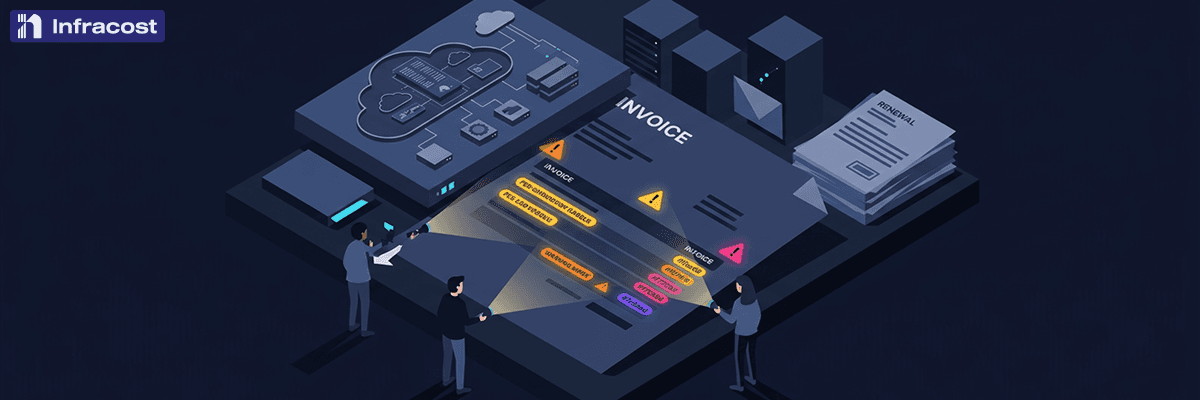
Avoiding upgrades isn’t just a security concern — it comes with an actual cost. All three major cloud providers — AWS, Azure, and Google Cloud — charge extended support fees when you continue running end-of-life versions of their managed services. These charges are automatic, often surprising, and compound quickly across your infrastructure footprint. For organizations running hundreds of clusters and database instances across multiple clouds, the math scales into the millions.
The Hidden Surcharge You Didn't Budget For
Cloud providers have gotten more aggressive about charging premiums for older service versions. Here's what that looks like in practice.
Amazon EKS is one of the most striking examples. Running a Kubernetes cluster on a version within the standard support window costs $0.10 per cluster per hour. Once that version enters extended support, the price jumps to $0.60 per cluster per hour — a 6x increase. For a single cluster, that's an extra $360 per month you weren't planning for. Every 25 clusters running on extended support versions adds roughly $100,000 per year in control-plane fees alone.
Amazon RDS follows a tiered model. Once a database engine version like PostgreSQL 11 or MySQL 5.7 exits standard support, AWS charges an additional $0.10 per vCPU per hour for the first two years, then $0.20 per vCPU per hour in year three. For a single db.r6g.4xlarge instance with 16 vCPUs, that's approximately $14,000 in additional annual charges — and the same fee applies to every standby in a Multi-AZ deployment and every read replica.
Google Cloud introduced extended support charges for Cloud SQL in May 2025. Any Cloud SQL instance running a major version that has reached end-of-life is automatically enrolled and billed at an additional per-vCPU-per-hour rate on top of your existing instance costs. GKE carries a similar cost structure for older Kubernetes versions, adding $0.50 per cluster per hour on top of the standard $0.10 rate — bringing the total to the same $0.60 per cluster per hour as EKS.
Microsoft Azure is rolling out extended support billing for Azure Database for MySQL through 2026. MySQL 5.7 standard support ends March 31, 2026, after which servers are automatically enrolled in extended support and billed per vCore-hour following a one-month grace period. Even versions as new as MySQL 8.0 follow close behind, with standard support ending May 31, 2026 and paid extended support beginning June 1, 2026. Both versions are covered by extended support through 2029.
In every case, enrollment is automatic. You don't opt in. You just start paying.
How You Know You Have Them?
Chances are you've already been warned. Cloud providers send email notifications when your services are approaching or have entered end-of-life status. AWS sends targeted emails about EKS cluster versions entering extended support. Google Cloud notifies you when Cloud SQL instances are running EOL major versions. Azure alerts you about upcoming support transitions for MySQL and PostgreSQL.
The problem is these emails often land in an infrastructure team inbox, get flagged as low-priority, or simply get lost in the noise. By the time someone notices, the charges have already started accruing.
How Fast the Costs Add Up
The math gets uncomfortable quickly when you're running more than a handful of affected services.
Consider a mid-size organization running 30 EKS clusters on an older Kubernetes version and 20 RDS instances on PostgreSQL 11 or MySQL 5.7, each averaging 8 vCPUs. The EKS extended support alone adds roughly $130,000 per year. The RDS charges add another $140,000 or more, depending on Multi-AZ configurations and read replicas. That's over $270,000 annually in fees that deliver zero new functionality — just the privilege of staying on an older version.
And that doesn't account for Cloud SQL instances on GCP, ElastiCache Redis clusters running deprecated versions — which carry an 80% surcharge in years one and two and a 160% surcharge in year three — or Azure databases approaching their own extended support deadlines. For larger organizations running hundreds of clusters and database instances across multiple clouds, extended support fees can quietly climb into the millions.
AWS recognized the scale of this problem enough to publish a dedicated cost estimator tool for RDS extended support charges and build extended support cost projections into their Cloud Intelligence Dashboards.
How Infracost Helps You Get Ahead of It
This is where Infracost comes in. Rather than waiting for a surprise on your monthly bill or hoping someone catches a vendor email, Infracost shifts this problem left into the engineering workflow where it can actually be fixed.
Infracost's FinOps policy engine scans your infrastructure-as-code configurations and flags resources running on versions that are approaching or have already entered extended support. When an engineer opens a pull request that deploys an EKS cluster on an older Kubernetes version or provisions an RDS instance on a soon-to-be-deprecated engine, Infracost surfaces the cost impact directly in the code review. No surprise bills. No after-the-fact audits.
This is the difference between reactive cost management — scrambling to explain a spike in your cloud bill — and proactive governance that prevents the cost from being incurred in the first place. Infracost gives engineering teams the visibility to make informed decisions at the moment those decisions are being made: in the pull request, before anything gets deployed.
For organizations managing infrastructure across AWS, Azure, and Google Cloud, Infracost provides a single operational workflow to catch extended support risks across all three providers before they turn into budget line items.
Stop Paying Extra to Stand Still
Extended support fees are one of the most avoidable costs in cloud infrastructure. Every dollar spent on them is a dollar that delivers no new capability, no better performance, and no competitive advantage. It's just the cost of not upgrading.
Schedule a demo with Infracost to see how your team can identify extended support charges hiding in your infrastructure, catch them before they ship, and build upgrade paths into your normal engineering workflow — before the next bill arrives.

Cloud Cost
Cloud Cost Optimization: A Formula
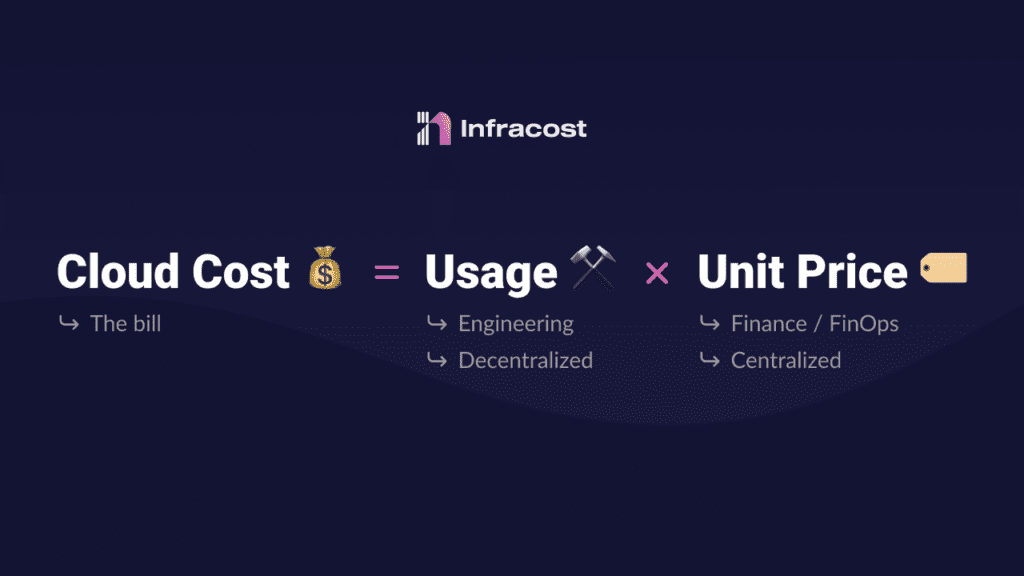
When considering cost optimization for the cloud, an equation can be used to structure the problem. Each component of the formula can be refined and delegated to the appropriate roles.
The formula is: Cloud Costs = Usage x Unit Price
A few years ago, I spoke with a user who proposed the equation above for optimizing cloud costs. They use it to tell teams and executives what needs to be done, as well as assign tasks to individuals. I have since referred to it many times.
In this blog, I'll explain when and how to use this equation. I'll cover who in an organization is best suited to influence each component, and provide examples from AWS, Microsoft Azure, and Google Cloud (GCP).
Changing the unit price is usually easier than altering usage; however, usage is the most vital factor. If a resource isn't used, it has 100% waste, regardless of a 60% price reduction - 40% still goes to waste.
Unit Price Optimization
Overview
The unit price is the rate you pay per-service per time-unit. For example, when launching an AWS EC2 instance, you will pay a rate based on instance size/type, region, and operating system. This rate can be on a per-hour or per-second basis, depending on the factors listed above. See AWS EC2 Pricing on Demand for more information.
The unit price can be reduced by carefully selecting payment timing and method. This is a financial decision which should be made by the finance or FinOps team, although there are exceptions which will be mentioned below (*).
Commitments
You can commit to use a resource for a period of time or a dollar amount and receive a standard off-the-shelf discount (self-service). For example, we can optimize the unit price of a standard EC2 instance in two ways:
Reserved Instances (RIs): You commit to a specific amount of compute capacity for a certain duration of time in exchange for a lower unit price.
Savings Plans (SPs): You commit to a specific amount of compute usage, measured in dollars per hour, for a term of either 1 or 3 years.
The key distinction between AWS Savings Plans and Reserved Instances is flexibility. With Savings Plans, you commit to an instance family and region only. Other cloud providers also offer similar pricing models.
Negotiation
Optimizing the unit price can also be done through negotiating an overall discount (not related to the service), tailored specifically for you, with cloud providers. There is much secrecy concerning how much can be negotiated, but it usually comes down to the amount spent on the cloud provider, your negotiation strength, and the commitment to annual total spend in the future. The cloud providers don't want customers to know other rates, as it would make them unhappy if they knew they were paying 50% more for the same service. This is why such custom prices are usually cloaked with NDAs. Refer to AWS EDPs and Microsoft EAs for more information.
(*) An exception requiring engineering involvement in unit price reduction is AWS Spot instances. Here, a user can select to run the instance only when not in use by another AWS customer. They get a lower unit price, but if another customer is willing to pay a higher rate, the instance is taken away and all data and access is removed. This requires specific architectures to handle the situation without disrupting the business.
Where to start
For optimizing the unit price, you can wait until resources are launched and running before taking action; let's call that "shifting right" 😉
We want to ascertain our current usage and if any major infrastructure changes are expected from engineering. Once we have this information, we can negotiate our unit price or commit to it.
Analysis can begin with the existing cost and usage reports provided by the cloud providers. For example, in AWS, this would be Cost Explorer, in Azure it is Cost Analysis and in GCP it is Cloud Billing.
In this stage, we aim to segment the data to a level where we can adjust the unit price. For small or medium companies, you can take the whole bill and begin, but for larger enterprises, usually the first step is to divide the data into business units, teams, or products. After that, we try to further divide the data into specific resources where commitments can be made.
For example, when looking an EC2 instances, we need to consider the type/family, region, OS etc. After gathering this info, we'll have an idea of our past usage levels and can make an informed decision on the number of large Linux instances to commit to (e.g. 100 in US-East). Next, we'll evaluate rate optimization options (e.g. 1 or 3 year commitment, upfront payment) and create a set of scenarios covering the upfront cost and reduced monthly bill.
I won't go into detail on how to do this here. Instead, I want to focus on the equation versus the tasks. For now, let's just say:
We should stay in contact with engineering teams to inquire about any major changes to resources currently in use. If there are, delay committing to a rate.
This exercise must be repeated regularly, not just once. Infrastructure is continually evolving and you must keep up.
In some cases, you can buy and sell commitments on marketplaces for more options than initially thought.
Each cloud provider offers distinct choices, making it challenging to understand and assess your options.
Learn by doing, and don’t be afraid to start small.
Usage Optimization
Overview
The usage component of the equation refers to the cloud resources you use and how they are incorporated into your software's architecture. For example, have you chosen an EC2 instance or serverless Lambda functions to run the software.
Before discussing usage optimization, consider this fact that might be surprising if you're not an engineer: when setting up infrastructure, there's no checkout screen! There's nothing indicating the cost of the resources you're about to buy. Our Cloud Pricing API holds nearly 4 million price points from AWS, Azure and Google (GCP). This illustrates one of the major challenges with cloud costs - they're incredibly complex.
When optimizing the usage of a system, remember that engineering time is necessary. Accordingly, it's helpful to consider each optimization item in terms of:
Minimal engineering effort, such as shutting down unused resources.
Medium engineering effort, like changing certain infrastructure components.
High engineering effort, for example, redesigning the system for greater efficiency.
Where to start
There are many tasks you can do, depending on the size of your company, cloud bill, how you set up infrastructure, and engineering organization. The best people to ask about the effort are the engineers who work with these systems daily.
It is essential to help your engineers comprehend where the money is being allocated:
If you are using Terraform, put a checkout screen in the CI/CD system, so engineers start to understand how their code changes will impact cloud costs. Infracost CI/CD is fully free and open source: https://www.infracost.io/docs/
Slice your cloud bill down to a level where engineers have the ability to change it, and show them the current running costs. This will require your to have good cloud bill hygiene setup already (tagging etc)
Your engineers are then able to spend time and assign an estimated effort level to each task. From here, it’s up to the engineers, product managers, FinOps, and management to decide which ones to do.
I won’t go further into the specific items to be looked at in this blog, but if you’d like to me to write more on this topic, please tweet at me: @hassankhosseini
Trust your engineers - you are on the same team.
Conclusion
In conclusion, optimizing cloud costs requires a combination of financial decisions, engineering, and an understanding of the equation: Cloud Costs = Usage x Unit Price.
Unit Price optimization can be done through committing to use a resource for a certain duration or dollar amount, or through negotiating an overall discount with the cloud provider.
Usage optimization requires engineering effort, and is the main component of the equation to impact for long term optimization.

Cloud Cost
The Broken Relationship Between Engineering And Cloud Bill Owners
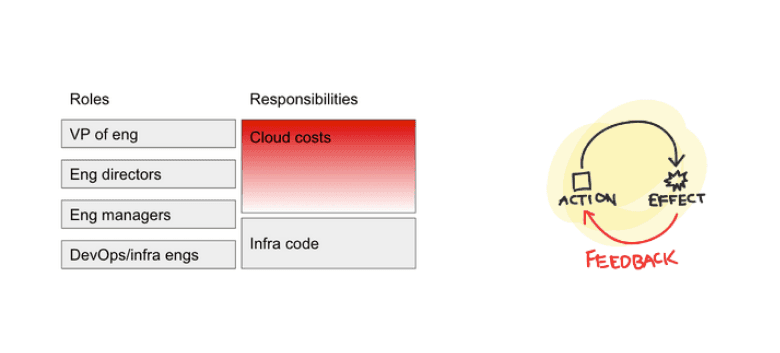
When it comes to cloud costs, the relationship between the engineers who are responsible for purchasing infrastructure and the team leads, managers and FinOps who are responsible for the cloud bills is broken.
It turns out the closer you are to the code, the further you are from costs.
Let’s look at an example product to production workflow and what happens when a company releases a new feature, which requires infrastructure.
Product to Production workflow
1. Product spec
The product manager writes a product spec for the new feature, and works with a designer to create wireframes. These product specs contain enough information for a developer to look at and make a SWAG (scientific wild-ass guess) as to how much development effort is required.
2. Technical design
The product spec moves into technical design, in which for the first time the engineers spend time figuring out how this feature should be built. This is when we start to see some early requirements for infrastructure come up.
3. Engineering
If everything goes to plan, engineering start to actually write the feature alongside the infrastructure requirements (usually via Infrastructure-as-Code), and any other dependencies for this feature to work. After a few sprints, the feature is ready to be shipped.
4. Release
The product goes into a release, and it is shipped into production for everyone to enjoy. At this point, the engineers have moved on and are working on the the next sprint tasks and the cloud bills are increasing.
5. The bill shock
A month goes by and a cloud bill comes through, or a billing alert is triggered. This is sent to the bill owners and managers - the budget has been blown (this is, if anyone actually notices what is happening and alerts have been setup and people are looking closely).
6. Who did what?
The slice and dice starts! The bills are sliced and diced via accounts or tags, trying to figure out who did what and when. Why did the bill increase? Was it a release, was it an accident, was it a marketing push etc.
7. Sprint interruption
We finally figure out that it was a release by a specific team. We go back to the team to see what happened. Remember, they are now 2-3 sprints past that release, and so are frustrated when they are asked to interrupt their current sprint to figure out what happened and how to ‘fix’ it.
8. Fix and new release
After the frustration, interruption, and delaying the current sprint tasks, we have a change to the infrastructure developed, and we can go through another release and hopefully that will fix it. That’s bad for 2 reasons:
The money has already been spent - and it’s not coming back.
We had to burn more time to fix it.
This is broken
It takes weeks, if not months for the feedback loop to close from action (engineering starting work) to effect (realizing cloud cost budgets have been blown), and then to action again (release a fix). It turns out the closer you are to the code, the further you are from costs. This is broken.
Fixing it
First: give engineers cost estimates as they code
As the engineers are typing out code, we should give them cost estimates so they can compare configs, instance types, and also catch any cost typos without ever having to leave their editor to go play around with a cloud cost calculator. For this, you can use the Infracost VS Code extension.
Second: give team a cost review check in CI/CD
Engineers will now create a pull request to merge their changes into the main branch. At this stage, the team review the code for code quality and security issues, and now a cost ‘diff’ to see what the impact of this change will be in the cloud bill. For this, you can use Infracost CI/CD.
Third: proactively inform team leads, managers and FinOps about upcoming changes
The teams have reviewed costs in the engineering workflow, but we also need to bring awareness to the cloud bill owners. Give the team leads, managers and FinOps an overview of all upcoming changes and their cloud cost impact in a single place. They can either take action now, before money has been spent, or set expectations of an upcoming increase to the bills. For this, you can use Infracost Cloud.
Fourth: traditional cloud cost management
Now that everyone has seen that cost impact of the upcoming change, we go to production. We can now track that everything is going according to plan, if the usage is lower or higher than we expected. For this, you can use the cloud provider native tools (AWS Cloud Intelligent Dashboard, Azure Cost Management, or Google Cost Management), or one of the 3rd party tools like Cloudability, Cloud Health Tech or Flexera One.
Future: close the feedback loop inside the workflow
We want recommendations that have been created from multiple data sources to be put in front of the right people so they can choose if these recommendations are right for them, and action it directly in their workflows. There is no great product that I have seen for this yet; a collection of emails, Slack messages and Excel files is what I have seen companies use. We will build a better solution for this in the future.
Conclusion
When it comes to cloud costs, the flow of information and the number of roles involved and how they interact is broken. The way we fix this is not to stop or break workflows, but append helpful information directly in workflows and empower engineering teams to use cloud infrastructure economically and efficiently.

Cloud Cost
Burst Pipes vs Leaky Faucets: Getting to the Root of Cloud Waste
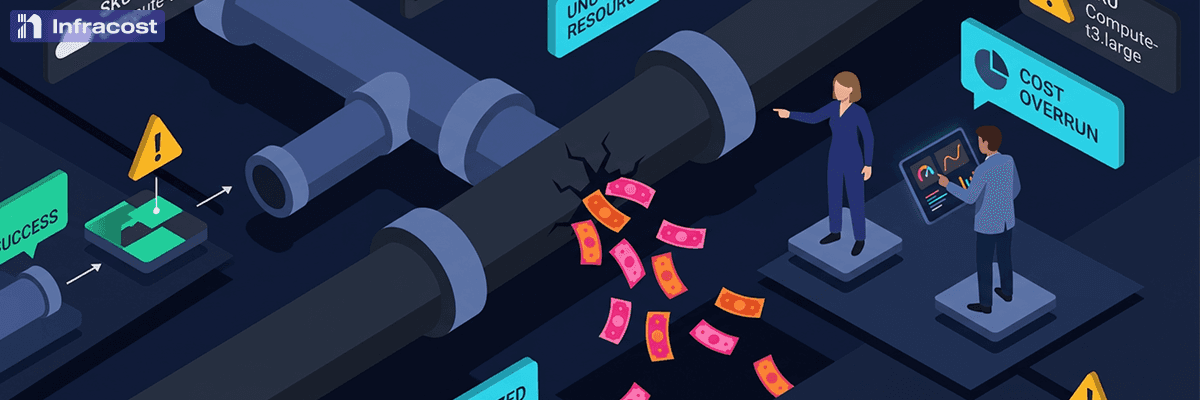
As a FinOps team, it’s easy and exciting to chase the big wins. Someone accidentally left a cluster running over the weekend? All hands on deck. A data scientist spun up a p4d.24xlarge and forgot about it? Emergency Slack channel. Everyone loves catching the burst pipe.
But here's the kicker: situations like this aren’t causing your budget overruns.
Your real problem is the 3,000 engineers at your company who, every single day, are making small decisions that each waste $50-200 a month. A slightly oversized EC2 instance here. An unoptimized RDS configuration. EC2 instances that should be upgraded to Graviton. Load balancers that aren't needed. It's death by a thousand cuts, and most FinOps teams struggle to keep up with it.
The “Leaky Faucets” Worst Offender List
The Default Setting Problem : Over 40% of cloud waste comes from overprovisioned resources. When an engineer creates an RDS instance and accepts the default db.m5.large instead of properly sizing it, that's $175/month of waste. Multiply that by hundreds of databases across your organization, and you're bleeding $2M+ annually on defaults alone.
The "I'll Come Back to This" Tax: 27% of cloud spend is wasted, with the majority being resources that are simply forgotten. An engineer spins up a test environment, gets pulled into something urgent, and never shuts it down. Each one is small—maybe $300/month—but with thousands of engineers, the money ads up.
The Terraform Copy-Paste Effect : Self-service infrastructure is powerful, but it can be risky from a cost perspective. We see it all the time. Perhaps an engineer writes a Terraform module that has an unnecessary NAT Gateway configuration. Out of convenience, other teams reuse that module 47 times across different projects before anybody notices. At $45/month per NAT Gateway, that's over $25,000 annually from a single copy-paste mistake.
Building Cloud Waste Prevention into IaC Workflows
The burst pipes get fixed because they're obvious. Someone's manager sees the AWS bill spike and demands answers. But the leaky faucets? Very difficult to fix with traditional FinOps processes. They show up as "expected growth" in your cloud spend.
That’s why shift-left makes so much sense for IaC workflows. When an engineer submits a PR that creates an oversized resource, they see the cost impact immediately. They can right-size it before it ever gets deployed, before it becomes part of the baseline. By making cost optimization part of the IaC workflow, engineers can build a cost optimization muscle without major interruptions in their day-to-day.
Prioritizing Leaky Faucets
Self-service infrastructure requires a mindset shift for FinOps. It’s not just about wearing the emergency plumber hat and showing up after the damage is done. Start being the building inspectors who prevent bad infrastructure from being installed in the first place. If you catch one burst pipe a month, you might save $50,000. If you prevent 10,000 leaky faucets from ever being installed, you save millions.

Cloud Cost
Cloud Costs Directly In Jira
You can now show the cloud cost impact of feature requests to Product Managers and Owners directly in their workflow, before features are shipped to production.
Overview
Cloud costs are hard to understand due to the complex pricing models used by the cloud providers. If cloud pricing was easy to understand it would be easier to forecast, which would make it easier to budget and track costs against that budget.
When budgets are broken, engineering is usually blamed for not taking action to reduce cloud costs. This is unfair – one of the reasons the budget broken is exactly the opposite; engineers took action to build features, tools and capabilities, which require more cloud resources, which is incredibly complex to estimate costs for, which after being shipped to production broke the pre-set budget.
Instead of blaming engineers for breaking the budget, we should look at where the budget number came from in the first place. In a typical company, it is set by a cross-functional team of managers from engineering, product, finance, and execs. They rely on tools that “slice and dice” cloud bills to help them guess where money will be spent in the future. Unfortunately, because they can only show past costs, any budgeting approach relying exclusively on cloud bills is fundamentally reactive: They can’t reflect the costs of newly delivered features and capabilities.
Shift Cloud Costs Left
We believe our industry can and should be more proactive when it comes to budgeting cloud costs. A growing army of more than 8000 engineers agree.
Infracost is a free open source tool which sits in the engineering workflow (CI/CD). When infrastructure code changes, before the code is shipped live, it shows the engineers how much those changes will cost: e.g. ‘This change will increase costs by $500 per month’ with a detailed breakdown.
Once engineers know how much their infrastructure changes will cost, they can show their product managers and product owners how much their new feature will cost. The team can then decide to ship it to production, work on it to reduce costs, or set expectations with finance that more budget is needed. This is all proactive, not reactive after budgets break.
I’m super excited to announce the Infracost Jira integration. Engineers can keep building features, and see cost estimates in the CI/CD. These estimates are pushed directly into Jira under the relevant issue so that product teams can see the cost impact of each feature they have requested. This is a bidirectional connection, meaning you can see cloud cost estimates in Jira and also filter by Jira issues in Infracost Cloud to see the Pull Requests which went into building the capability. If there are many PRs for a Jira issue, they are all summed up and sent to Jira. I’d love to invite you to try it now, and provide your feedback on where this feature should go next: https://www.infracost.io/docs/infracost_cloud/jira_integration/

Cloud Cost
Why Are Cloud Computing Costs So Complicated? A Walkthrough.
In 2009 I started my PhD research to focus on the decisions that needed to be made for an organization to adopt public clouds. These included the benefits, the risks and the costs of using such systems. My aim was to create a set of vendor neutral tools that would assist decision makers during the process.
At the end, I had developed three tools:
Cloud Suitability Checklist: A set of questions to help asses the suitability of public clouds for a given application.
Benefits & Risk assessment: A list of benefits and risks that provides a starting point for organizations to talk about cloud adoption.
Cloud cost modeling: A tool that enables architects to design a system (compute, databases, storage, network etc) with built-in elasticity and growth, and create a 3-year cloud cost forecast using public cloud prices. This tool turned into a startup called PlanForCloud and was acquired by RightScale:
Over the last 13 years of working in cloud computing costs, many things have changed, but two things remained consistent:
Cloud costs are an ever-green topic of discussion.
Cloud cost complexity has increased exponentially.
Back in 2012 when we were building PlanForCloud (the above tool), we were tracking around 10,000 price points from cloud providers. Today, as part of our new startup Infracost.io, our Cloud Pricing API is tracking almost 4 million price points.
What is the price of cloud computing?
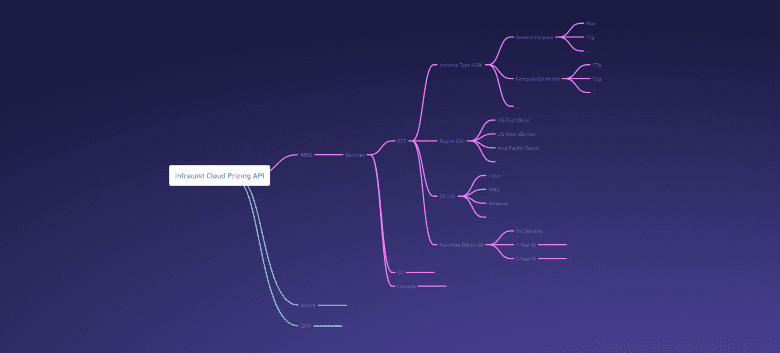
To see why there are so many price points, let me use an example. At the highest point of our Cloud Pricing API tree, are the cloud providers: AWS, Azure and Google. Each provider has many services (compute, storage, network and so on). Each of these in turn has a completely different pricing structure, and this is where the complexity increases by multiple magnitudes.
An example: Finding out the price of a simple app on EC2 instance
Let’s say I want to run an app on an AWS EC2 instance. First we have to choose the instance type. Depending on your region, there are 5 different instance families. Within those instance families are 438 instance types. Then we have to select an operating system, of which there are around 16. Now, we choose our AWS region, there are about 26 of those. Finally, we need to decide how we should purchase and pay for the instances. The options are on-demand, upfront pricing (on what term and how much you’d like to pay upfront), or maybe even a spot pricing model. That’s over a million prices just for the EC2 options I have listed here (438 x 16 x 26 x 6 = 1,093,248 - there are even more nuanced options).
What is the impact of cloud cost complexity
As the complexity has grown exponentially over time, it’s become impossible to manually calculate the cost impact of changes to infrastructure. In 2012 I remember a lot of companies trying to calculate the potential cost of the cloud using spreadsheets. Now such efforts are futile.
This has resulted in three big impacts:
Costs have become harder to predict, and so budgets and actuals are mis-aligned. We see this happen all the time and is sometimes covered under the umbrella ‘bill shock’.
Costs have become so complex that sometimes we don’t actually know if the cloud providers are charging us the right amount. We’ve found on multiple occasions where the listed price on a cloud providers website is different to the charges that appear on the bill. One of our users Tweeted about a $4K surprise he found.
It is painful and time consuming for the people responsible for designing systems and provisioning infrastructure to estimate the costs. DevOps, SREs and platform engineers are under tremendous pressure to deliver, and end-up being the ones facing the sharp edge of the knife from management when something goes wrong.
Here is what happens. Someone in the finance or management team gets surprised by a high bill. They need to understand what happened and that task requires context that only the engineering team has. First, the engineers get pulled away from the current sprint work to answer the ‘what happened’ question. Then, they are tasked with figuring out how to fix it, which usually comes in the form of a change that has to go through a release process (test, deploy to stage, then to prod) all the way to redesigning systems ‘to optimize cloud costs’.
This is incredibly frustrating to the engineers.
Cloud cost frustration
This frustration is not easy to fix. There is no single tool/product or process you can run to fix it. It will always be around and an ever-green discussion. But whatever solution we try has to start with the engineers because they hold the context and the keys to fixing it.
We started an open source project called Infracost.io (GitHub link), which sits in the CI/CD workflow (GitHub Actions, GitLab CI, Atlantis, Azure DevOps etc), and after analyzing Terraform code, leaves a comment with a detailed cost breakdown of the infrastructure changes. This ensures that engineers know how code changes will impact cloud costs, which of the millions of price points will be triggered, and can set expectations with management of significant upcoming changes to the cloud bill.
Since 2009, I’ve had this unhealthy obsession with cloud costs! I love reading and talking about it and finding solutions that have worked, and ones which did not work. If you want to connect with me and chat, here is my Twitter and LinkedIn. If you want to try Infracost out, here is our getting started guide.

Cloud Cost
The Best Cloud Cost Optimization Tools: Save Money on Your AWS, Azure, and GCP Bills
In 2023, cloud cost complexity kept increasing, and many new cloud cost management tools were launched. We also saw existing players launch new features and capabilities to help their customers reduce cloud costs, improve their cloud budget, and eliminate cloud waste.
The cloud providers released new capabilities, AWS Cost Explorer released a whole set of new features and capabilities, Azure Cost Management started integrating more data into their solution, and Google's GCP added more recommendations and forecasting capabilities.
Everyone can see that navigating the intricate maze of cloud costs is complex. You've got resources spinning up and down every minute, a cloud bill that seems to grow each month, and a finance team wondering if there's a way to bring these expenses under control.
How to Manage Cloud Costs?
Before we get into the tools that are going to help you with your cloud computing bills, let's quickly cover the basics of how to manage cloud costs and the benefits of cloud cost management tools.
Recognize the Need for a Strategy
Cloud services offer great flexibility and scalability, enabling organizations to dynamically adjust resources as required. However, this flexibility will also increase costs if not managed effectively. By implementing a clear cloud cost management strategy, you can identify potential cost-saving opportunities, set budgetary guidelines, and monitor resource utilization. Mindlessly moving workloads to the cloud without considering the financial impact is a recipe for disaster.
The first step is to adopt an Infrastructure as Code (IaC) tool when managing cloud infrastructure. This will be the first step in your cloud management journey. There are also many tools in this space - the category to look at is a cloud management platform.
Adopt a Governance Model
FinOps is the future of cloud cost management. The FinOps foundation has created a great framework to help you navigate the cloud cost management space (read more: What is Cloud FinOps). One of the tasks you will need to address is adopting a governance model to control cloud costs and allocate resources more efficiently. Forming a team responsible for FinOps will help you set a cloud budget with cost allocation and cost analysis. This team will be your go-to resource for understanding cost anomalies when they happen and how to reduce costs.
Monitor, Analyze, Act
One of the first things you will need to manage cloud costs is to have basic monitoring in place. Basic monitoring and analysis can provide substantial insights into cloud usage and spending. The cloud providers have great tools for this and help you export cost management data into a format that can be digested into any other tool for further analysis. This will also export the metadata if you have used these, such as cost centers,
Once you have basic monitoring, you can analyze the data. This is the real cloud cost analysis: looking at unit costs at each cost center, at the usage data and the pricing structure being used, and looking for cost savings opportunities.
Then, it's time to act to reduce costs. Shutting down idle resources to reduce unnecessary expenses, looking at over-provisioned resources, and looking for old instance types, volume types, etc., that are less performant and more expensive.
Leverage Automation
My final tip is that automation is your friend in cloud cost optimization. With automation, you can ensure that your engineers know the cost impact of their code changes before they ship to production. You can check for the best practices being followed directly in CI/CD. You can make sure all resources that are launched are tagged correctly. You can automate the spinning up and down of resources that are only needed at specific times of the day or week to reduce idle resources. You can also automatically change your saving programs to match your usage patterns.
How do you pick the best cloud cost management solutions?
First, Understand Your Needs
This is not a one-size-fits-all scenario. The best cloud cost management tool for you will depend on your needs, your organization size, your security requirements, the tool that you currently use, and what you are trying to achieve (e.g., cost allocation, auto-tagging, helping engineers take action, maximize savings of reserved instances, etc.).
Ensure the tool supports your cloud providers. You might be using a hybrid cloud with a mix of public clouds like AWS, Azure, Google, Oracle, etc. Ensure that the cloud monitoring tools support your setup.
Finally, the latest FinOps report showed that the best companies use a mixture of cloud cost management tools to help them with their cloud costs. The average number of tools being used was 4.
The Best Cloud Cost Management Tools of 2023
Infracost
Infracost differs greatly from all the other cloud cost management tools in this list. Infracost is shifting FinOps left and making it proactive. It sits in the engineer's workflow (e.g., GitHub, GitLab, etc). Every time an engineer makes a code change, it tells them about the cost impact, scans it for FinOps tags to be present on all resources, and ensures the latest generation of cloud resources are being used. This is all done before any code is shipped to production. Over 3,000 companies are using it, and it is growing fast. Give it a try.
Cloud Provider native tools
GCP Billing - Google Cloud Cost Management Tool: Naturally tailored for Google Cloud Platform users, GCP Billing provides powerful analytics and recommendations to help you control your cloud spending efficiently.
Azure Cost Management + Billing : This native tool gives you robust capabilities for managing your MS Azure cost. It not only monitors but also recommends cost-saving measures. The Azure cost management product will be great if you only use Azure.
AWS Cost Explorer : Directly from the AWS console, this tool offers straightforward visualizations to understand your spending patterns. It is combined with other tools such as AWS Trusted Advisor, AWS Cloud Watch, and Resource Optimizer to help you manage your AWS costs.
Apptio Cloudability (now IBM)
It is one of the three oldest cloud cost management tools. Cloudability was launched in 2011 and acquired by Apptio in 2019. Apptio was then acquired by IBM in 2023. The product is very mature, covers many cloud providers, and offers services to larger enterprises. This also makes it one of the more expensive cost management products.
Flexera One
The second of the three oldest cloud cost management tools. The founders of Infracost are the same team that started the cloud cost management product that was acquired and integrated into the Flexera One product. Flexera One leans more towards IT Spend Management (ITSM). It covers public, private, hybrid cloud, and other IT spending categories.
CloudHealth Technology
The third oldest cloud cost management tool. This one has been renamed at least three times this year and is currently called VMware (by Broadcom) Tanzu CloudHealth. The product tries to break out past cloud cost management and get into configuration management and security.
CloudZero
One of the challengers to the old three, CloudZero, was launched in 2016. They offer cloud cost monitoring from IaaS cloud providers and SaaS, such as Confluent, Fastly, Heroku, and Amplitude.
CAST AI
Cast AI was launched in 2019 and is focused on Kubernetes workloads. It provides cloud cost management (visibility, right-sizing, reporting, etc.) and has started looking at providing security solutions for Kubernetes.
KubeCost
One of the other Kubernetes-focused cloud cost management tools. KubeCost is open source and helps with cost allocation by Kubernetes concepts such as namespaces, deployments, labels, etc. It also provides optimization insights and some governance controls.
Spot (by Netapp)
Spot got a foothold in the cloud cost management space by specializing in spot instances. If your application could run on Spot instances, then Spot would automatically bid and change your resources to ensure you will get the best price automatically. NetApp has acquired them and has expanded to address other costs and provide cost control.
CloudCheckr
This comprehensive cloud cost management platform provides cost allocation and chargeback features, making it easier for finance teams to allocate costs across various departments.
Vantage
Vantage is a new but quickly up-and-coming provider. They have been focused on self-service users with the ability to monitor and reduce their AWS, Azure, and GCP costs. They have been used in many startups and have started growing to serve enterprise users as well.
ProsperOps
ProsperOps automates AWS Reserved Instance management to realize the best possible savings. That's their focus, and they are doing a great job. They automatically buy and sell Reservations to make sure as many reservations as possible cover your cloud usage. If those reservations are no longer needed, it will automatically sell them. Just a note: AWS recently announced some limitations around using RI optimizers, so we will have to see what happens with this service.
Azure Cloud Cost Management Solution
Specifically for Azure, a few companies have started to offer in-depth insights and recommendations for managing cloud costs. Given they only focus on Azure, I haven't included them by name here. But they offer some cool features that only work on MS Azure.
Many others
Many others will help in cloud cost management via products, consultancy, or professional services. If you think we should include more providers, please get in touch.
Conclusion: Time to Take Action
The array of tools at your disposal for cloud cost management is vast, and the benefits of implementing them are even more remarkable. Pick the right ones according to your needs, and start reining in those cloud costs today.
Recommended Next Steps
Evaluate your cloud environments and identify key cost drivers.
Choose a cloud cost management tool that aligns with your strategy.
Implement the tool and monitor its impact on your cloud spend.
The need for cloud cost optimization has never been more pressing. The right tools can be game-changers in managing and optimizing your cloud investments. Make your choice wisely, and your cloud bills will thank you.
Frequently Asked Questions (FAQs)
How Can I Get Started?
Start by evaluating your current cloud spend and understanding your cost drivers. Once you've grasped where your money is going, you can choose a cloud cost management tool that aligns with your needs.
What is Cloud Cost Management?
Cloud cost management involves the practices and tools for monitoring, analyzing, and optimizing the expenses incurred in a cloud environment. The goal is to maximize the return on cloud investments while minimizing waste.
How Do Cloud Cost Management Tools Work?
Cloud cost management tools collect data from your cloud service provider, analyze usage patterns, and provide insights or recommendations. They can automate specific tasks like shutting down idle instances or changing your instance types to suit your needs better.
Is Infracost a Good Tool for Cloud Cost Optimization?
Infracost is the only real proactive cloud cost management tool, shifting FinOps left. Infracost fits seamlessly into your engineering and DevOps workflow, providing real-time cost estimates to your engineers and FinOps teams before any code has been shipped or any money spent. This enables informed decision-making before deploying resources, helping to prevent unexpected costs.
Can One Tool Work Across Multiple Cloud Providers?
Some tools offer multi-cloud spend management, letting you manage costs across AWS, Azure, and Google Cloud. However, each cloud provider also has native tools that offer deep-dive functionalities specific to their services.
How Can I Identify Idle Resources?
Most cloud cost management tools offer resource monitoring features that flag idle or underutilized resources. You can then take action to remove or reconfigure these resources.
Do I Need Technical Expertise to Use These Tools?
While some tools are developer-focused, many are designed to be user-friendly and can be used effectively by finance teams, cloud architects, and business analysts alike.
What is the ROI of Cloud Cost Management Tools?
The ROI can vary depending on your cloud spend and how effectively you use the tool. However, most businesses find that the investment pays for itself quickly through reduced cloud expenses and more efficient resource allocation.
What is Cloud Governance?
Cloud governance is a framework that guides how you manage your cloud resources, aiming to align your cloud operations with your organizational goals. Effective governance can play a crucial role in cloud cost management.
How Do I Choose Between On-Demand and Reserved Instances?
On-demand instances offer flexibility but usually come at a higher cost. On the other hand, Reserved instances provide cost savings but require a longer-term commitment.
Feel free to reach out if you have more questions or need personalized advice on managing your cloud costs.

Cloud Cost
The Death Of The Cloud Cost Calculator
In 2012, we built a Total Cost of Ownership (TCO) calculator for cloud. Companies could use our online calculator to design their desired cloud infrastructure, and our tool would calculate how much it would cost.
Now in 2022, 10 years later, we want to kill all cloud cost calculators ☠️
Back in 2012, there were no pricing APIs available so we had to scrape the AWS, Azure, and GCP marketing sites to discover prices. Our database held 10,000 price points from these cloud providers. Back then, there were two ways companies calculated their potential cloud costs: Excel spreadsheets and cloud cost calculators.
Today we count nearly 4 million prices in our Cloud Pricing API from AWS, Azure and GCP. A few months ago we wrote about why cloud pricing is so complex. It has become impossible to do estimation using Excel because it’s not possible to model both the complex cloud pricing, and complex system architectures. That leaves us with one target: kill cloud cost calculators!
For us to achieve this aim, we need to build a product which is 10x better. The dimensions we want to improve on are: speed and accuracy.
Speed : Engineers are already overloaded with sprint work. Adding a distinct step to calculate the cost of a change slows feature delivery by adding another task. But worse, the design and cost of a system are so tightly coupled that trying to separate cost estimation work from development work means a bigger potential for rework - if you design a system and then find out it costs too much, you have to redesign it.
Accuracy : If you try to use any of the cloud provider calculators, you will immediately see the problem with getting accurate cost estimates. You first need to select a region, then select a service from a massive list, then select the optionality of that service (e.g. instance type, OS, EBS block attachment etc). It has become so complex that AWS’ calculator now has an option to make it simpler by removing accuracy (called ‘quick estimate’):
We think we have achieved an 11x better product (See Spinal Tap the movie) by automating the cost calculator to perform estimations while the engineer types their code. Because the code describes exactly what will be launched, we automatically get accuracy.
VS Code extension: Integrate directly into VS Code so that as you type infrastructure code, a cost estimate is generated and displayed inline. Just install the plugin and you are good to go.
We currently only support VS Code (IntelliJ is coming next). If you are working in a team, the best solution is Infracost CI/CD, where the cost estimate is still automated and appears in the CI/CD in your Pull Request.
Now, we are setting our targets on automating the end to end flow. From Jira to cost estimation and back. Follow @infracost on Twitter for updates!

Cloud Cost
Cloud Cost Policies With Open Policy Agent And Sentinel
Today, we are excited to release an integration between Infracost and Open Policy Agent (OPA), HashiCorp Sentinel and Conftest. This enables DevOps teams to set policies on cost estimates before resources are launched.
Today, we are excited to release an integration between Infracost and Open Policy Agent (OPA), HashiCorp Sentinel and Conftest. This enables DevOps teams to set policies on cost estimates before resources are launched. For example, you can write three policies to provide guardrails: if the changes to Terraform increase the total cost more than 15%, or the instance cost per hour increases more than $2/hour or if the IOPS cost more than the instances, then the change needs to be approved by the team lead.
This feature is a great addition to your developer workflow. It enables self-service of infrastructure for your team and the wider engineering organization by creating the guardrails needed to stay within an acceptable cloud infrastructure budget. Everyone wants to make the right choice, but it’s hard to choose between services without cost information. As one of our users put it: if you tell the team we need to get from point A to B, then offer them a Ford or a Ferrari with no price tag, guess what? Most people will choose the Ferrari.
Many companies have been using after-the-fact alerts and cloud cost management reports from their cloud providers and 3rd parties, but ask any engineer and they will tell you that it is distracting, hard and time-consuming to retro fix infrastructure after something has gone to production. You need to catch costly components earlier in the process, ideally in Continuous Integration / Continuous Delivery (CI/CD) as part of the code review process.
Infracost is an open source project which sits in the CI/CD pipeline and combined with policy engines can provide these guardrails at the right time, directly in the developer workflow. Here is an end to end demo of the Infracost and Open Policy Agent integration:
You can get this up and running using our policy example in less than 15 mins, start here: Infracost Docs
This capability is also live in our partner products: Env0; SpaceLift; Scalr;

Cloud Cost
A Hidden Tax: Are You Paying for Unnecessary Extended Support Fees?
Version lifecycle management. It’s not the most glamorous part of DevOps, but it’s a lot easier when you write infrastructure as code. Upgrading instance types, load balancers, databases, or any cloud service becomes both easier and safer when it’s part of a GitOps workflow.
Avoiding upgrades isn’t just a security concern — it comes with an actual cost. All three major cloud providers — AWS, Azure, and Google Cloud — charge extended support fees when you continue running end-of-life versions of their managed services. These charges are automatic, often surprising, and compound quickly across your infrastructure footprint. For organizations running hundreds of clusters and database instances across multiple clouds, the math scales into the millions.
The Hidden Surcharge You Didn't Budget For
Cloud providers have gotten more aggressive about charging premiums for older service versions. Here's what that looks like in practice.
Amazon EKS is one of the most striking examples. Running a Kubernetes cluster on a version within the standard support window costs $0.10 per cluster per hour. Once that version enters extended support, the price jumps to $0.60 per cluster per hour — a 6x increase. For a single cluster, that's an extra $360 per month you weren't planning for. Every 25 clusters running on extended support versions adds roughly $100,000 per year in control-plane fees alone.
Amazon RDS follows a tiered model. Once a database engine version like PostgreSQL 11 or MySQL 5.7 exits standard support, AWS charges an additional $0.10 per vCPU per hour for the first two years, then $0.20 per vCPU per hour in year three. For a single db.r6g.4xlarge instance with 16 vCPUs, that's approximately $14,000 in additional annual charges — and the same fee applies to every standby in a Multi-AZ deployment and every read replica.
Google Cloud introduced extended support charges for Cloud SQL in May 2025. Any Cloud SQL instance running a major version that has reached end-of-life is automatically enrolled and billed at an additional per-vCPU-per-hour rate on top of your existing instance costs. GKE carries a similar cost structure for older Kubernetes versions, adding $0.50 per cluster per hour on top of the standard $0.10 rate — bringing the total to the same $0.60 per cluster per hour as EKS.
Microsoft Azure is rolling out extended support billing for Azure Database for MySQL through 2026. MySQL 5.7 standard support ends March 31, 2026, after which servers are automatically enrolled in extended support and billed per vCore-hour following a one-month grace period. Even versions as new as MySQL 8.0 follow close behind, with standard support ending May 31, 2026 and paid extended support beginning June 1, 2026. Both versions are covered by extended support through 2029.
In every case, enrollment is automatic. You don't opt in. You just start paying.
How You Know You Have Them?
Chances are you've already been warned. Cloud providers send email notifications when your services are approaching or have entered end-of-life status. AWS sends targeted emails about EKS cluster versions entering extended support. Google Cloud notifies you when Cloud SQL instances are running EOL major versions. Azure alerts you about upcoming support transitions for MySQL and PostgreSQL.
The problem is these emails often land in an infrastructure team inbox, get flagged as low-priority, or simply get lost in the noise. By the time someone notices, the charges have already started accruing.
How Fast the Costs Add Up
The math gets uncomfortable quickly when you're running more than a handful of affected services.
Consider a mid-size organization running 30 EKS clusters on an older Kubernetes version and 20 RDS instances on PostgreSQL 11 or MySQL 5.7, each averaging 8 vCPUs. The EKS extended support alone adds roughly $130,000 per year. The RDS charges add another $140,000 or more, depending on Multi-AZ configurations and read replicas. That's over $270,000 annually in fees that deliver zero new functionality — just the privilege of staying on an older version.
And that doesn't account for Cloud SQL instances on GCP, ElastiCache Redis clusters running deprecated versions — which carry an 80% surcharge in years one and two and a 160% surcharge in year three — or Azure databases approaching their own extended support deadlines. For larger organizations running hundreds of clusters and database instances across multiple clouds, extended support fees can quietly climb into the millions.
AWS recognized the scale of this problem enough to publish a dedicated cost estimator tool for RDS extended support charges and build extended support cost projections into their Cloud Intelligence Dashboards.
How Infracost Helps You Get Ahead of It
This is where Infracost comes in. Rather than waiting for a surprise on your monthly bill or hoping someone catches a vendor email, Infracost shifts this problem left into the engineering workflow where it can actually be fixed.
Infracost's FinOps policy engine scans your infrastructure-as-code configurations and flags resources running on versions that are approaching or have already entered extended support. When an engineer opens a pull request that deploys an EKS cluster on an older Kubernetes version or provisions an RDS instance on a soon-to-be-deprecated engine, Infracost surfaces the cost impact directly in the code review. No surprise bills. No after-the-fact audits.
This is the difference between reactive cost management — scrambling to explain a spike in your cloud bill — and proactive governance that prevents the cost from being incurred in the first place. Infracost gives engineering teams the visibility to make informed decisions at the moment those decisions are being made: in the pull request, before anything gets deployed.
For organizations managing infrastructure across AWS, Azure, and Google Cloud, Infracost provides a single operational workflow to catch extended support risks across all three providers before they turn into budget line items.
Stop Paying Extra to Stand Still
Extended support fees are one of the most avoidable costs in cloud infrastructure. Every dollar spent on them is a dollar that delivers no new capability, no better performance, and no competitive advantage. It's just the cost of not upgrading.
Schedule a demo with Infracost to see how your team can identify extended support charges hiding in your infrastructure, catch them before they ship, and build upgrade paths into your normal engineering workflow — before the next bill arrives.

Cloud Cost
Burst Pipes vs Leaky Faucets: Getting to the Root of Cloud Waste
As a FinOps team, it’s easy and exciting to chase the big wins. Someone accidentally left a cluster running over the weekend? All hands on deck. A data scientist spun up a p4d.24xlarge and forgot about it? Emergency Slack channel. Everyone loves catching the burst pipe.
But here's the kicker: situations like this aren’t causing your budget overruns.
Your real problem is the 3,000 engineers at your company who, every single day, are making small decisions that each waste $50-200 a month. A slightly oversized EC2 instance here. An unoptimized RDS configuration. EC2 instances that should be upgraded to Graviton. Load balancers that aren't needed. It's death by a thousand cuts, and most FinOps teams struggle to keep up with it.
The “Leaky Faucets” Worst Offender List
The Default Setting Problem : Over 40% of cloud waste comes from overprovisioned resources. When an engineer creates an RDS instance and accepts the default db.m5.large instead of properly sizing it, that's $175/month of waste. Multiply that by hundreds of databases across your organization, and you're bleeding $2M+ annually on defaults alone.
The "I'll Come Back to This" Tax: 27% of cloud spend is wasted, with the majority being resources that are simply forgotten. An engineer spins up a test environment, gets pulled into something urgent, and never shuts it down. Each one is small—maybe $300/month—but with thousands of engineers, the money ads up.
The Terraform Copy-Paste Effect : Self-service infrastructure is powerful, but it can be risky from a cost perspective. We see it all the time. Perhaps an engineer writes a Terraform module that has an unnecessary NAT Gateway configuration. Out of convenience, other teams reuse that module 47 times across different projects before anybody notices. At $45/month per NAT Gateway, that's over $25,000 annually from a single copy-paste mistake.
Building Cloud Waste Prevention into IaC Workflows
The burst pipes get fixed because they're obvious. Someone's manager sees the AWS bill spike and demands answers. But the leaky faucets? Very difficult to fix with traditional FinOps processes. They show up as "expected growth" in your cloud spend.
That’s why shift-left makes so much sense for IaC workflows. When an engineer submits a PR that creates an oversized resource, they see the cost impact immediately. They can right-size it before it ever gets deployed, before it becomes part of the baseline. By making cost optimization part of the IaC workflow, engineers can build a cost optimization muscle without major interruptions in their day-to-day.
Prioritizing Leaky Faucets
Self-service infrastructure requires a mindset shift for FinOps. It’s not just about wearing the emergency plumber hat and showing up after the damage is done. Start being the building inspectors who prevent bad infrastructure from being installed in the first place. If you catch one burst pipe a month, you might save $50,000. If you prevent 10,000 leaky faucets from ever being installed, you save millions.

Cloud Cost
The Best Cloud Cost Optimization Tools: Save Money on Your AWS, Azure, and GCP Bills
In 2023, cloud cost complexity kept increasing, and many new cloud cost management tools were launched. We also saw existing players launch new features and capabilities to help their customers reduce cloud costs, improve their cloud budget, and eliminate cloud waste.
The cloud providers released new capabilities, AWS Cost Explorer released a whole set of new features and capabilities, Azure Cost Management started integrating more data into their solution, and Google's GCP added more recommendations and forecasting capabilities.
Everyone can see that navigating the intricate maze of cloud costs is complex. You've got resources spinning up and down every minute, a cloud bill that seems to grow each month, and a finance team wondering if there's a way to bring these expenses under control.
How to Manage Cloud Costs?
Before we get into the tools that are going to help you with your cloud computing bills, let's quickly cover the basics of how to manage cloud costs and the benefits of cloud cost management tools.
Recognize the Need for a Strategy
Cloud services offer great flexibility and scalability, enabling organizations to dynamically adjust resources as required. However, this flexibility will also increase costs if not managed effectively. By implementing a clear cloud cost management strategy, you can identify potential cost-saving opportunities, set budgetary guidelines, and monitor resource utilization. Mindlessly moving workloads to the cloud without considering the financial impact is a recipe for disaster.
The first step is to adopt an Infrastructure as Code (IaC) tool when managing cloud infrastructure. This will be the first step in your cloud management journey. There are also many tools in this space - the category to look at is a cloud management platform.
Adopt a Governance Model
FinOps is the future of cloud cost management. The FinOps foundation has created a great framework to help you navigate the cloud cost management space (read more: What is Cloud FinOps). One of the tasks you will need to address is adopting a governance model to control cloud costs and allocate resources more efficiently. Forming a team responsible for FinOps will help you set a cloud budget with cost allocation and cost analysis. This team will be your go-to resource for understanding cost anomalies when they happen and how to reduce costs.
Monitor, Analyze, Act
One of the first things you will need to manage cloud costs is to have basic monitoring in place. Basic monitoring and analysis can provide substantial insights into cloud usage and spending. The cloud providers have great tools for this and help you export cost management data into a format that can be digested into any other tool for further analysis. This will also export the metadata if you have used these, such as cost centers,
Once you have basic monitoring, you can analyze the data. This is the real cloud cost analysis: looking at unit costs at each cost center, at the usage data and the pricing structure being used, and looking for cost savings opportunities.
Then, it's time to act to reduce costs. Shutting down idle resources to reduce unnecessary expenses, looking at over-provisioned resources, and looking for old instance types, volume types, etc., that are less performant and more expensive.
Leverage Automation
My final tip is that automation is your friend in cloud cost optimization. With automation, you can ensure that your engineers know the cost impact of their code changes before they ship to production. You can check for the best practices being followed directly in CI/CD. You can make sure all resources that are launched are tagged correctly. You can automate the spinning up and down of resources that are only needed at specific times of the day or week to reduce idle resources. You can also automatically change your saving programs to match your usage patterns.
How do you pick the best cloud cost management solutions?
First, Understand Your Needs
This is not a one-size-fits-all scenario. The best cloud cost management tool for you will depend on your needs, your organization size, your security requirements, the tool that you currently use, and what you are trying to achieve (e.g., cost allocation, auto-tagging, helping engineers take action, maximize savings of reserved instances, etc.).
Ensure the tool supports your cloud providers. You might be using a hybrid cloud with a mix of public clouds like AWS, Azure, Google, Oracle, etc. Ensure that the cloud monitoring tools support your setup.
Finally, the latest FinOps report showed that the best companies use a mixture of cloud cost management tools to help them with their cloud costs. The average number of tools being used was 4.
The Best Cloud Cost Management Tools of 2023
Infracost
Infracost differs greatly from all the other cloud cost management tools in this list. Infracost is shifting FinOps left and making it proactive. It sits in the engineer's workflow (e.g., GitHub, GitLab, etc). Every time an engineer makes a code change, it tells them about the cost impact, scans it for FinOps tags to be present on all resources, and ensures the latest generation of cloud resources are being used. This is all done before any code is shipped to production. Over 3,000 companies are using it, and it is growing fast. Give it a try.
Cloud Provider native tools
GCP Billing - Google Cloud Cost Management Tool: Naturally tailored for Google Cloud Platform users, GCP Billing provides powerful analytics and recommendations to help you control your cloud spending efficiently.
Azure Cost Management + Billing : This native tool gives you robust capabilities for managing your MS Azure cost. It not only monitors but also recommends cost-saving measures. The Azure cost management product will be great if you only use Azure.
AWS Cost Explorer : Directly from the AWS console, this tool offers straightforward visualizations to understand your spending patterns. It is combined with other tools such as AWS Trusted Advisor, AWS Cloud Watch, and Resource Optimizer to help you manage your AWS costs.
Apptio Cloudability (now IBM)
It is one of the three oldest cloud cost management tools. Cloudability was launched in 2011 and acquired by Apptio in 2019. Apptio was then acquired by IBM in 2023. The product is very mature, covers many cloud providers, and offers services to larger enterprises. This also makes it one of the more expensive cost management products.
Flexera One
The second of the three oldest cloud cost management tools. The founders of Infracost are the same team that started the cloud cost management product that was acquired and integrated into the Flexera One product. Flexera One leans more towards IT Spend Management (ITSM). It covers public, private, hybrid cloud, and other IT spending categories.
CloudHealth Technology
The third oldest cloud cost management tool. This one has been renamed at least three times this year and is currently called VMware (by Broadcom) Tanzu CloudHealth. The product tries to break out past cloud cost management and get into configuration management and security.
CloudZero
One of the challengers to the old three, CloudZero, was launched in 2016. They offer cloud cost monitoring from IaaS cloud providers and SaaS, such as Confluent, Fastly, Heroku, and Amplitude.
CAST AI
Cast AI was launched in 2019 and is focused on Kubernetes workloads. It provides cloud cost management (visibility, right-sizing, reporting, etc.) and has started looking at providing security solutions for Kubernetes.
KubeCost
One of the other Kubernetes-focused cloud cost management tools. KubeCost is open source and helps with cost allocation by Kubernetes concepts such as namespaces, deployments, labels, etc. It also provides optimization insights and some governance controls.
Spot (by Netapp)
Spot got a foothold in the cloud cost management space by specializing in spot instances. If your application could run on Spot instances, then Spot would automatically bid and change your resources to ensure you will get the best price automatically. NetApp has acquired them and has expanded to address other costs and provide cost control.
CloudCheckr
This comprehensive cloud cost management platform provides cost allocation and chargeback features, making it easier for finance teams to allocate costs across various departments.
Vantage
Vantage is a new but quickly up-and-coming provider. They have been focused on self-service users with the ability to monitor and reduce their AWS, Azure, and GCP costs. They have been used in many startups and have started growing to serve enterprise users as well.
ProsperOps
ProsperOps automates AWS Reserved Instance management to realize the best possible savings. That's their focus, and they are doing a great job. They automatically buy and sell Reservations to make sure as many reservations as possible cover your cloud usage. If those reservations are no longer needed, it will automatically sell them. Just a note: AWS recently announced some limitations around using RI optimizers, so we will have to see what happens with this service.
Azure Cloud Cost Management Solution
Specifically for Azure, a few companies have started to offer in-depth insights and recommendations for managing cloud costs. Given they only focus on Azure, I haven't included them by name here. But they offer some cool features that only work on MS Azure.
Many others
Many others will help in cloud cost management via products, consultancy, or professional services. If you think we should include more providers, please get in touch.
Conclusion: Time to Take Action
The array of tools at your disposal for cloud cost management is vast, and the benefits of implementing them are even more remarkable. Pick the right ones according to your needs, and start reining in those cloud costs today.
Recommended Next Steps
Evaluate your cloud environments and identify key cost drivers.
Choose a cloud cost management tool that aligns with your strategy.
Implement the tool and monitor its impact on your cloud spend.
The need for cloud cost optimization has never been more pressing. The right tools can be game-changers in managing and optimizing your cloud investments. Make your choice wisely, and your cloud bills will thank you.
Frequently Asked Questions (FAQs)
How Can I Get Started?
Start by evaluating your current cloud spend and understanding your cost drivers. Once you've grasped where your money is going, you can choose a cloud cost management tool that aligns with your needs.
What is Cloud Cost Management?
Cloud cost management involves the practices and tools for monitoring, analyzing, and optimizing the expenses incurred in a cloud environment. The goal is to maximize the return on cloud investments while minimizing waste.
How Do Cloud Cost Management Tools Work?
Cloud cost management tools collect data from your cloud service provider, analyze usage patterns, and provide insights or recommendations. They can automate specific tasks like shutting down idle instances or changing your instance types to suit your needs better.
Is Infracost a Good Tool for Cloud Cost Optimization?
Infracost is the only real proactive cloud cost management tool, shifting FinOps left. Infracost fits seamlessly into your engineering and DevOps workflow, providing real-time cost estimates to your engineers and FinOps teams before any code has been shipped or any money spent. This enables informed decision-making before deploying resources, helping to prevent unexpected costs.
Can One Tool Work Across Multiple Cloud Providers?
Some tools offer multi-cloud spend management, letting you manage costs across AWS, Azure, and Google Cloud. However, each cloud provider also has native tools that offer deep-dive functionalities specific to their services.
How Can I Identify Idle Resources?
Most cloud cost management tools offer resource monitoring features that flag idle or underutilized resources. You can then take action to remove or reconfigure these resources.
Do I Need Technical Expertise to Use These Tools?
While some tools are developer-focused, many are designed to be user-friendly and can be used effectively by finance teams, cloud architects, and business analysts alike.
What is the ROI of Cloud Cost Management Tools?
The ROI can vary depending on your cloud spend and how effectively you use the tool. However, most businesses find that the investment pays for itself quickly through reduced cloud expenses and more efficient resource allocation.
What is Cloud Governance?
Cloud governance is a framework that guides how you manage your cloud resources, aiming to align your cloud operations with your organizational goals. Effective governance can play a crucial role in cloud cost management.
How Do I Choose Between On-Demand and Reserved Instances?
On-demand instances offer flexibility but usually come at a higher cost. On the other hand, Reserved instances provide cost savings but require a longer-term commitment.
Feel free to reach out if you have more questions or need personalized advice on managing your cloud costs.

Cloud Cost
Cloud Cost Optimization: A Formula
When considering cost optimization for the cloud, an equation can be used to structure the problem. Each component of the formula can be refined and delegated to the appropriate roles.
The formula is: Cloud Costs = Usage x Unit Price
A few years ago, I spoke with a user who proposed the equation above for optimizing cloud costs. They use it to tell teams and executives what needs to be done, as well as assign tasks to individuals. I have since referred to it many times.
In this blog, I'll explain when and how to use this equation. I'll cover who in an organization is best suited to influence each component, and provide examples from AWS, Microsoft Azure, and Google Cloud (GCP).
Changing the unit price is usually easier than altering usage; however, usage is the most vital factor. If a resource isn't used, it has 100% waste, regardless of a 60% price reduction - 40% still goes to waste.
Unit Price Optimization
Overview
The unit price is the rate you pay per-service per time-unit. For example, when launching an AWS EC2 instance, you will pay a rate based on instance size/type, region, and operating system. This rate can be on a per-hour or per-second basis, depending on the factors listed above. See AWS EC2 Pricing on Demand for more information.
The unit price can be reduced by carefully selecting payment timing and method. This is a financial decision which should be made by the finance or FinOps team, although there are exceptions which will be mentioned below (*).
Commitments
You can commit to use a resource for a period of time or a dollar amount and receive a standard off-the-shelf discount (self-service). For example, we can optimize the unit price of a standard EC2 instance in two ways:
Reserved Instances (RIs): You commit to a specific amount of compute capacity for a certain duration of time in exchange for a lower unit price.
Savings Plans (SPs): You commit to a specific amount of compute usage, measured in dollars per hour, for a term of either 1 or 3 years.
The key distinction between AWS Savings Plans and Reserved Instances is flexibility. With Savings Plans, you commit to an instance family and region only. Other cloud providers also offer similar pricing models.
Negotiation
Optimizing the unit price can also be done through negotiating an overall discount (not related to the service), tailored specifically for you, with cloud providers. There is much secrecy concerning how much can be negotiated, but it usually comes down to the amount spent on the cloud provider, your negotiation strength, and the commitment to annual total spend in the future. The cloud providers don't want customers to know other rates, as it would make them unhappy if they knew they were paying 50% more for the same service. This is why such custom prices are usually cloaked with NDAs. Refer to AWS EDPs and Microsoft EAs for more information.
(*) An exception requiring engineering involvement in unit price reduction is AWS Spot instances. Here, a user can select to run the instance only when not in use by another AWS customer. They get a lower unit price, but if another customer is willing to pay a higher rate, the instance is taken away and all data and access is removed. This requires specific architectures to handle the situation without disrupting the business.
Where to start
For optimizing the unit price, you can wait until resources are launched and running before taking action; let's call that "shifting right" 😉
We want to ascertain our current usage and if any major infrastructure changes are expected from engineering. Once we have this information, we can negotiate our unit price or commit to it.
Analysis can begin with the existing cost and usage reports provided by the cloud providers. For example, in AWS, this would be Cost Explorer, in Azure it is Cost Analysis and in GCP it is Cloud Billing.
In this stage, we aim to segment the data to a level where we can adjust the unit price. For small or medium companies, you can take the whole bill and begin, but for larger enterprises, usually the first step is to divide the data into business units, teams, or products. After that, we try to further divide the data into specific resources where commitments can be made.
For example, when looking an EC2 instances, we need to consider the type/family, region, OS etc. After gathering this info, we'll have an idea of our past usage levels and can make an informed decision on the number of large Linux instances to commit to (e.g. 100 in US-East). Next, we'll evaluate rate optimization options (e.g. 1 or 3 year commitment, upfront payment) and create a set of scenarios covering the upfront cost and reduced monthly bill.
I won't go into detail on how to do this here. Instead, I want to focus on the equation versus the tasks. For now, let's just say:
We should stay in contact with engineering teams to inquire about any major changes to resources currently in use. If there are, delay committing to a rate.
This exercise must be repeated regularly, not just once. Infrastructure is continually evolving and you must keep up.
In some cases, you can buy and sell commitments on marketplaces for more options than initially thought.
Each cloud provider offers distinct choices, making it challenging to understand and assess your options.
Learn by doing, and don’t be afraid to start small.
Usage Optimization
Overview
The usage component of the equation refers to the cloud resources you use and how they are incorporated into your software's architecture. For example, have you chosen an EC2 instance or serverless Lambda functions to run the software.
Before discussing usage optimization, consider this fact that might be surprising if you're not an engineer: when setting up infrastructure, there's no checkout screen! There's nothing indicating the cost of the resources you're about to buy. Our Cloud Pricing API holds nearly 4 million price points from AWS, Azure and Google (GCP). This illustrates one of the major challenges with cloud costs - they're incredibly complex.
When optimizing the usage of a system, remember that engineering time is necessary. Accordingly, it's helpful to consider each optimization item in terms of:
Minimal engineering effort, such as shutting down unused resources.
Medium engineering effort, like changing certain infrastructure components.
High engineering effort, for example, redesigning the system for greater efficiency.
Where to start
There are many tasks you can do, depending on the size of your company, cloud bill, how you set up infrastructure, and engineering organization. The best people to ask about the effort are the engineers who work with these systems daily.
It is essential to help your engineers comprehend where the money is being allocated:
If you are using Terraform, put a checkout screen in the CI/CD system, so engineers start to understand how their code changes will impact cloud costs. Infracost CI/CD is fully free and open source: https://www.infracost.io/docs/
Slice your cloud bill down to a level where engineers have the ability to change it, and show them the current running costs. This will require your to have good cloud bill hygiene setup already (tagging etc)
Your engineers are then able to spend time and assign an estimated effort level to each task. From here, it’s up to the engineers, product managers, FinOps, and management to decide which ones to do.
I won’t go further into the specific items to be looked at in this blog, but if you’d like to me to write more on this topic, please tweet at me: @hassankhosseini
Trust your engineers - you are on the same team.
Conclusion
In conclusion, optimizing cloud costs requires a combination of financial decisions, engineering, and an understanding of the equation: Cloud Costs = Usage x Unit Price.
Unit Price optimization can be done through committing to use a resource for a certain duration or dollar amount, or through negotiating an overall discount with the cloud provider.
Usage optimization requires engineering effort, and is the main component of the equation to impact for long term optimization.

Cloud Cost
Cloud Costs Directly In Jira
You can now show the cloud cost impact of feature requests to Product Managers and Owners directly in their workflow, before features are shipped to production.
Overview
Cloud costs are hard to understand due to the complex pricing models used by the cloud providers. If cloud pricing was easy to understand it would be easier to forecast, which would make it easier to budget and track costs against that budget.
When budgets are broken, engineering is usually blamed for not taking action to reduce cloud costs. This is unfair – one of the reasons the budget broken is exactly the opposite; engineers took action to build features, tools and capabilities, which require more cloud resources, which is incredibly complex to estimate costs for, which after being shipped to production broke the pre-set budget.
Instead of blaming engineers for breaking the budget, we should look at where the budget number came from in the first place. In a typical company, it is set by a cross-functional team of managers from engineering, product, finance, and execs. They rely on tools that “slice and dice” cloud bills to help them guess where money will be spent in the future. Unfortunately, because they can only show past costs, any budgeting approach relying exclusively on cloud bills is fundamentally reactive: They can’t reflect the costs of newly delivered features and capabilities.
Shift Cloud Costs Left
We believe our industry can and should be more proactive when it comes to budgeting cloud costs. A growing army of more than 8000 engineers agree.
Infracost is a free open source tool which sits in the engineering workflow (CI/CD). When infrastructure code changes, before the code is shipped live, it shows the engineers how much those changes will cost: e.g. ‘This change will increase costs by $500 per month’ with a detailed breakdown.
Once engineers know how much their infrastructure changes will cost, they can show their product managers and product owners how much their new feature will cost. The team can then decide to ship it to production, work on it to reduce costs, or set expectations with finance that more budget is needed. This is all proactive, not reactive after budgets break.
I’m super excited to announce the Infracost Jira integration. Engineers can keep building features, and see cost estimates in the CI/CD. These estimates are pushed directly into Jira under the relevant issue so that product teams can see the cost impact of each feature they have requested. This is a bidirectional connection, meaning you can see cloud cost estimates in Jira and also filter by Jira issues in Infracost Cloud to see the Pull Requests which went into building the capability. If there are many PRs for a Jira issue, they are all summed up and sent to Jira. I’d love to invite you to try it now, and provide your feedback on where this feature should go next: https://www.infracost.io/docs/infracost_cloud/jira_integration/

Cloud Cost
The Death Of The Cloud Cost Calculator
In 2012, we built a Total Cost of Ownership (TCO) calculator for cloud. Companies could use our online calculator to design their desired cloud infrastructure, and our tool would calculate how much it would cost.
Now in 2022, 10 years later, we want to kill all cloud cost calculators ☠️
Back in 2012, there were no pricing APIs available so we had to scrape the AWS, Azure, and GCP marketing sites to discover prices. Our database held 10,000 price points from these cloud providers. Back then, there were two ways companies calculated their potential cloud costs: Excel spreadsheets and cloud cost calculators.
Today we count nearly 4 million prices in our Cloud Pricing API from AWS, Azure and GCP. A few months ago we wrote about why cloud pricing is so complex. It has become impossible to do estimation using Excel because it’s not possible to model both the complex cloud pricing, and complex system architectures. That leaves us with one target: kill cloud cost calculators!
For us to achieve this aim, we need to build a product which is 10x better. The dimensions we want to improve on are: speed and accuracy.
Speed : Engineers are already overloaded with sprint work. Adding a distinct step to calculate the cost of a change slows feature delivery by adding another task. But worse, the design and cost of a system are so tightly coupled that trying to separate cost estimation work from development work means a bigger potential for rework - if you design a system and then find out it costs too much, you have to redesign it.
Accuracy : If you try to use any of the cloud provider calculators, you will immediately see the problem with getting accurate cost estimates. You first need to select a region, then select a service from a massive list, then select the optionality of that service (e.g. instance type, OS, EBS block attachment etc). It has become so complex that AWS’ calculator now has an option to make it simpler by removing accuracy (called ‘quick estimate’):
We think we have achieved an 11x better product (See Spinal Tap the movie) by automating the cost calculator to perform estimations while the engineer types their code. Because the code describes exactly what will be launched, we automatically get accuracy.
VS Code extension: Integrate directly into VS Code so that as you type infrastructure code, a cost estimate is generated and displayed inline. Just install the plugin and you are good to go.
We currently only support VS Code (IntelliJ is coming next). If you are working in a team, the best solution is Infracost CI/CD, where the cost estimate is still automated and appears in the CI/CD in your Pull Request.
Now, we are setting our targets on automating the end to end flow. From Jira to cost estimation and back. Follow @infracost on Twitter for updates!

Cloud Cost
The Broken Relationship Between Engineering And Cloud Bill Owners
When it comes to cloud costs, the relationship between the engineers who are responsible for purchasing infrastructure and the team leads, managers and FinOps who are responsible for the cloud bills is broken.
It turns out the closer you are to the code, the further you are from costs.
Let’s look at an example product to production workflow and what happens when a company releases a new feature, which requires infrastructure.
Product to Production workflow
1. Product spec
The product manager writes a product spec for the new feature, and works with a designer to create wireframes. These product specs contain enough information for a developer to look at and make a SWAG (scientific wild-ass guess) as to how much development effort is required.
2. Technical design
The product spec moves into technical design, in which for the first time the engineers spend time figuring out how this feature should be built. This is when we start to see some early requirements for infrastructure come up.
3. Engineering
If everything goes to plan, engineering start to actually write the feature alongside the infrastructure requirements (usually via Infrastructure-as-Code), and any other dependencies for this feature to work. After a few sprints, the feature is ready to be shipped.
4. Release
The product goes into a release, and it is shipped into production for everyone to enjoy. At this point, the engineers have moved on and are working on the the next sprint tasks and the cloud bills are increasing.
5. The bill shock
A month goes by and a cloud bill comes through, or a billing alert is triggered. This is sent to the bill owners and managers - the budget has been blown (this is, if anyone actually notices what is happening and alerts have been setup and people are looking closely).
6. Who did what?
The slice and dice starts! The bills are sliced and diced via accounts or tags, trying to figure out who did what and when. Why did the bill increase? Was it a release, was it an accident, was it a marketing push etc.
7. Sprint interruption
We finally figure out that it was a release by a specific team. We go back to the team to see what happened. Remember, they are now 2-3 sprints past that release, and so are frustrated when they are asked to interrupt their current sprint to figure out what happened and how to ‘fix’ it.
8. Fix and new release
After the frustration, interruption, and delaying the current sprint tasks, we have a change to the infrastructure developed, and we can go through another release and hopefully that will fix it. That’s bad for 2 reasons:
The money has already been spent - and it’s not coming back.
We had to burn more time to fix it.
This is broken
It takes weeks, if not months for the feedback loop to close from action (engineering starting work) to effect (realizing cloud cost budgets have been blown), and then to action again (release a fix). It turns out the closer you are to the code, the further you are from costs. This is broken.
Fixing it
First: give engineers cost estimates as they code
As the engineers are typing out code, we should give them cost estimates so they can compare configs, instance types, and also catch any cost typos without ever having to leave their editor to go play around with a cloud cost calculator. For this, you can use the Infracost VS Code extension.
Second: give team a cost review check in CI/CD
Engineers will now create a pull request to merge their changes into the main branch. At this stage, the team review the code for code quality and security issues, and now a cost ‘diff’ to see what the impact of this change will be in the cloud bill. For this, you can use Infracost CI/CD.
Third: proactively inform team leads, managers and FinOps about upcoming changes
The teams have reviewed costs in the engineering workflow, but we also need to bring awareness to the cloud bill owners. Give the team leads, managers and FinOps an overview of all upcoming changes and their cloud cost impact in a single place. They can either take action now, before money has been spent, or set expectations of an upcoming increase to the bills. For this, you can use Infracost Cloud.
Fourth: traditional cloud cost management
Now that everyone has seen that cost impact of the upcoming change, we go to production. We can now track that everything is going according to plan, if the usage is lower or higher than we expected. For this, you can use the cloud provider native tools (AWS Cloud Intelligent Dashboard, Azure Cost Management, or Google Cost Management), or one of the 3rd party tools like Cloudability, Cloud Health Tech or Flexera One.
Future: close the feedback loop inside the workflow
We want recommendations that have been created from multiple data sources to be put in front of the right people so they can choose if these recommendations are right for them, and action it directly in their workflows. There is no great product that I have seen for this yet; a collection of emails, Slack messages and Excel files is what I have seen companies use. We will build a better solution for this in the future.
Conclusion
When it comes to cloud costs, the flow of information and the number of roles involved and how they interact is broken. The way we fix this is not to stop or break workflows, but append helpful information directly in workflows and empower engineering teams to use cloud infrastructure economically and efficiently.

Cloud Cost
Why Are Cloud Computing Costs So Complicated? A Walkthrough.
In 2009 I started my PhD research to focus on the decisions that needed to be made for an organization to adopt public clouds. These included the benefits, the risks and the costs of using such systems. My aim was to create a set of vendor neutral tools that would assist decision makers during the process.
At the end, I had developed three tools:
Cloud Suitability Checklist: A set of questions to help asses the suitability of public clouds for a given application.
Benefits & Risk assessment: A list of benefits and risks that provides a starting point for organizations to talk about cloud adoption.
Cloud cost modeling: A tool that enables architects to design a system (compute, databases, storage, network etc) with built-in elasticity and growth, and create a 3-year cloud cost forecast using public cloud prices. This tool turned into a startup called PlanForCloud and was acquired by RightScale:
Over the last 13 years of working in cloud computing costs, many things have changed, but two things remained consistent:
Cloud costs are an ever-green topic of discussion.
Cloud cost complexity has increased exponentially.
Back in 2012 when we were building PlanForCloud (the above tool), we were tracking around 10,000 price points from cloud providers. Today, as part of our new startup Infracost.io, our Cloud Pricing API is tracking almost 4 million price points.
What is the price of cloud computing?
To see why there are so many price points, let me use an example. At the highest point of our Cloud Pricing API tree, are the cloud providers: AWS, Azure and Google. Each provider has many services (compute, storage, network and so on). Each of these in turn has a completely different pricing structure, and this is where the complexity increases by multiple magnitudes.
An example: Finding out the price of a simple app on EC2 instance
Let’s say I want to run an app on an AWS EC2 instance. First we have to choose the instance type. Depending on your region, there are 5 different instance families. Within those instance families are 438 instance types. Then we have to select an operating system, of which there are around 16. Now, we choose our AWS region, there are about 26 of those. Finally, we need to decide how we should purchase and pay for the instances. The options are on-demand, upfront pricing (on what term and how much you’d like to pay upfront), or maybe even a spot pricing model. That’s over a million prices just for the EC2 options I have listed here (438 x 16 x 26 x 6 = 1,093,248 - there are even more nuanced options).
What is the impact of cloud cost complexity
As the complexity has grown exponentially over time, it’s become impossible to manually calculate the cost impact of changes to infrastructure. In 2012 I remember a lot of companies trying to calculate the potential cost of the cloud using spreadsheets. Now such efforts are futile.
This has resulted in three big impacts:
Costs have become harder to predict, and so budgets and actuals are mis-aligned. We see this happen all the time and is sometimes covered under the umbrella ‘bill shock’.
Costs have become so complex that sometimes we don’t actually know if the cloud providers are charging us the right amount. We’ve found on multiple occasions where the listed price on a cloud providers website is different to the charges that appear on the bill. One of our users Tweeted about a $4K surprise he found.
It is painful and time consuming for the people responsible for designing systems and provisioning infrastructure to estimate the costs. DevOps, SREs and platform engineers are under tremendous pressure to deliver, and end-up being the ones facing the sharp edge of the knife from management when something goes wrong.
Here is what happens. Someone in the finance or management team gets surprised by a high bill. They need to understand what happened and that task requires context that only the engineering team has. First, the engineers get pulled away from the current sprint work to answer the ‘what happened’ question. Then, they are tasked with figuring out how to fix it, which usually comes in the form of a change that has to go through a release process (test, deploy to stage, then to prod) all the way to redesigning systems ‘to optimize cloud costs’.
This is incredibly frustrating to the engineers.
Cloud cost frustration
This frustration is not easy to fix. There is no single tool/product or process you can run to fix it. It will always be around and an ever-green discussion. But whatever solution we try has to start with the engineers because they hold the context and the keys to fixing it.
We started an open source project called Infracost.io (GitHub link), which sits in the CI/CD workflow (GitHub Actions, GitLab CI, Atlantis, Azure DevOps etc), and after analyzing Terraform code, leaves a comment with a detailed cost breakdown of the infrastructure changes. This ensures that engineers know how code changes will impact cloud costs, which of the millions of price points will be triggered, and can set expectations with management of significant upcoming changes to the cloud bill.
Since 2009, I’ve had this unhealthy obsession with cloud costs! I love reading and talking about it and finding solutions that have worked, and ones which did not work. If you want to connect with me and chat, here is my Twitter and LinkedIn. If you want to try Infracost out, here is our getting started guide.

Cloud Cost
Cloud Cost Policies With Open Policy Agent And Sentinel
Today, we are excited to release an integration between Infracost and Open Policy Agent (OPA), HashiCorp Sentinel and Conftest. This enables DevOps teams to set policies on cost estimates before resources are launched.
Today, we are excited to release an integration between Infracost and Open Policy Agent (OPA), HashiCorp Sentinel and Conftest. This enables DevOps teams to set policies on cost estimates before resources are launched. For example, you can write three policies to provide guardrails: if the changes to Terraform increase the total cost more than 15%, or the instance cost per hour increases more than $2/hour or if the IOPS cost more than the instances, then the change needs to be approved by the team lead.
This feature is a great addition to your developer workflow. It enables self-service of infrastructure for your team and the wider engineering organization by creating the guardrails needed to stay within an acceptable cloud infrastructure budget. Everyone wants to make the right choice, but it’s hard to choose between services without cost information. As one of our users put it: if you tell the team we need to get from point A to B, then offer them a Ford or a Ferrari with no price tag, guess what? Most people will choose the Ferrari.
Many companies have been using after-the-fact alerts and cloud cost management reports from their cloud providers and 3rd parties, but ask any engineer and they will tell you that it is distracting, hard and time-consuming to retro fix infrastructure after something has gone to production. You need to catch costly components earlier in the process, ideally in Continuous Integration / Continuous Delivery (CI/CD) as part of the code review process.
Infracost is an open source project which sits in the CI/CD pipeline and combined with policy engines can provide these guardrails at the right time, directly in the developer workflow. Here is an end to end demo of the Infracost and Open Policy Agent integration:
You can get this up and running using our policy example in less than 15 mins, start here: Infracost Docs
This capability is also live in our partner products: Env0; SpaceLift; Scalr;

Cloud Cost
How Eagle.io Achieves Cloud Cost Attribution For Their Multi-Tenant SaaS
I sat down with David Julia, who is the Head of Engineering at Eagle.io to talk about cost attribution, why it matters, who should care and how Eagle.io achieves this. We worked through their use-case, their tech stack, the tools they use, what worked and what did not work, and ultimately how they have achieved cloud cost attribution.
The following is lightly edited transcript (from YouTube) of the introduction section of our chat:
Ali : Hey everyone, I have David Julia here who is the head of engineering at Eagle.io. David thank you very much for taking time to speak with me today. Would you like to introduce yourself?
David : Yeah absolutely, so David Julia head of engineering at Eagle.io. We do environmental IoT so we're an environmental IoT data platform essentially, you connect up all sorts of devices to us were used in water monitoring, natural resource monitoring, various other things. We are used to monitor the cracks in Mount Rushmore for example, how Mount Rushmore is splitting and how that's going and whether they need to remediate anything so you know a broad variety of use cases, all these data loggers centers, connected to the platform and analytics and processing logic on that. A fun gig for me. I just started that a couple of months ago before that I was in software engineering consulting for a long time, about nine years at Pivotal Labs and then VMware. A fun little project that we're working on now and I had the chance to jump into some cost attribution stuff as part of it, hence the conversation today.
Ali : Which cloud providers are you using and what is the setup?
David : We're a multi-tenant SaaS platform so the whole value proposition of Eagle.io is unlike AWS IoT Core or Azure IoT, we think of those as primitive building blocks which if you want to build your own solution cool go nuts with them but we're much higher up the stack than that. Essentially for engineering firms or big municipal water companies, state water companies, mining companies that they don't really want to mess around with all this code and IoT Core and all of this different stuff that's out there, which is really cool admittedly, but not core to their business so they just hook up to us and very quickly they're able to get data in analyze it alert on it. If you're monitoring a dam for example you want to know if a dam wall is failing you don't really care about configuring microservices or anything like that. So we're a multi-tenant SaaS application lots and lots of different users but a lot of shared resources as well. So that's kind of the layout. We're mostly AWS.
Ali : Can you tell us then in this context, what do you mean by cost attribution and why do cloud costs matter as part of that?
David : So why cost attribution, well it's pretty fundamental especially when you're building a data intensive application like ours, but also in other circumstances you really just want to know 1) can I guarantee that I'm going to make good gross margin, and 2) if I add more customers am I going to be adding more profit or not is it going to be impacting my gross margin positively or negatively and if that's a very big question mark that's something to be nervous about and that's actually the situation we found ourselves in. We were negotiating with a particular enterprise customer who wanted to essentially more than 10x their usage of the platform and so they said well you got to give us a discount, for this to be financially feasible for us to do this and we want to do this deal you guys but we need to make it in the realm of dollars and that we can actually do. We said well we should be able to do this but our current pricing model doesn't scale for them or maybe it's just the numbers but if we give them too deep of a discount are we going to lose money on the thing like we don't know like what are our costs what's their usage what rights like what what's even driving our costs. So that's when we really sat down and said okay we need to figure this out.
Watch the whole interview on Infracost's YouTube channel. Subtitles have also been enabled.
If you are interested in working in environmental IoT, reach out to David on Twitter!